Latitude 5590: Veiledning for tastaturfunksjon
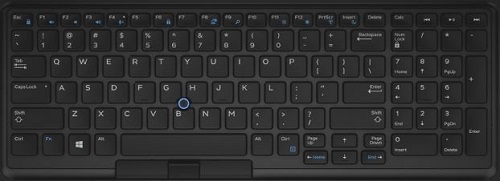
Riepilogo: Følgende veiledning oppgir de tilgjengelige tastatursnarveiene og funksjonene de utfører på Dell Latitude 5590.
Questo articolo si applica a
Questo articolo non si applica a
Questo articolo non è legato a un prodotto specifico.
Non tutte le versioni del prodotto sono identificate in questo articolo.
Sintomi
Tastatursnarvei, tastefunksjoner
Følgende tabell er en liste over tilgjengelige tastatursnarveier på Latitude 5590.
Causa
Ikke aktuelt
Risoluzione
| Funksjonstast-kombinasjon | Resultat |
|---|---|
| Fn+F1 | Dempe høyttaler |
| Fn+F2 | Volum ned |
| Fn+F3 | Volum opp |
| Fn+F4 | Demp mikrofon |
| Fn+F5 | Number Lock |
| Fn+F6 | Scroll Lock |
| Fn+F8 | Veksle mellom skjerm (Win+P) |
| Fn+F9 | Søk |
| Fn og F10 (ekstrautstyr) | Øk lysstyrken på tastaturbakgrunnsbelysningen (ekstrautstyr) |
| Fn+F11 | Redusere LCD-lysstyrken |
| Fn+F12 | Øke LCD-lysstyrken |
| Fn+Esc | Låse Fn-tast for svitsj |
| Fn+Insert | Hvilemodus |
| Fn+Print Screen | Slå trådløst av og på |
| Fn+høyre markør | End |
| Fn+pil venstre | Hjem |
 Gå til kunnskapsbasen for tastaturet for å få mer ressurser og informasjon.
 Hvis du vil ha mer informasjon, kan du gå til støttesiden for pekeflaten.
 Du finner også flere artikler og mer informasjon på støttesiden for musen.
Prodotti interessati
Latitude 5590Proprietà dell'articolo
Numero articolo: 000143256
Tipo di articolo: Solution
Ultima modifica: 01 mag 2026
Versione: 6
Trova risposta alle tue domande dagli altri utenti Dell
Support Services
Verifica che il dispositivo sia coperto dai Servizi di supporto.