How to Download the CrowdStrike Falcon Sensor
Riepilogo: Learn how to download the CrowdStrike Falcon Sensor from the Falcon Console for Windows, macOS, or Linux.
Questo articolo si applica a
Questo articolo non si applica a
Questo articolo non è legato a un prodotto specifico.
Non tutte le versioni del prodotto sono identificate in questo articolo.
Istruzioni
Note: The process to access the CrowdStrike Falcon Sensor download is the same regardless of if it is purchased from Dell or CrowdStrike.
- In a web browser, go to https://falcon.crowdstrike.com/login/
.
- Log In to the Falcon Console.

- In the left menu pane, click Host setup and management and then select Sensor Downloads.
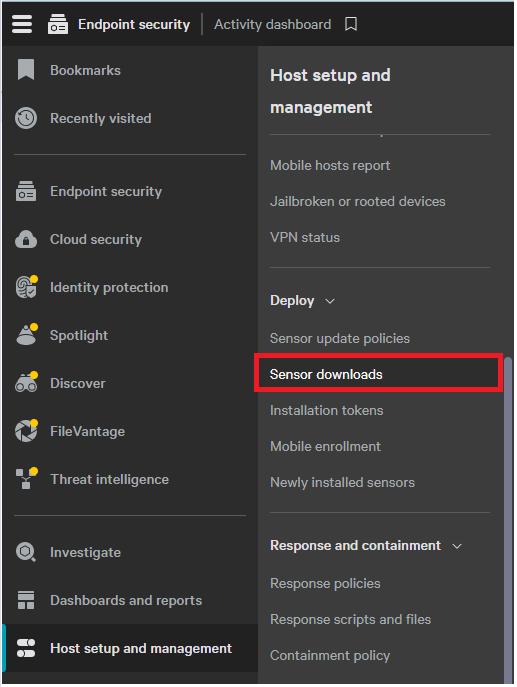 Note: The layout in the example may differ slightly from your environment.
 - Click the Download icon on the appropriate operating system.
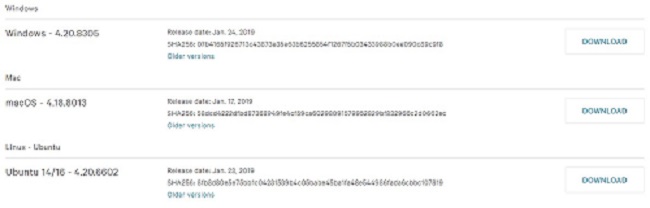
Note: The operating system versions may differ from the example.
Prodotti interessati
CrowdStrikeProprietà dell'articolo
Numero articolo: 000156053
Tipo di articolo: How To
Ultima modifica: 10 ago 2026
Versione: 20
Trova risposta alle tue domande dagli altri utenti Dell
Support Services
Verifica che il dispositivo sia coperto dai Servizi di supporto.