PowerEdge: SSDs, LTXX00MO, LTXX00RO, LTXX00WM Fail at 40,000 Power-on Hours
Riepilogo: Guida di DELL EMC per risolvere un problema delle unità SSD Dell EMC Enterprise, numeri di modello LT0200MO, LT0400MO, LT0800MO, LT1600MO, LT0800RO, LT1600RO, LT0200WM, LT0400WM e LT0800WM. Si verificherà un errore del firmware dopo 40.000 di accensione che comporterà un errore del driver. Questa guida dettagliata fornisce le istruzioni per aggiornare correttamente il firmware del driver al fine di evitare questo problema. ...
Questo articolo si applica a
Questo articolo non si applica a
Questo articolo non è legato a un prodotto specifico.
Non tutte le versioni del prodotto sono identificate in questo articolo.
Sintomi
Prodotti interessati:
Dell Enterprise SSD drives, with the below model numbers with firmware prior to D417:
- LT0200MO
- LT0400MO
- LT0800MO
- LT1600MO
- LT0800RO
- LT1600RO
- LT0200WM
- LT0400WM
- LT0800WM
These drives are available in PowerEdge servers, PowerVault storage, and Data Center Scalable Solutions (DSS 7500) systems. There are no other Dell Enterprise products that shipped with these SSD drives.
| Modello | Numero parte Dell | Descrizione |
|---|---|---|
| LT0200MO | 2XR0K | SSDR,200G,SAS12,2.5,MU,SD-K,EC |
| LT0400MO | C06VX | SSDR,400G,SAS12,2.5,MU,SD-K,EC |
| LT0800MO | 989R8 | SSDR,800G,SAS12,2.5,MU,SD-K,EC |
| LT1600MO | JDTGX | SSDR,1.6T,SAS12,2.5,MU,SD-K,EC |
| LT0800RO | J19XM | SSDR,800G,SAS12,2.5,RI,SD-K,EC |
| LT1600R0 | 2M61G | SSDR,1.6T,SAS12,2.5,RI,SD-K,EC |
| LT0200WM | M7KYX | SSDR,200G,SAS12,2.5,WI,SD-K,EC |
| LT0400WM | T2TPF | SSDR,400G,SAS12,2.5,WI,SD-K,EC |
| LT0800WM | FHFNJ | SSDR,800G,SAS12,2.5,WI,SD-K,EC |
Causa
Details:
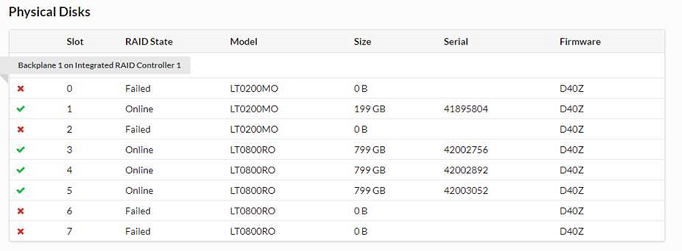
Dell Enterprise SSD models listed above with firmware prior to D417, have a firmware issue that results in drive failure at 40,000 power-on hours. A failed drive due to this firmware issue resulted in the drive reporting 0 GB of available storage. The drive goes offline and becomes unusable after a power cycle in a format corruption state (drive reports 03/31/00.
Esempio:
Risoluzione
Risoluzione
Aggiornare il firmware dell'unità alla versione D417 (o successiva). Upgrading the drive firmware to version D417 (or Later) prior to 40,000 power-on hours should address this issue.
Go to the Dell Drivers & Downloads site for updates on the applicable products. Nota: nell'elenco di prodotti interessati riportato più avanti è incluso un link agli aggiornamenti.
- Per i server PowerEdge, Dell Storage MD1400 e MD1420, Dell Storage NX3230 e DSS7500
- Scaricare il firmware D417.
- Upgrade the firmware with the Dell Update package. To learn more, go to Dell Updating Firmware using Dell Update Packages (DUPs). In alternativa, l'upgrade del firmware può essere applicato anche tramite iDRAC, Repository Manager oppure OpenManage Enterprise.
Verificare che non esistano le seguenti condizioni per l'unità:
-
-
- Uno dei dischi virtuali in stato non ottimale.
- Un contenitore RAID che sta eseguendo un'inizializzazione o una verifica di coerenza in background.
- Una ricostruzione, una risincronizzazione o una copia in corso.
- Un gruppo RAID danneggiato o parzialmente danneggiato.
-
Questo aggiornamento verrà eseguito sulle unità rimanenti in un set RAID che si trova in uno stato offline.
- Per PowerVault serie MD32, serie MD34, serie MD36 e serie MD38
- Scaricare il firmware D417.
- Aggiornare il firmware del driver con l'applicazione di gestione Modular Disk Storage Manager (MDSM).
- Decomprimere il pacchetto nella stazione di gestione (server che utilizza il software MDSM)
- Nella finestra gestione degli array selezionare Advanced > Maintenance > Download > Physical Disk Firmware...
- La procedura guidata inizierà con le istruzioni per aggiornare il firmware dell'unità
Se sull'unità si è già verificato un errore a causa di questo problema o è richiesta ulteriore assistenza, contattare il supporto.
Prodotti interessati
DSS 7500, PowerEdge XR2, PowerEdge C4130, PowerEdge c6320, PowerEdge c6320p, Poweredge FC630, Poweredge FC830, PowerEdge FD332, PowerEdge M520, PowerEdge M520 (for PE VRTX), PowerEdge M620, PowerEdge M620 (for PE VRTX), PowerEdge M630
, PowerEdge M630 (for PE VRTX), PowerEdge M820, PowerEdge M820 (for PE VRTX), PowerEdge M830, PowerEdge M830 (for PE VRTX), PowerEdge M910, PowerEdge M915, PowerEdge R320, PowerEdge R415, PowerEdge R420, PowerEdge R515, PowerEdge R520, PowerEdge R620, PowerEdge R630, PowerEdge R715, PowerEdge R720, PowerEdge R720XD, PowerEdge R730, PowerEdge R730xd, PowerEdge R815, PowerEdge R820, PowerEdge R830, PowerEdge R910, PowerEdge R920, PowerEdge R930, PowerEdge T320, PowerEdge T420, PowerEdge T620, PowerEdge T630, POWEREDGE VRTX, PowerVault MD3200, PowerVault MD3200i, PowerVault MD3220, PowerVault MD3220i, PowerVault MD3260, PowerVault MD3260i, PowerVault MD3400, PowerVault MD3420, PowerVault MD3460, PowerVault MD3600F, PowerVault MD3600i, PowerVault MD3620F, PowerVault MD3620i, PowerVault MD3660f, PowerVault MD3660i, PowerVault MD3800f, PowerVault MD3800i, PowerVault MD3820f, PowerVault MD3820i, PowerVault MD3860f, PowerVault MD3860i, Dell Storage MD1400, Dell Storage MD1420, Dell Storage NX3230
...
Proprietà dell'articolo
Numero articolo: 000177640
Tipo di articolo: Solution
Ultima modifica: 06 mag 2026
Versione: 15
Trova risposta alle tue domande dagli altri utenti Dell
Support Services
Verifica che il dispositivo sia coperto dai Servizi di supporto.