MyAccount Kullanıcısı için kaydolma
Riepilogo: Geçerli bir e-posta adresine (tüketici, iş ortağı veya kurumsal işletme kullanıcısı) sahip herkes, çevrimiçi hesap (MyAccount) için ilk kaydı oluşturabilir.
Questo articolo si applica a
Questo articolo non si applica a
Questo articolo non è legato a un prodotto specifico.
Non tutte le versioni del prodotto sono identificate in questo articolo.
Istruzioni
Aşağıdaki adımları takiperek MyAccount'a kaydolun:
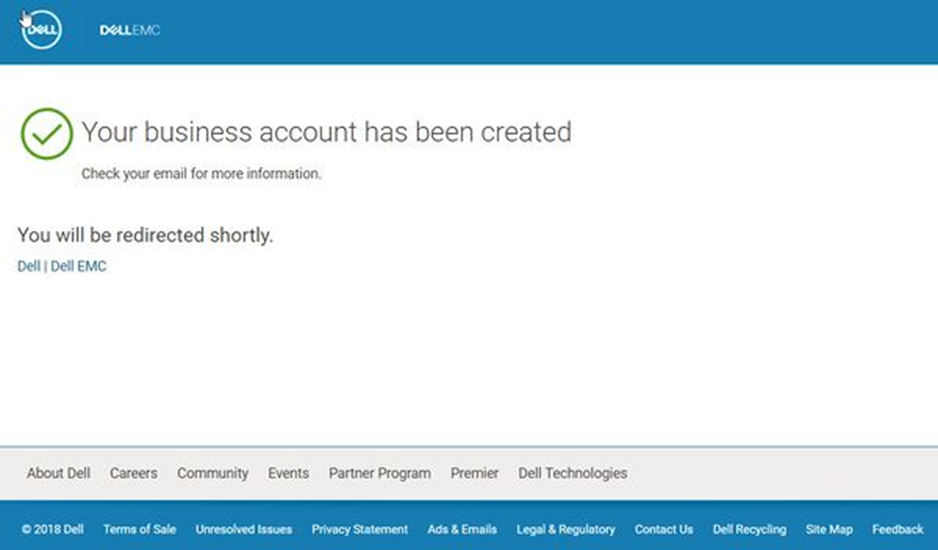
Tüm bilgileri girdikten sonra hesabınızı belirten ekranı görürsünüz.
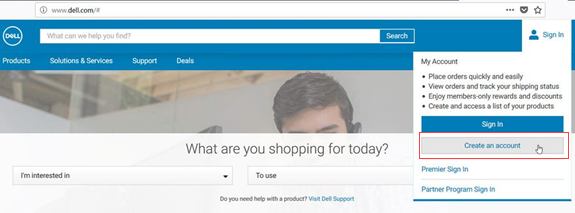
- Kayıt, Dell web sitesi oturum açma alanında bulunur. Hesap oluştur seçimine tıklayın.
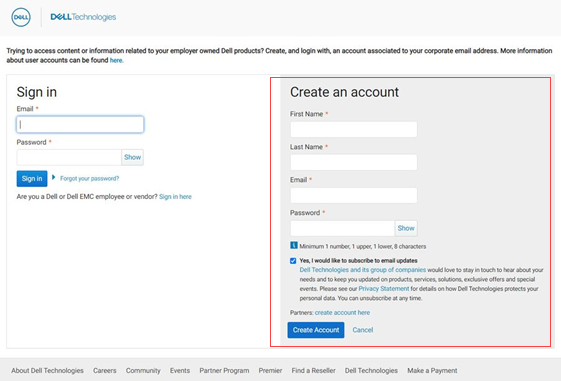
- Create an account (Hesap oluştur ) altındaki alanları girin.
- Create Account (Hesap Oluştur) öğesine tıklayın
- İş Telefonu Ekle
- Bilgi kutusunu seçin.
- Gönder öğesine tıklayın
Tüm bilgileri girdikten sonra hesabınızı belirten ekranı görürsünüz.
Prodotti interessati
APEX, APEX Data Storage ServicesProprietà dell'articolo
Numero articolo: 000196613
Tipo di articolo: How To
Ultima modifica: 11 ago 2022
Versione: 2
Trova risposta alle tue domande dagli altri utenti Dell
Support Services
Verifica che il dispositivo sia coperto dai Servizi di supporto.