PowerStore: Health Check: Platform DIMM Correctable Error Check Failed (platform_dimm_ce_check_failed).
Riepilogo: Health Check failed with a message of "Platform DIMM correctable error check failed. Please check the problematic DIMMs and replace as necessary, refer to KB000199841 for additional details (platform_dimm_ce_check_failed)". ...
Questo articolo si applica a
Questo articolo non si applica a
Questo articolo non è legato a un prodotto specifico.
Non tutte le versioni del prodotto sono identificate in questo articolo.
Sintomi
PowerStore Manager may display the following message when performing a Health Check of a PowerStore cluster as part of routine maintenance or when preparing a PowerStore cluster for a nondisruptive software upgrade (NDU): Platform DIMM correctable error check failed. Please check the problematic DIMMs and replace as necessary, refer to KB000199841 for additional details (platform_dimm_ce_check_failed).
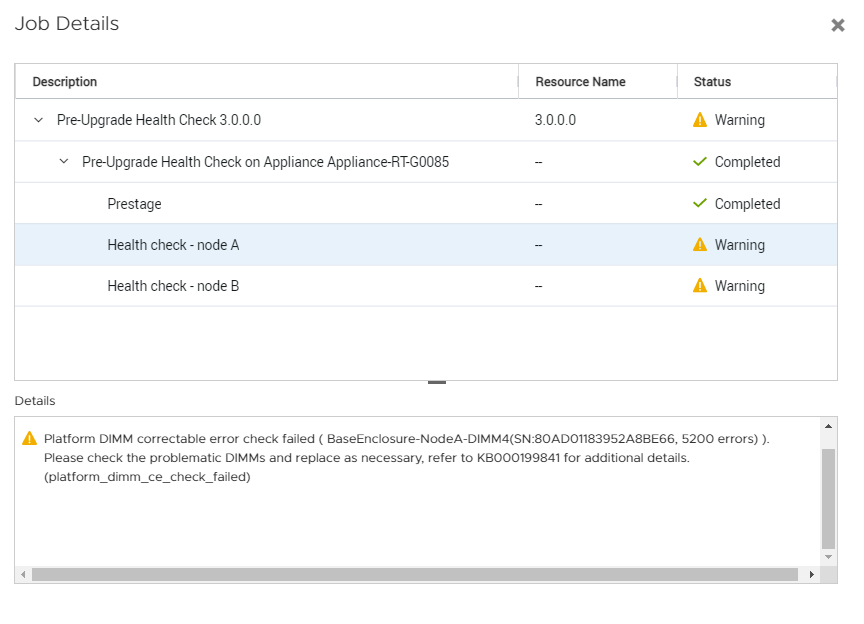
In the example above, DIMM 4 with Serial Number (S/N) 80AD01183952A8BE66 of Node A in the Base Enclosure should be considered for replacement.
In the example above, DIMM 4 with Serial Number (S/N) 80AD01183952A8BE66 of Node A in the Base Enclosure should be considered for replacement.
Causa
DIMM modules within a PowerStore node have accumulated more than 5,000 Correctable Errors (CE) within 24 hours.
Replacement of DIMM modules reported by Health Check is highly recommended before proceeding with a software upgrade.
Replacement of DIMM modules reported by Health Check is highly recommended before proceeding with a software upgrade.
Risoluzione
Contact Dell EMC Global Remote Support for assistance planning the needed DIMM replacements prior to performing software upgrade.
Please refer to the KB PowerStore: Customer advisory ET004498 proactive field replacement of DIMMs (PowerStore: Customer advisory ET004498 proactive field replacement of DIMMs)
The script procedure is available in the following article PowerStore: How to determine if an appliance requires proactive DIMM replacements (svc_dimm_pfr)
svc_dimm_pfr script is recommended to be run on the system to determine which DIMMs are required to be replaced.
Please refer to the KB PowerStore: Customer advisory ET004498 proactive field replacement of DIMMs (PowerStore: Customer advisory ET004498 proactive field replacement of DIMMs)
The script procedure is available in the following article PowerStore: How to determine if an appliance requires proactive DIMM replacements (svc_dimm_pfr)
svc_dimm_pfr script is recommended to be run on the system to determine which DIMMs are required to be replaced.
Prodotti interessati
PowerStore, PowerStore 1000T, PowerStore 1200T, PowerStore 3000T, PowerStore 3200T, PowerStore 5000T, PowerStore 500T, PowerStore 5200T, PowerStore 7000T, PowerStore 9000TProdotti
PowerStore 9000X, PowerStore 9200TProprietà dell'articolo
Numero articolo: 000199841
Tipo di articolo: Solution
Ultima modifica: 23 feb 2023
Versione: 2
Trova risposta alle tue domande dagli altri utenti Dell
Support Services
Verifica che il dispositivo sia coperto dai Servizi di supporto.