PowerStore: 상태 점검: 플랫폼 DIMM 수정 가능 오류 검사 실패(platform_dimm_ce_check_failed)
Riepilogo: "Platform DIMM correctable error check failed. Please check the problematic DIMMs and replace as necessary, refer to KB000199841 for additional details (platform_dimm_ce_check_failed)"라는 메시지와 함께 상태 점검에 실패했습니다. ...
Questo articolo si applica a
Questo articolo non si applica a
Questo articolo non è legato a un prodotto specifico.
Non tutte le versioni del prodotto sono identificate in questo articolo.
Sintomi
PowerStore Manager가 일상적인 유지 보수의 일부로 PowerStore 클러스터의 상태 점검을 수행하거나 PowerStore 클러스터에서 무중단 소프트웨어 업그레이드(NDU)를 준비할 때 다음 메시지를 표시할 수 있습니다. Platform DIMM correctable error check failed. Please check the problematic DIMMs and replace as necessary, refer to KB000199841 for additional details (platform_dimm_ce_check_failed).
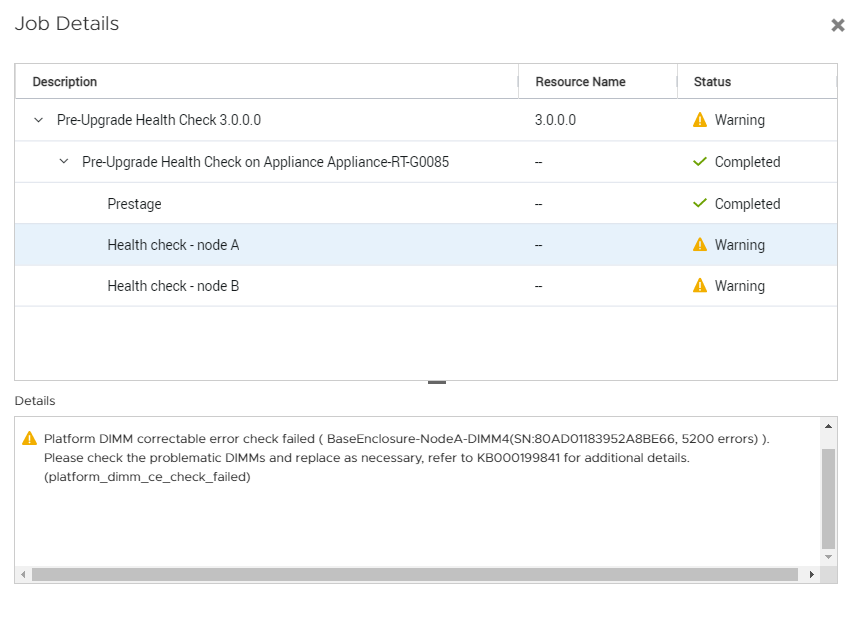
위의 예에서 기본 인클로저에 노드 A의 S/N(Serial Number) 80AD01183952A8BE66가 있는 DIMM 4는 교체를 고려해야 합니다.
위의 예에서 기본 인클로저에 노드 A의 S/N(Serial Number) 80AD01183952A8BE66가 있는 DIMM 4는 교체를 고려해야 합니다.
Causa
PowerStore 노드 내의 DIMM 모듈은 24시간 이내에 5,000개 이상의 CE(Correctable Error)를 누적했습니다.
소프트웨어 업그레이드를 진행하기 전에 상태 점검에서 보고된 DIMM 모듈을 교체하는 것이 좋습니다.
소프트웨어 업그레이드를 진행하기 전에 상태 점검에서 보고된 DIMM 모듈을 교체하는 것이 좋습니다.
Risoluzione
소프트웨어 업그레이드를 수행하기 전에 필요한 DIMM 교체를 계획하는 데 도움이 필요하면 Dell EMC 글로벌 원격 지원에 문의하십시오. 다음의 PowerStore: PowerStore에서 다양한 로그를 생성 및 수집하는 방법에 따라 지원 자료(데이터 수집)를 수집합니다. 이 기술 자료 문서(KB# 000199841)를 인용하십시오. 자세한 내용은 PowerStore 설치 및 서비스 가이드에 있는 DIMM(Dual Inline Memory Module) 교체 서비스 절차를 참조하십시오.
Prodotti interessati
PowerStore, PowerStore 1000T, PowerStore 1200T, PowerStore 3000T, PowerStore 3200T, PowerStore 5000T, PowerStore 500T, PowerStore 5200T, PowerStore 7000T, PowerStore 9000TProdotti
PowerStore 9000X, PowerStore 9200TProprietà dell'articolo
Numero articolo: 000199841
Tipo di articolo: Solution
Ultima modifica: 23 feb 2023
Versione: 2
Trova risposta alle tue domande dagli altri utenti Dell
Support Services
Verifica che il dispositivo sia coperto dai Servizi di supporto.