PowerStore: Sağlık Kontrolü: Platform DIMM Correctable Error Check Failed (platform_dimm_ce_check_failed) [Platform DIMM'si düzeltilebilir hata kontrolü başarısız oldu (platform_dimm_ce_check_failed)].
Riepilogo: Sağlık Kontrolü şu hatayla başarısız oldu: "Platform DIMM correctable error check failed. Please check the problematic DIMMs and replace as necessary, refer to KB000199841 for additional details (platform_dimm_ce_check_failed)" [Platform DIMM'si düzeltilebilir hata kontrolü başarısız oldu. Lütfen sorunlu DIMM'leri kontrol edin ve gerekirse değiştirin; ek ayrıntılar için bkz. KB 000199841 (platform_dimm_ce_check_failed)]. ...
Questo articolo si applica a
Questo articolo non si applica a
Questo articolo non è legato a un prodotto specifico.
Non tutte le versioni del prodotto sono identificate in questo articolo.
Sintomi
PowerStore Manager, rutin bakım kapsamında bir PowerStore kümesini sağlık kontrolüne tabi tutarken veya bir PowerStore kümesini kesintiye neden olmayan bir yazılım yükseltmesi (NDU) işlemine hazırlarken aşağıdaki mesajı gösterebilir: Platform DIMM correctable error check failed. Please check the problematic DIMMs and replace as necessary, refer to KB000199841 for additional details (platform_dimm_ce_check_failed) [Platform DIMM'si düzeltilebilir hata kontrolü başarısız oldu. Lütfen sorunlu DIMM'leri kontrol edin ve gerekirse değiştirin; ek ayrıntılar için bkz. KB 000199841 (platform_dimm_ce_check_failed)]
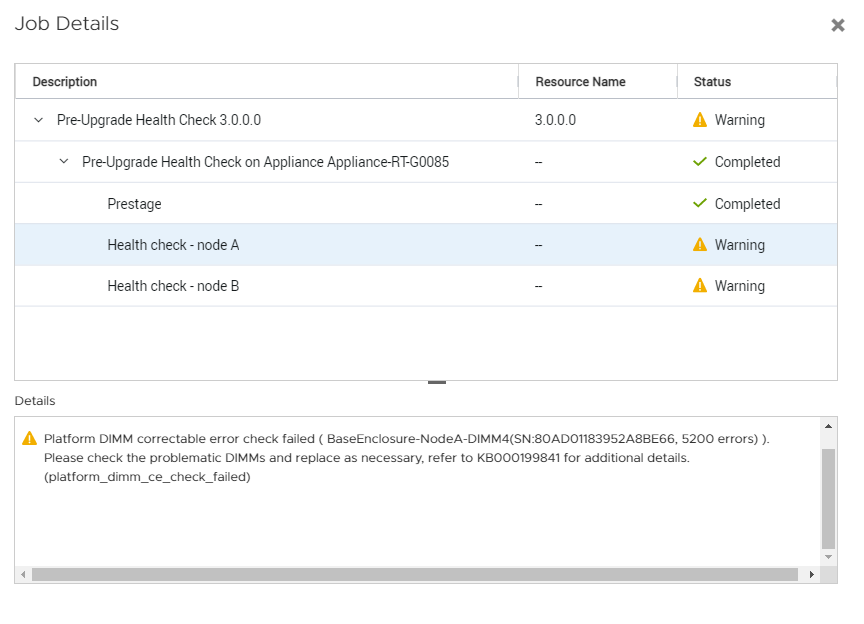
Yukarıdaki örnekte, Temel Kasadaki A Düğümüne ait 80AD01183952A8BE66 Seri Numaralı (S/N) DIMM 4'ün değiştirilmesi önerilir.
Yukarıdaki örnekte, Temel Kasadaki A Düğümüne ait 80AD01183952A8BE66 Seri Numaralı (S/N) DIMM 4'ün değiştirilmesi önerilir.
Causa
PowerStore düğümündeki DIMM modülleri, 24 saat içinde 5.000'den fazla Düzeltilebilir Hata (CE) topladı.
Sağlık Kontrolü ile bildirilen DIMM modüllerinin bir yazılım yükseltmesine devam etmeden önce değiştirilmesi önemle tavsiye edilir.
Sağlık Kontrolü ile bildirilen DIMM modüllerinin bir yazılım yükseltmesine devam etmeden önce değiştirilmesi önemle tavsiye edilir.
Risoluzione
Yazılım yükseltmesi gerçekleştirmeden önce gerekli DIMM değiştirmelerini planlama konusunda yardım almak için Dell EMC Global Uzaktan Destek ekibi ile iletişime geçin. Şu makaledeki adımları izleyerek Destek Materyallerini (Veri Toplama) toplayın: PowerStore: PowerStore'da çeşitli günlükler oluşturma ve toplama (İngilizce). İlgili Knowledge Base makalesini referans gösterin (KB 000199841). Ek ayrıntılar için PowerStore Kurulum ve Servis Rehberi'nde bulunan Çift hat içi bellek modülünü (DIMM) değiştirme servis prosedürünü inceleyin.
Prodotti interessati
PowerStore, PowerStore 1000T, PowerStore 1200T, PowerStore 3000T, PowerStore 3200T, PowerStore 5000T, PowerStore 500T, PowerStore 5200T, PowerStore 7000T, PowerStore 9000TProdotti
PowerStore 9000X, PowerStore 9200TProprietà dell'articolo
Numero articolo: 000199841
Tipo di articolo: Solution
Ultima modifica: 23 feb 2023
Versione: 2
Trova risposta alle tue domande dagli altri utenti Dell
Support Services
Verifica che il dispositivo sia coperto dai Servizi di supporto.