How to Download and Install CyberLink Media Suite Essentials
Riepilogo: Easily download and install CyberLink Media Suite Essentials on Dell computers with internal DVD or Blu-ray players. Access Power Media Player, video editing, and disk burning features with CyberLink Media Suite. ...
Questo articolo si applica a
Questo articolo non si applica a
Questo articolo non è legato a un prodotto specifico.
Non tutte le versioni del prodotto sono identificate in questo articolo.
Istruzioni
Affected Products:
- CyberLink Media Suite Essentials
CyberLink Media Suite Essentials is provided for free on any Dell computer running Windows with an internal DVD or Blu-ray player.
Note: CyberLink Media Suite Essentials is not available for external DVD or Blu-ray players.
Warning: Before installing CyberLink Media Suite Essentials, validate the computer:
- The computer is running Windows 8.1 or later
- The computer has an internal DVD or Blu-ray player
- The computer has the Microsoft Store application installed
- To reinstall the Microsoft Store application, reference https://apps.microsoft.com/store/apps
.
- To reinstall the Microsoft Store application, reference https://apps.microsoft.com/store/apps
- Go to https://apps.microsoft.com/store/detail/media-suite-essentials-for-dell/9NN8BSS5N72F
- Click Get in Store App.

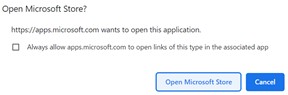
- On the prompt, click Open Microsoft Store to launch the application.
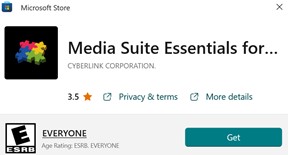
- In the Microsoft Store UI, click Get to download and install CyberLink Media Suite Essentials for Dell.
- On installation, click Open to launch the application.

- In the product UI, click the appropriate product feature to download:
- Power Media Player: Enables DVD or Blu-ray media playing
- Power Director: Video Editor software
- Power2Go: Disk burning functionality
Warning: Dell computers without an internal DVD player or Blu-ray player will redirect to a paid version of the software.
Note: For further technical support, reference How to Get Support for CyberLink Products Sold at Dell.
Proprietà dell'articolo
Numero articolo: 000201421
Tipo di articolo: How To
Ultima modifica: 14 mag 2026
Versione: 9
Trova risposta alle tue domande dagli altri utenti Dell
Support Services
Verifica che il dispositivo sia coperto dai Servizi di supporto.