DisplayPort Monitor not Detected or Only Two Displays on Dell Universal Dock UD22
Riepilogo: This article documents how to resolve a Dell Universal Dock (UD22) that does not show a DisplayPort connected display, or the dock is limited to only two external displays.
Questo articolo si applica a
Questo articolo non si applica a
Questo articolo non è legato a un prodotto specifico.
Non tutte le versioni del prodotto sono identificate in questo articolo.
Sintomi
A Dell Universal Dock may only display video on two external monitors. These monitors only operate when connected to the HDMI port and either the DisplayPort 1 port (near HDMI) or the USB Type-C port. A monitor connected to DisplayPort #2 (Next to the network connection) may not display video at all (Figure 1).
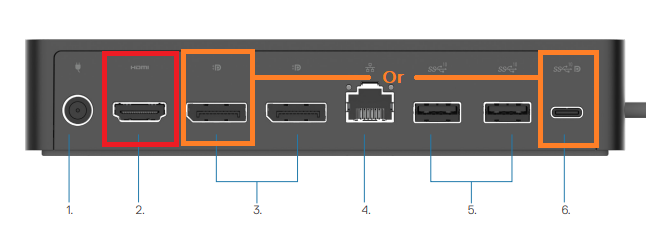
Figure 1. External monitors only work on HDMI (Red) and DisplayPort1 or USB Type-C ports (Orange)
Only the HDMI port and DisplayPort #1 or USB Type-C port are active without installation of the DisplayLink video driver. DisplayPort #2 depends on the DisplayLink driver and does not function when the DisplayLink driver is not installed on the connected computer.
Causa
The dock is working as designed because the DisplayLink driver is not installed on the docked computer.
Risoluzione
The Dell Universal Dock requires installation of the DisplayLink driver to operate in three or four monitor configurations. The driver can be downloaded from the Dell Support Website (Figure 2).
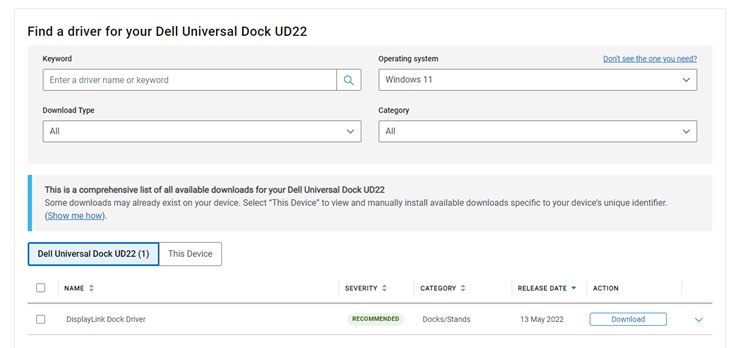
Figure 2. Downloading the Dell Universal Dock (UD22) DisplayLink driver
Note: Dell Technologies recommends that you install the latest BIOS update and any available firmware updates for the dock to ensure optimal dock performance.
Before installation of the DisplayLink driver the external displays in DisplayLink Manager shows no DisplayLink device detected (Figure 3).
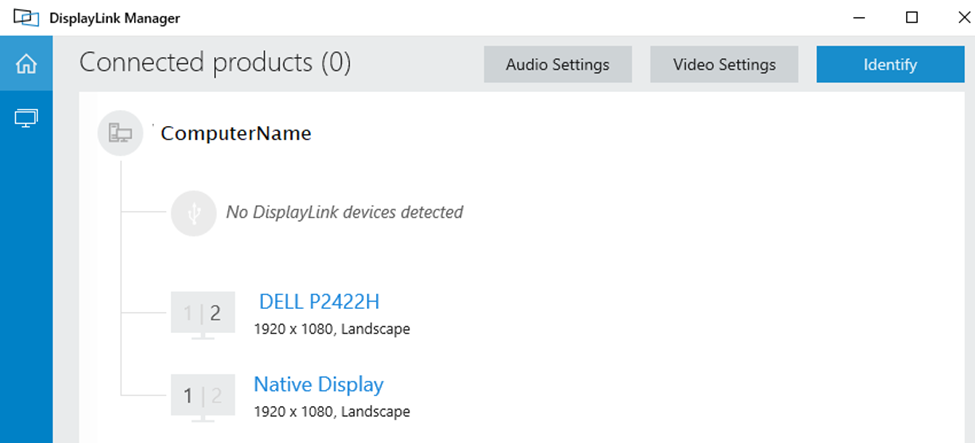
Figure 3. No DisplayLink Device is detected.
The displays detect after installing the DisplayLink driver (Figure 4).
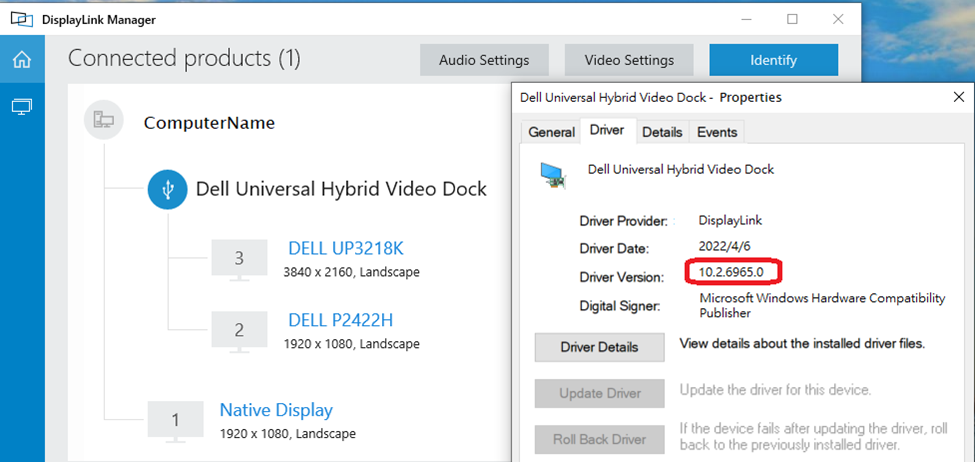
Figure 4. Displays detected after Display link driver installation
For more information about configuring multiple external displays on the Dell Universal Dock (UD22), go to our support page.
Prodotti interessati
Dell Universal Dock UD22Proprietà dell'articolo
Numero articolo: 000202555
Tipo di articolo: Solution
Ultima modifica: 24 apr 2025
Versione: 6
Trova risposta alle tue domande dagli altri utenti Dell
Support Services
Verifica che il dispositivo sia coperto dai Servizi di supporto.