Data Domain:如何使用適用於 DD 和 DDMC 的內嵌 REST API
Riepilogo: Data Domain (DD) (實體和虛擬) 和 PowerProtect DD Management Center (DDMC) 安裝均隨附 REST 服務內嵌。 客戶可以使用它來構建自己的應用程式,以便與 DD 和 DDMC 互動。
Questo articolo si applica a
Questo articolo non si applica a
Questo articolo non è legato a un prodotto specifico.
Non tutte le versioni del prodotto sono identificate in questo articolo.
Istruzioni
您可以在 https://developer.dell.com/apis/products/data-protection 找到最新的文件。
DD 與 DDMC 皆預設會啟用 Web 型 REST API。REST API 是一種以程式設計方式與 DD 和 DDMC 互動的方法。本文使用從現在開始使用簡單用戶端和伺服器通訊協定的 DD 範例。HTTP 通訊協定不保留狀態,並允許用戶端從 DD 讀取狀態,並使用特別製作的 HTTP 呼叫執行命令。
在命令列中,以下命令通知基於 Web 的 REST API 服務 (web-service) 的狀態:
# adminaccess show
Service       Enabled   Allowed Hosts
-----------   -------   ---------------------
ssh           yes       -
scp           yes       (same as ssh)
telnet        no        DD3300.example.com
                        DD3300.example.com
ftp           no        DD3300.example.com
                        DD3300.example.com
ftps          yes       -
http          yes       -
https         yes       -
web-service   yes       N/A
-----------   -------   ---------------------
...
請注意,由於 REST API 是從與 UI 相同的連接埠提供服務,因此無法個別停用。這不會帶來安全風險,因為對 API 的所有請求都需要進行身份驗證,其方式與對 UI 或 CLI 的請求相同。
開始使用 REST API 的最佳方式,是在每個 DD 和 DDMC 上使用套裝用戶端。可以在以下位置存取:
https://DD_OR_DDMC_IP_ADDRESS/api/
這將提供一個頁面,其中包含指向幾個重要資源的連結,即:
- API 說明文件:DD 或 DDMC 支援的所有可用 API 呼叫的詳細清單
- REST 測試用戶端:測試從 DD Web 介面本身的 API 呼叫
程式設計師必須使用 API 文件,以運用 DD REST API 在 DD 之上建立應用程式。
使用 API 需要 DD 驗證。需要兩條資訊:
- X-DD-AUTH-TOKEN:DD 在成功驗證後提供的 Cookie,必須作為任何進一步請求的驗證器。
- X-DD-UUID:用於(大多數)對 API 請求的唯一 DD 識別碼。請注意,對於個別 DD,這可能看起來是多餘的,但對於 DDMC 來說顯然是必要的,因為可能會選擇個別 DD。
若要針對 DD 進行驗證,請使用「/rest/v1.0/auth」方法。若要從任何已安裝「curl」且有網路存取 DD 的主機執行此操作,請發出要求,如下所示:
# curl --include --insecure -X 'POST' --header 'Content-Type: application/json' --header 'Accept: application/text' -d '{ "auth_info":{ "username":"sysadmin","password":"SomePass" } }' 'https://DD_OR_DDMC_IP_ADDRESS:3009/rest/v1.0/auth'
關於上面運行的命令行的一些註釋如下:
- 需要選項“--include”,因為某些查詢回應以 HTTP 回應標記的形式返回,而不是作為正文的一部分
- 當 curl 設定為根據已知和受信任的 CA 授權單位清單檢查伺服器 CA 憑證時,需要選項「--insecure」。由於與 DD 搭售的 REST TEST 用戶端不會新增此選項,但必須用來驗證 CA 憑證,否則從測試用戶端執行的所有命令都會失敗 (undefinedERROR 文字狀態:錯誤)。如果嘗試從命令列執行範例「curl」,則錯誤會是:
curl: (60) SSL certificate problem: self signed certificate in certificate chain
More details here: https://curl.haxx.se/docs/sslcerts.html

curl failed to verify the legitimacy of the server and therefore could not
establish a secure connection to it. To learn more about this situation and
how to fix it, please visit the web page mentioned above.
- 我們使用 HTTP 方法「POST」。每個 API 方法都有自己的方法,在文檔中清楚地突出顯示了這些方法。
- 「--header」選項可用來將 HTTP 層級標頭或選項傳遞給稱為 DD
- 「-d」會將要求內文傳送至 DD,在此範例中為使用者名稱和密碼
- 最後,調用特定身份驗證方法的 URI 作為最後一個參數調用 (https://DD_OR_DDMC_IP_ADDRESS:3009/rest/v1.0/auth)。當我們使用HTTPS時,憑據通過網路加密傳輸。請注意,文檔和嵌入式測試用戶端是通過埠 443 訪問的,而 REST API 服務入口點位於埠 3009,並且必須使用 HTTPS(而不是 HTTP)才能工作
對上述身份驗證查詢的回應如下所示:
HTTP/1.1 201 Created
Content-Type: application/json
Content-Length: 112
X-DD-AUTH-TOKEN: 434f1d6dc1528bb8d3ad66c70dc7f74f9
X-DD-UUID: 7850d7a24f93f502:1346d63c57821e38
Access-Control-Allow-Credentials: true
Cache-Control: no-cache
Server: Data Domain OS
Access-Control-Expose-Headers: AUTHORIZATION, X-DD-AUTH-TOKEN, X-DD-JSON-RESPONSE-WITH-ROOT, X-DD-PEER-USERNAME

{"service_status": {"details": "success", "code": 0, "link": [{"rel": "related", "href": "/rest/v1.0/system"}]}}
空行之前的所有內容都是回應中發送的 HTTP 標頭。之後的內容是回應正文,在這種情況下,它通知成功。對於此方法,最重要的數據是:
- X-DD-AUTH-TOKEN (434f1d6dc1528bb8d3ad66c70dc7f74f9) 這是一個臨時的驗證權杖,可在指定的時間內用來對進一步的作業進行驗證
- X-DD-UUID (7850d7a24f93f502:1346d63c57821e38) 所要求 DD 的 ID,後續要求必須使用。
對於任何進一步的請求,我們必須使用這些值。舉例來說,我們想要瞭解 DD 檔案系統的資訊。轉到“API 文檔”,找到最適合我們需求的調用,如下圖
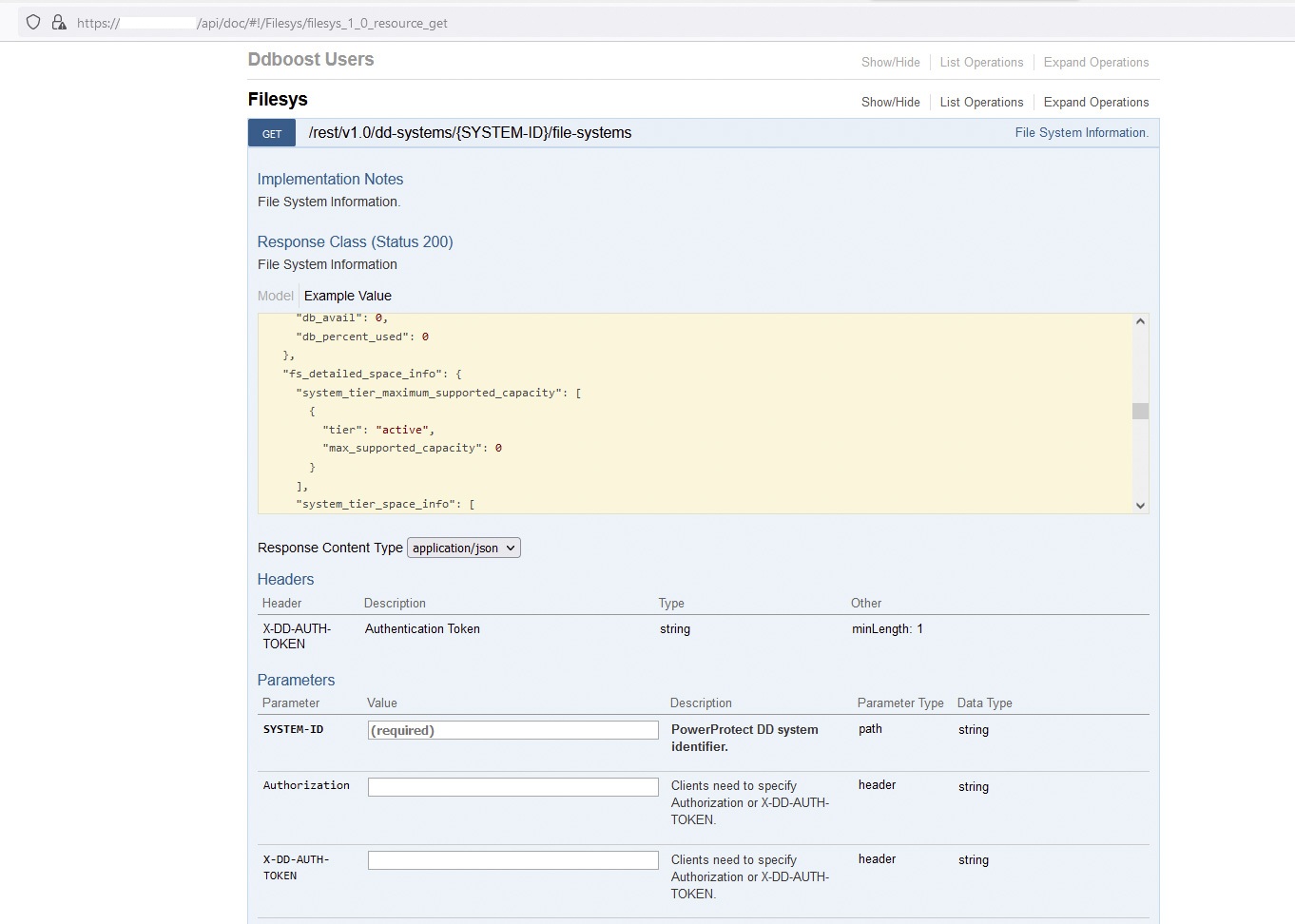
所示:檢查必要的參數后,我們可以構建如下請求。 請注意,在此案例中,我們執行的是「GET」類型的要求,而非「POST」,例如驗證方法:
# curl --include --insecure -X 'GET' --header 'Content-Type: application/json' --header 'Accept: application/text' --header 'X-DD-AUTH-TOKEN:434f1d6dc1528bb8d3ad66c70dc7f74f9' 'https://DD_OR_DDMC_IP_ADDRESS:3009/rest/v1.0/dd-systems/7850d7a24f93f502%3A1346d63c57821e38/file-systems'
但我們收到以下回應,指示身份驗證令牌無效或已過期:
{"details": "**** Authentication token \"434f1d6dc1528bb8d3ad66c70dc7f74f9\" is invalid.", "code": 5427, "link": [{"rel": "self", "href": "/rest/v1.0/auth"}]}
我們必須生成一個新的身份驗證令牌來運行查詢並獲得預期的結果,例如:
# curl --include --insecure -X GET --header 'Accept: application/json' --header 'X-DD-AUTH-TOKEN: 178a7b8f337ce3027acdcd889ed10446c' 'https://DD_OR_DDMC_IP_ADDRESS:3009/rest/v1.0/dd-systems/7850d7a24f93f502%3A1346d63c57821e38/file-systems'
HTTP/1.1 200 OK
Content-Type: application/json
Content-Length: 1123
X-DD-AUTH-TOKEN: 178a7b8f337ce3027acdcd889ed10446c
X-DD-UUID: 7850d7a24f93f502:1346d63c57821e38
Access-Control-Allow-Credentials: true
Cache-Control: no-cache
Server: Data Domain OS
Access-Control-Expose-Headers: AUTHORIZATION, X-DD-AUTH-TOKEN, X-DD-JSON-RESPONSE-WITH-ROOT, X-DD-PEER-USERNAME

{"hostname": "DD3300.example.com", "fs_status": "sn_enabled", "fs_clean_status": "inactive", "fs_cleaning_info": {"filesys_clean_info": {"cleaning_status": "inactive", "cleaning_dates": {"start_epoch": 1663879075, "end_epoch": 1663879131, "success_epoch": 1663679711}, "is_aborted": true, "abort_reason": "Cleaning was aborted by user.", "throttle": 50, "schedule": {"occurrence": "weekly", "days": ["Tue"], "time": "0600"}}, "cloud_clean_info": {"cleaning_status": "inactive", "cleaning_dates": {}, "is_aborted": false, "throttle": 50, "frequency": 0}}, "fs_uptime_secs": 344738, "fs_options": [{"key": "local-compression-type", "value": "gz"}, {"key": "marker-type", "value": "auto"}, {"key": "report-replica-as-writable", "value": "disabled"}, {"key": "staging-reserve", "value": "5% = 4271.2 GiB percent of total space"}, {"key": "warning-space-usage", "value": "90"}, {"key": "critical-space-usage", "value": "95"}], "link": [{"rel": "self", "href": "/rest/v1.0/dd-systems/7850d7a24f93f502%3A1346d63c57821e38/file-systems"}, {"rel": "parent", "href": "/rest/v1.0/dd-systems/7850d7a24f93f502%3A1346d63c57821e38"}]}
回應正文中的輸出以 JSON 格式發送給調用方,這是標準。
Prodotti interessati
Data DomainProprietà dell'articolo
Numero articolo: 000203754
Tipo di articolo: How To
Ultima modifica: 30 lug 2026
Versione: 3
Trova risposta alle tue domande dagli altri utenti Dell
Support Services
Verifica che il dispositivo sia coperto dai Servizi di supporto.