PowerStore : System Health Check detects an offline or failed SSD
Riepilogo: System Health Check detects an offline or failed SSD.
Questo articolo si applica a
Questo articolo non si applica a
Questo articolo non è legato a un prodotto specifico.
Non tutte le versioni del prodotto sono identificate in questo articolo.
Sintomi
The system health check may detect offline or failed SSD the following message:
It may occur in one of the following scenarios: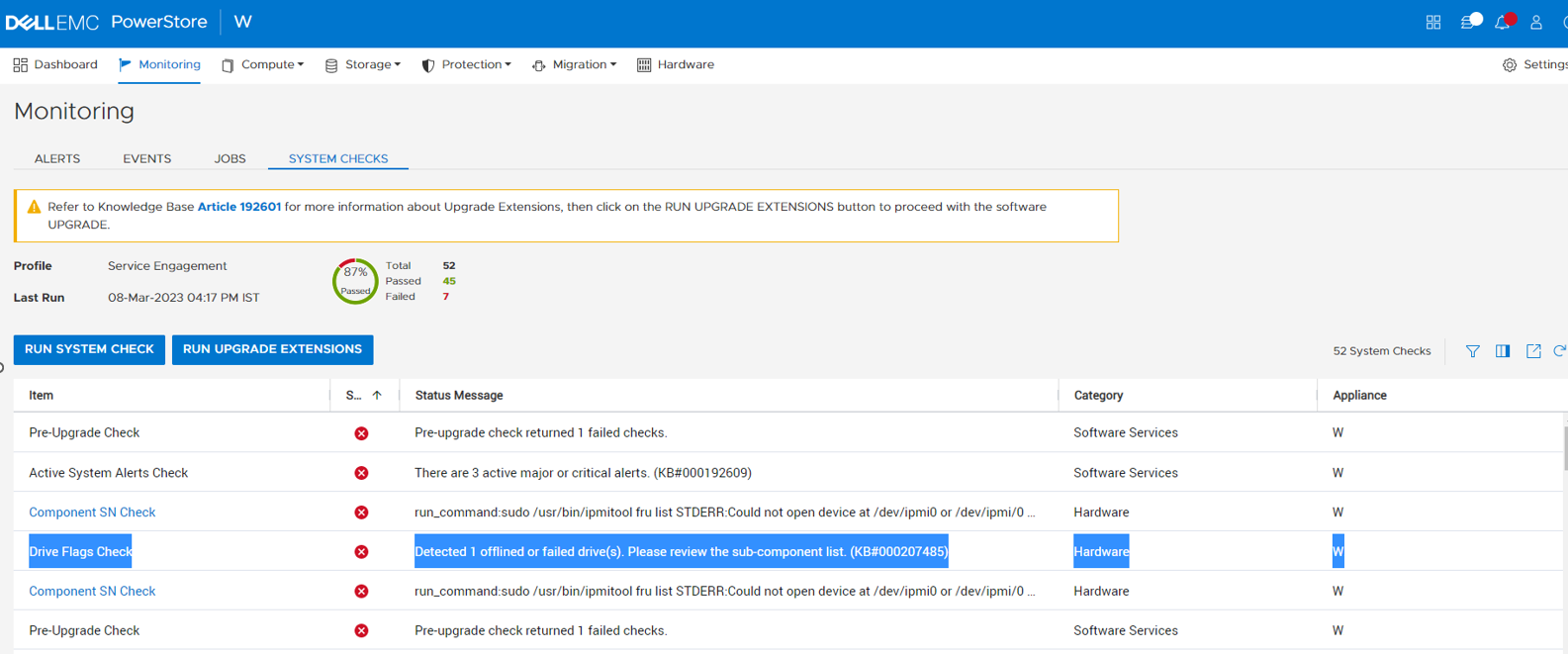
Detected <number> offlined or failed drive(s). Please review the sub-component list. (KB#000207485).
It may occur in one of the following scenarios:
- Running a System Check using PowerStore Manager (UI) with the Run System Check or Run Upgrade Extensions option:
- Running the System Health Service Script (svc_health_check) using an SSH connection:
| [SVC:root@ABCDEF2-B health_checks]$ svc_health_check run -rhc drive_flags_check Name Location Status Description Drive Flags Check node_b FAILED Detected 3 offlined or failed drive(s). Please review the sub-component list. (KB#000207485) wwn-0x002538f491001164 FAILED wwn-0x002538f491001c82 FAILED wwn-0x002538f4910011d0 FAILEDCODE_BLOCK |
Causa
The health check detects additional issues for SSD and NVRAM drives that may not be detected by the system alerts.
- To determine the problematic drives, navigate to the Hardware page in the PowerStore Manager UI to see the unhealthy drives.
Risoluzione
For the drives that are identified as being offline:
- Visually check if the drive is not seated properly. Reseat if not seated properly.
- If reseating the drive does not resolve the issue, then the drive should be replaced.
Informazioni aggiuntive
For more information about System Health Checks see KB 000198084 PowerStore: How to use the System Check feature or KB 000192601 PowerStore: How to Check the Health of the Cluster Before Software Upgrade Using Pre-Upgrade Health Check and System Check.
Prodotti interessati
PowerStoreProprietà dell'articolo
Numero articolo: 000207485
Tipo di articolo: Solution
Ultima modifica: 13 giu 2025
Versione: 3
Trova risposta alle tue domande dagli altri utenti Dell
Support Services
Verifica che il dispositivo sia coperto dai Servizi di supporto.