Data Domain: SRM Discovery Issues with Timed Out Errors
Riepilogo: The article describes timeout failures during SRM discovery of Data Domain systems. Long polling cycles and TTL expirations are caused by the maxBulkSize value being too large.
Questo articolo si applica a
Questo articolo non si applica a
Questo articolo non è legato a un prodotto specifico.
Non tutte le versioni del prodotto sono identificate in questo articolo.
Sintomi
Discovery issues occur on Data Domain systems. Timeout errors are reported. These same Data Domain systems were discovered earlier without issues. Increasing the timeout to 1200 only cleared the issue for some Dell Data Domain appliances.
The Data Domain collector log shows the following generic errors:
WARNING -- [2023-02-15 10:59:00 MST] -- PollingUnitPollingGroup::waitAtEndOfPollingCycle(): Polling group 300.EMC-DATA-DOMAIN-BOOST.EMC-DATA-DOMAIN-CIFS.EMC-DATA-DOMAIN-DISK.EMC-DATA-DOMAIN-ENV.EMC-DATA-DOMAIN-FS.GENERIC-INTERFACES.GENERIC-HOST-RESOURCES-PROCESSOR.GENERIC-HOST-RESOURCES-STORAGE.EMC-DATA-DOMAIN-MTREE.EMC-DATA-DOMAIN-NFS.EMC-DATA-DOMAIN-QUOTA.EMC-DATA-DOMAIN-REPLICATION.GENERIC-SYSUPTIME.EMC-DATA-DOMAIN-SYSTEM.EMC-DATA-DOMAIN-VTL is taking too long: Completed in 425081ms. Skipping next polling cycle. 174919ms until next polling, at timestamp: 1676484115000

WARNING -- [2023-02-15 11:01:56 MST] -- PollingUnitTable::closeSession(): Interrupted session on xxx-xxxxxx.xx.xx.org:161 : Time to live has expired.
Causa
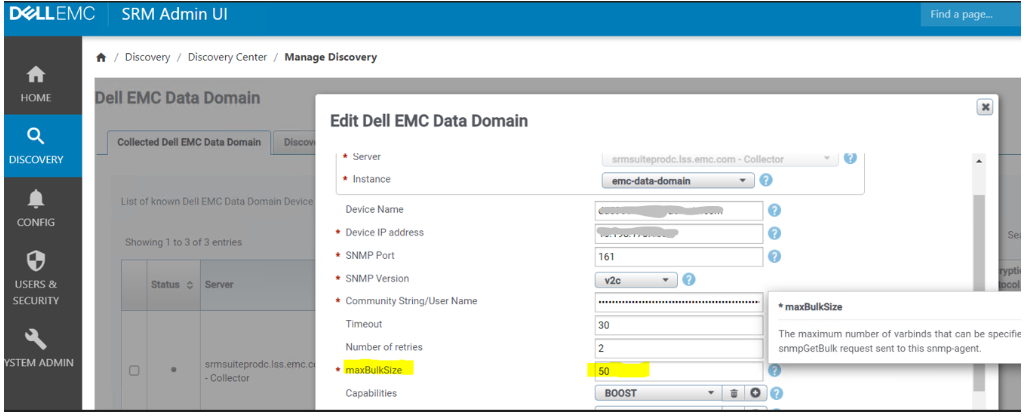
The default maxBulkSize of 50 was causing discovery timedout errors.
Risoluzione
In the incident that generated this KB article, reducing the maxBulkSize value cleared the discovery issue.
Set the maxBulkSize value to a lower number, such as 15.
Proprietà dell'articolo
Numero articolo: 000210196
Tipo di articolo: Solution
Ultima modifica: 17 lug 2026
Versione: 5
Trova risposta alle tue domande dagli altri utenti Dell
Support Services
Verifica che il dispositivo sia coperto dai Servizi di supporto.