Backup store Cloudlink Amazon S3 "Access Denied" Codice di stato 403
Riepilogo: Risoluzione dell'errore "Access Denied" codice di stato 403 sulla configurazione del backup store Amazon S3.
Questo articolo si applica a
Questo articolo non si applica a
Questo articolo non è legato a un prodotto specifico.
Non tutte le versioni del prodotto sono identificate in questo articolo.
Sintomi
"Access Denied" durante il test dell'accesso al backup store Amazon S3:
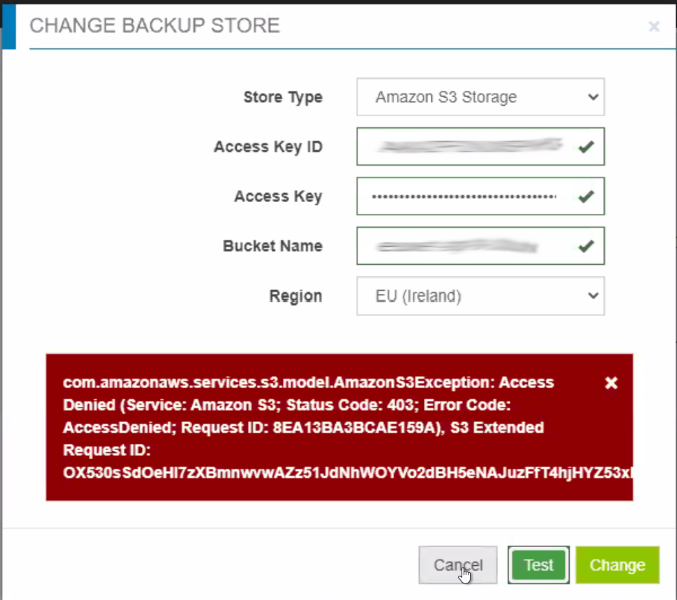
Aspetto dell'errore:
com.amazonaws.services.s3.model.AmazonS3Exception: Access Denied (Service: Amazon S3 Status Code: 403 Error Code: AccessDenied Request ID: WX2272G8B4XMDJKZ S3 Extended Request ID: [...]
Aspetto dell'errore:
com.amazonaws.services.s3.model.AmazonS3Exception: Access Denied (Service: Amazon S3 Status Code: 403 Error Code: AccessDenied Request ID: WX2272G8B4XMDJKZ S3 Extended Request ID: [...]
Causa
Policy di accesso al bucket non corretta impostata per il bucket su Amazon S3.
Risoluzione
Applicare la policy di accesso bucket corretta. Di seguito è riportato un esempio di policy di accesso bucket che funziona.
{
    "Versione": "2012-10-17",
    "Dichiarazione": [
        {
            "Sid": "VisualEditor0",
            "Effetto": "Consenti",
            "Azione": [
                "s3:GetObjectVersionTagging",
                "s3:ReplicateObject",
                "s3:GetObjectAcl",
                "s3:GetIntelligentTieringConfiguration",
                "s3:PutLifecycleConfiguration",
                "s3:GetObjectVersionAcl",
                "s3:PutObjectTagging",
                "s3:DeleteObject",
                "s3:DeleteObjectTagging",
                "s3:GetBucketPolicyStatus",
                "s3:GetObjectRetention",
                "s3:DeleteObjectVersionTagging",
                "s3:GetBucketNotification",
                "s3:GetReplicationConfiguration",
                "s3:PutObject",
                "s3:GetObject",
                "s3:PutBucketNotification",
                "s3:PutBucketLogging",
                "s3:GetAnalyticsConfiguration",
                "s3:GetObjectVersionForReplication",
                "s3:GetLifecycleConfiguration",
                "s3:GetInventoryConfiguration",
                "s3:GetBucketTagging",
                "s3:DeleteObjectVersion",
                "s3:GetBucketLogging",
                "s3:ListBucketVersions",
                "s3:ReplicateTags",
                "s3:RestoreObject",
                "s3:ListBucket",
                "s3:GetAccelerateConfiguration",
                "s3:GetBucketPolicy",
                "s3:PutEncryptionConfiguration",
                "s3:GetEncryptionConfiguration",
                "s3:AbortMultipartUpload",
                "s3:PutBucketTagging",
                "s3:GetObjectTagging",
                "s3:GetMetricsConfiguration",
                "s3:PutBucketVersioning",
                "s3:GetBucketPublicAccessBlock",
                "s3:ListBucketMultipartUploads",
                "s3:PutObjectVersionTagging",
                "s3:GetBucketVersioning",
                "s3:GetBucketAcl",
                "s3:PutInventoryConfiguration",
                "s3:PutObjectRetention",
                "s3:GetBucketCORS",
                "s3:GetBucketLocation",
                "s3:ReplicateDelete",
                "s3:GetObjectVersion"
            ],
            "Risorsa": [
                "arn:aws:s3:::BUCKET",
                "arn:aws:s3:::BUCKET/*"
            ]
        }
    ]
}
Prodotti interessati
CloudLink SecureVM, CloudLinkProprietà dell'articolo
Numero articolo: 000210609
Tipo di articolo: Solution
Ultima modifica: 17 mag 2026
Versione: 6
Trova risposta alle tue domande dagli altri utenti Dell
Support Services
Verifica che il dispositivo sia coperto dai Servizi di supporto.