VxRail: Event Code VXR0140A4
Riepilogo: Event VXR0140A4 is reported when the Core and Inventory disk reaches 90% capacity.
Questo articolo si applica a
Questo articolo non si applica a
Questo articolo non è legato a un prodotto specifico.
Non tutte le versioni del prodotto sono identificate in questo articolo.
Sintomi
Severity: Error
A VxRail event VXR0140A4 occurs, and a red alarm appears in the vCenter portal.
A VxRail event VXR0140A4 occurs, and a red alarm appears in the vCenter portal.
Causa
The storage of the Core and Inventory disk (/storage/db/) on vCenter has reached 90% capacity.
Risoluzione
Log in to the vCenter Server Appliance as root via SSH or the vCenter virtual machine Console.
If SSH is not enabled on your vCenter server, follow these steps to enable it:
- Go to
https://[vCenter_url]:5480(the vCenter Server Management UI) and log in as root. - Click Access, then click Edit to enable vCenter SSH.

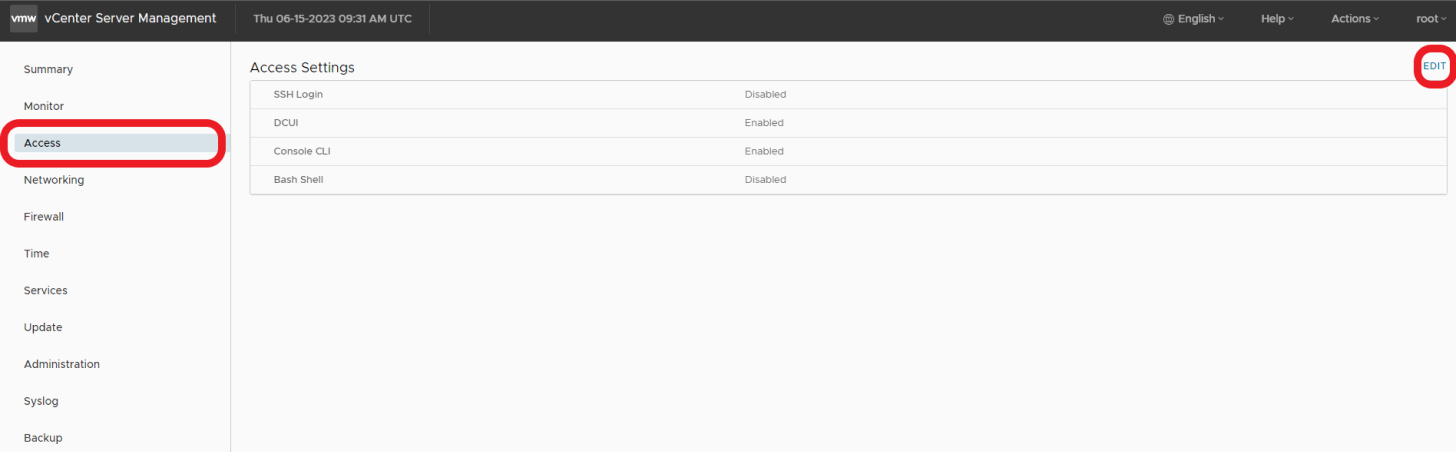

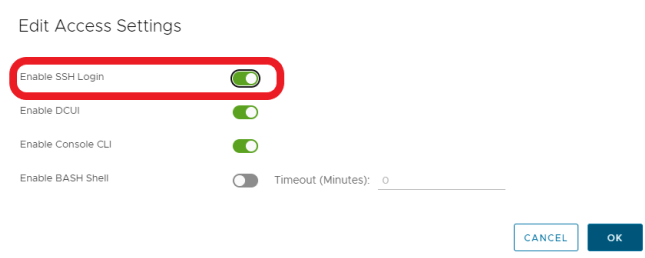
- SSH to vCenter
ssh root@[vcenter ip or fqdn]
To resolve the issue, please follow the steps outlined in these VMWare KB articles.

Prodotti interessati
VxRail, VxRail Appliance Series, VxRail SoftwareProprietà dell'articolo
Numero articolo: 000214541
Tipo di articolo: Solution
Ultima modifica: 22 mag 2026
Versione: 2
Trova risposta alle tue domande dagli altri utenti Dell
Support Services
Verifica che il dispositivo sia coperto dai Servizi di supporto.