VxRail: Gebeurteniscode VXR0140A4
Riepilogo: Gebeurtenis VXR0140A4 wordt gerapporteerd wanneer de core- en inventarisschijf 90% van de capaciteit bereikt.
Questo articolo si applica a
Questo articolo non si applica a
Questo articolo non è legato a un prodotto specifico.
Non tutte le versioni del prodotto sono identificate in questo articolo.
Sintomi
Severity: Fout
Er treedt VXR0140A4 een VxRail-gebeurtenis op en er wordt een rood alarm weergegeven in de vCenter-portal.
Er treedt VXR0140A4 een VxRail-gebeurtenis op en er wordt een rood alarm weergegeven in de vCenter-portal.
Causa
De storage van de core- en inventarisschijf (/storage/db/) op vCenter heeft 90% van de capaciteit bereikt.
Risoluzione
Meld u aan bij de vCenter Server Appliance als root via SSH of de vCenter Virtual Machine Console.
Als SSH niet is ingeschakeld op uw vCenter server, volgt u deze stappen om dit in te schakelen:
- Ga naar:
https://[vCenter_url]:5480(de vCenter Server Management-UI) en meld u aan als root. - Klik op Access en vervolgens op Edit om vCenter SSH in te schakelen.

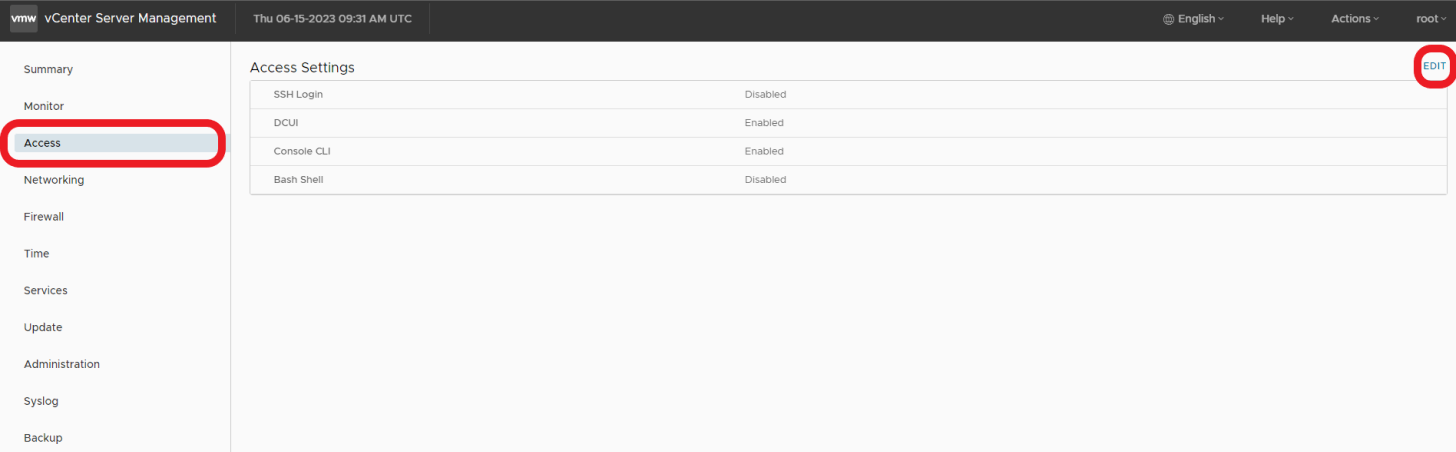

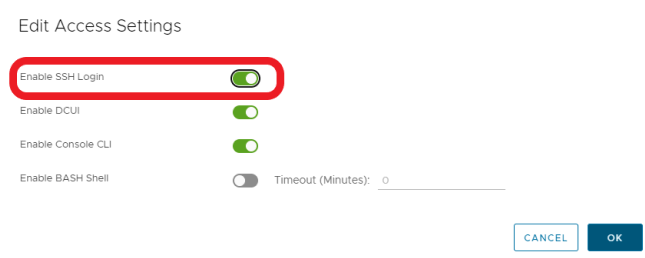
- SSH naar vCenter
ssh root@[vcenter ip or fqdn]
Volg de stappen in deze VMware KB-artikelen om het probleem op te lossen.

Prodotti interessati
VxRail, VxRail Appliance Series, VxRail SoftwareProprietà dell'articolo
Numero articolo: 000214541
Tipo di articolo: Solution
Ultima modifica: 22 mag 2026
Versione: 2
Trova risposta alle tue domande dagli altri utenti Dell
Support Services
Verifica che il dispositivo sia coperto dai Servizi di supporto.