PowerProtect Data Manager: il restore della macchina virtuale smette di rispondere e ha esito negativo con un problema del certificato di Data Domain
Riepilogo: Il restore della macchina virtuale di PowerProtect Data Manager smette di rispondere e quindi ha esito negativo con l'errore "The operation was not successful because of a issue with the certificate. Verificare che il certificato sia stato accettato." ...
Questo articolo si applica a
Questo articolo non si applica a
Questo articolo non è legato a un prodotto specifico.
Non tutte le versioni del prodotto sono identificate in questo articolo.
Sintomi
Messaggio di errore:
YYYY-MM-DDTHH:MM:SS.956Z INFO [request-dispatch-service-1] [][][][][] [c.e.b.d.c.r.c.DdRestClient.dataDomainLogin(236)] -  hostname=mynas-dd####.abc.local url=https://mynas-dd####.abc.local:3009/rest/v1.0/auth
YYYY-MM-DDTHH:MM:SS.222Z ERROR [request-dispatch-service-1] [][][][][] [c.e.b.d.c.r.c.DdRestClient.executeDataDomainAuthRequest(281)] -  issue with certificate when execute request
YYYY-MM-DDTHH:MM:SS.222Z ERROR [request-dispatch-service-1] [][][][][] [c.e.b.d.c.r.c.DdRestClient.executeDataDomainAuthRequest(285)] -  Exception when trying to login, PowerProtect DD System = mynas-dd####.abc.local, error = The operation was unsuccessful because of an issue with certificate.  Verify that the certificate was accepted.
Causa
Il certificato Data Domain scaduto causa l'errore di restore della VM PowerProtect Data Manager.
Risoluzione
Rinnovare il certificato Data Domain scaduto utilizzando l'utilità della riga di comando PPCP:
- Autorizzazione script PPCP di configurazione
Run
admin@my-ppdm:~> sudo chmod 755 /home/admin/bin/ppcp
admin@my-ppdm:~> cd /home/admin/bin/ppcp
- Elencare i certificati per convalidare il
port: 3009estate showing expired
Run
admin@my-ppdm:~> ./ppcp certs list
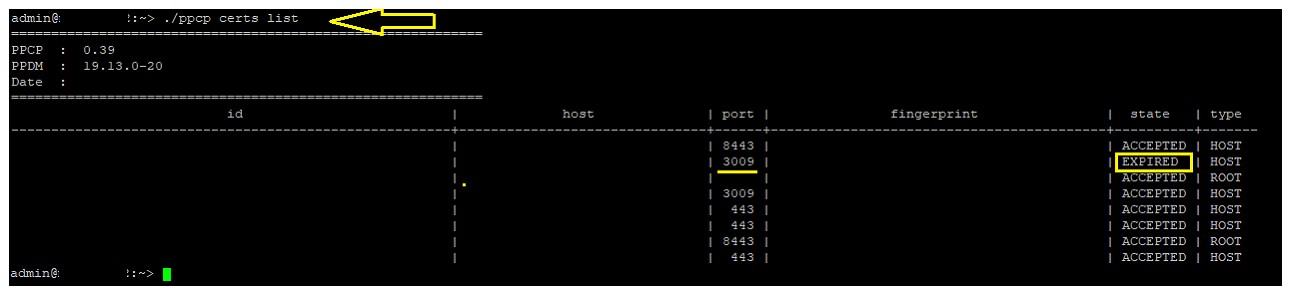
- Eseguire il comando certificate update per aggiornare il certificato Data Domain. In questo modo si rinnova la rimozione del certificato scaduto.
Run below command using the actual <certid>

admin@my-ppdm:~> ./ppcp certs update --host mynas-dd####.abc.local --port 3009
- Riavviare il servizio VMDM
Run
admin@my-ppdm:~> vmdm restart
admin@my-ppdm:~> vmdm status
- Riavviare il servizio VPOD
Run
admin@my-ppdm:~> systemctl restart vpod
admin@my-ppdm:~> systemctl status vpod
- Riavviare il servizio vproxyd
Run
admin@my-ppdm:~> systemctl restart vproxyd
admin@my-ppdm:~> systemctl status vproxyd
- Testare nuovamente il restore della macchina virtuale PPDM .
Prodotti
PowerProtect SoftwareProprietà dell'articolo
Numero articolo: 000218428
Tipo di articolo: Solution
Ultima modifica: 21 ago 2026
Versione: 4
Trova risposta alle tue domande dagli altri utenti Dell
Support Services
Verifica che il dispositivo sia coperto dai Servizi di supporto.