NVP vProxy: Red Hat 9 VM does not show some folders during an FLR.
Riepilogo: A Virtual Machine (VM) File Level Restore (FLR) is performed on a Red Hat 9.x VM. The mount operation is successful but some folders are not seen during the FLR browse operation. No error is reported in the user interface. The VM is configured with LVM partitions. ...
Questo articolo si applica a
Questo articolo non si applica a
Questo articolo non è legato a un prodotto specifico.
Non tutte le versioni del prodotto sono identificate in questo articolo.
Sintomi
- The NetWorker VMware solution is configured with the NetWorker VMware Protection (NVP) vProxy appliance.
- A File Level Restore (FLR) is performed for a Linux VM. The FLR mount operation completes successfully; however, during the browse operation only some of the system folders are presented:
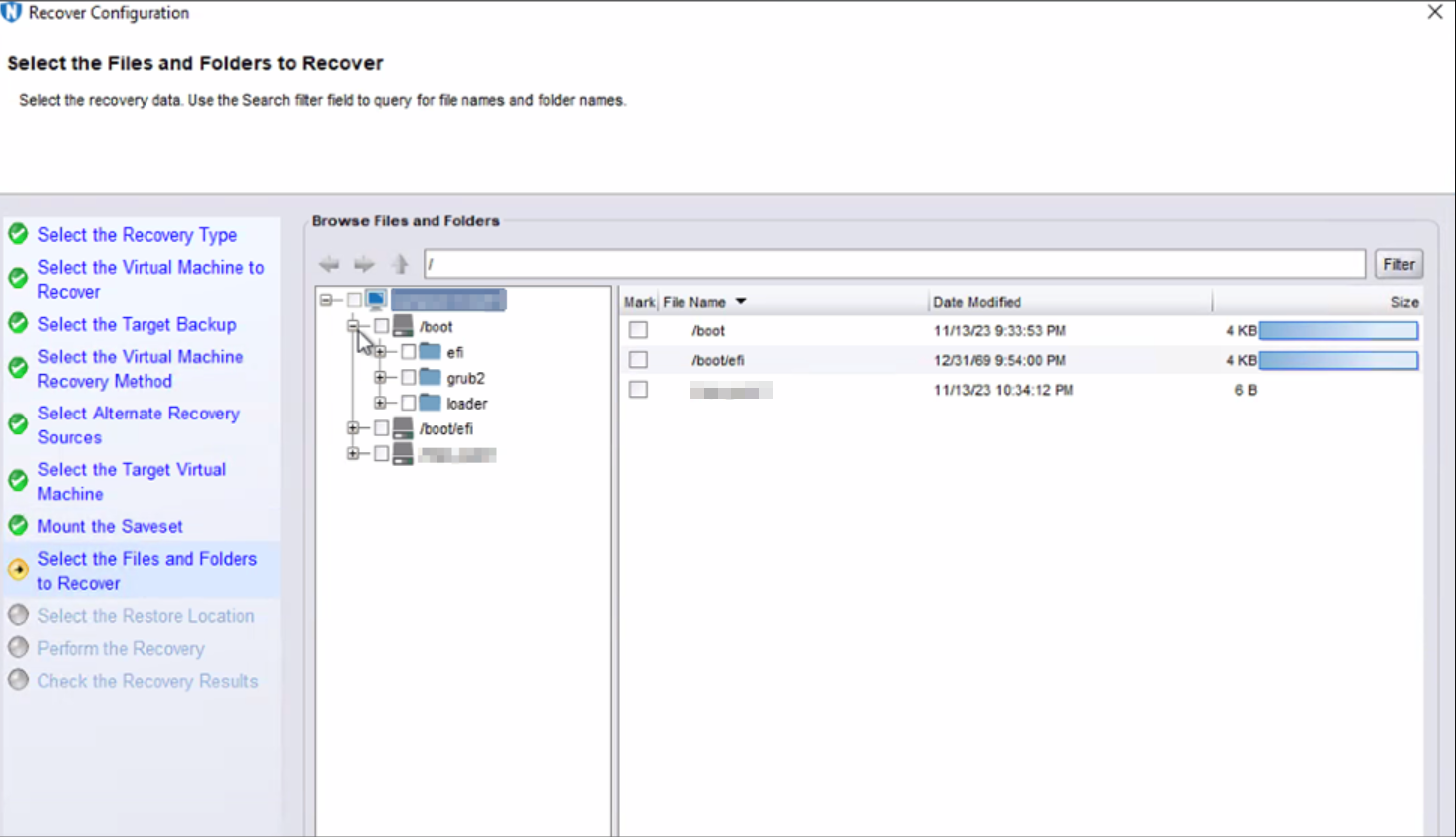
NOTE: In this example, the browse session is only showing
/boot and /bootefi directories. The / (root) and /home folders and their contents are missing.
- The issue appears regardless of using the NetWorker Management Console (NMC) or NetWorker Web User Interface (NWUI), and when the VM's root user account is used to perform the FLR mount.
- The VM's
/opt/emc/vproxyra/logs/vflragentd/vflragentd-agent.log reports:
YYYY-MM-DDTHH:mm:SS-TZ INFO:   Mount #6: HH:mm:SS Mounting LVM volumes...
YYYY-MM-DDTHH:mm:SS-TZ INFO:   Mount #6: HH:mm:SS Running command: /sbin/lvm pvs --config 'global { use_lvmetad = 0 }' -o vg_name,pv_name --noheadings --separator : '/dev/sdc3' 2>&1
YYYY-MM-DDTHH:mm:SS-TZ INFO:   Mount #6: HH:mm:SS -->   Cannot use /dev/sdc3: device is not in devices file
- The VM is a Red Hat 9.x release (or later)
- The VM's LVM configuration meet FLR support requirements: NVP vProxy: FLR LVM Limitations
- The vProxy appliance is 4.3.0-38 or older.
Causa
The VM is configured with LVM partitions. Code changes were needed in the vProxy to support Red Hat 9 Logical Volume Management (LVM) devices.
Code changes went into vProxy 4.3.0-39 which resolve this issue.
Risoluzione
- Ensure that the VM's LVM configuration is supported by vProxy FLR: NVP vProxy: FLR LVM Limitations
- If the current vProxies are 4.3.0-38 or older, upgrade the vProxy appliances:
NOTE: It is recommended to upgrade the vProxy appliance to the latest release supported by your NetWorker server. vProxy support is detailed in the NetWorker version-specific compatibility guides: https://elabnavigator.dell.com/eln/modernHomeAutomatedTiles?page=NetWorker
- NVP vProxy: How To Upgrade the NVP vProxy Appliance using nsrvproxy_mgmt
- NVP vProxy: NetWorker vProxy Version Information
- Once the vProxy has been upgraded to 4.3.0-39 or newer, perform the FLR again, the LVM partitions are visible during the browse operations.
Informazioni aggiuntive
The Linux lsblk command can be used to identify which file system mountpoints use LVM devices.
[root@lnx-client03]:~# lsblk
NAME          MAJ:MIN RM  SIZE RO TYPE MOUNTPOINTS
sda             8:0    0   30G  0 disk
├─sda1          8:1    0  600M  0 part /boot/efi
├─sda2          8:2    0    1G  0 part /boot
└─sda3          8:3    0 28.4G  0 part
  ├─rhel-root 253:0    0 25.4G  0 lvm  /
  └─rhel-swap 253:1    0    3G  0 lvm  [SWAP]
sr0            11:0    1 1024M  0 rom
- NVP vProxy: How To Perform A File Level Recovery When FLR Is Failing or Not Supported By the V
- https://access.redhat.com/documentation/en-us/red_hat_enterprise_linux/9/html/configuring_and_managing_logical_volumes/limiting-lvm-device-visibility-and-usage_configuring-and-managing-logical-volumes#accessing-all-devices-on-the-system_the-lvm-devices-file

Prodotti interessati
NetWorkerProdotti
NetWorker Family, NetWorker SeriesProprietà dell'articolo
Numero articolo: 000219868
Tipo di articolo: Solution
Ultima modifica: 28 mar 2025
Versione: 3
Trova risposta alle tue domande dagli altri utenti Dell
Support Services
Verifica che il dispositivo sia coperto dai Servizi di supporto.