雲端上和裝置上的安全元件驗證是什麼
Riepilogo: 深入瞭解離機 (雲端上) 或機上 (裝置上) 解決方案的安全元件驗證及其運作方式。
Questo articolo si applica a
Questo articolo non si applica a
Questo articolo non è legato a un prodotto specifico.
Non tutte le versioni del prodotto sono identificate in questo articolo.
Istruzioni
雲端或裝置上的安全元件驗證 (SCV) 可讓組織放心部署新的 Dell 電腦,確保其關鍵元件與出廠時的組態完全相符。
受影響的產品:
- Dell Trusted Device
- Secured Component Verification
受影響的作業系統:
- Windows 11
- Windows 10
主要優點:
- 安全元件驗證可確保訂購的 Dell 電腦硬體元件與原廠製造和組裝的元件相符,從而提供數位證明和供應鏈安全性。
- 增強 IT 安全性:使您的安全性標準符合零信任原則和其他新興產業指南,以滿足要求最嚴苛的安全 IT 基礎結構。
- 改善 IT 安全性作業:將 SCV 新增至部署的標準作業程序,以進行低接觸、低風險增強,最終保護您的整體 IT 安全性作業。
注意:
- 安全元件驗證 (雲端上) 服務自收到後 30 天內有效,或直至硬體元件變更或硬體設定變更為止 (以先到者為準)。
- 如果您使用加值轉售商 (VAR) 接收及設定裝置,則 30 天的時間範圍適用於 VAR,一旦離開 VAR 前往終端使用者後,Dell Technologies 對元件驗證概不負責。
- 雲端上和裝置上的安全元件驗證是授權產品。
安全元件驗證產品
有兩種安全元件驗證產品。以下提供每個產品的詳細資料:
安全元件驗證 (雲端上) 離機解決方案
隨即建立清查憑證,並儲存在 Dell 的離機安全雲端環境中。此憑證可用於確認硬體元件的真實性。
驗證方法:
- 在端點部署 SupportAssist for Business 和 Dell Trusted Device (DTD) 通知代理程式
- 使用線上入口網站 (TechDirect) 檢視驗證狀態以擷取驗證狀態
安全元件驗證 (裝置上) 機上解決方案
系統會產生清查憑證並儲存在 Dell 裝置上,用於確認所安裝硬體元件的真實性。
注意:本文不會進一步討論安全元件驗證 (裝置上)。如需詳細資訊,請聯絡您的 Dell 銷售代表。
安全元件驗證 (雲端上) 的運作方式
客戶訂購含 SCV 的電腦後,即會建立產品、收集並加密電腦元件資料,且此資訊會產生在出廠時建立和簽署的平台憑證。數位憑證會儲存在本機磁碟機或安全的 Dell Cloud 中,以交付給客戶。收到後,客戶可以驗證交付到憑證中的元件。此程序可確保客戶訂購的就是他們收到的商品,並且未經篡改。下圖說明一般的安全供應鏈工作流程。驗證階段會出現未預期硬體變更的 SCV 警示。
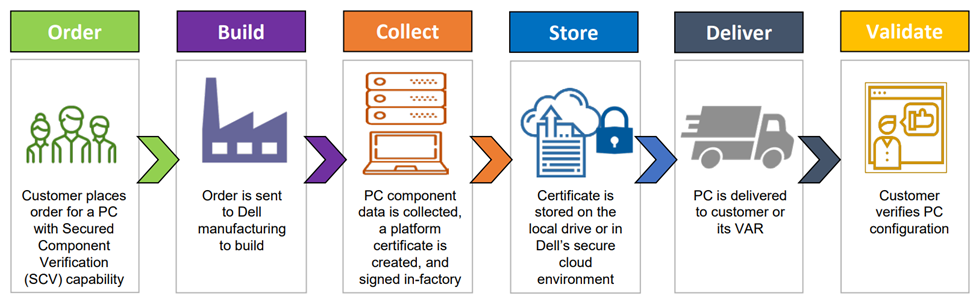
在不同的主控台中,可能會看到安全元件驗證 (雲端上) 清查驗證狀態的警示。這取決於端點機隊的管理方式。
安裝 Dell Trusted Device 所在端點上的 Windows 事件檢視器。安全元件驗證 (雲端上) 記錄的位置為:
Event Viewer - Applications and Services Logs - Dell
| 動作 | 等級 | 事件 ID | 工作類別 |
|---|---|---|---|
| 驗證成功 | 資訊性 | 41 | 9 |
| 驗證失敗 | 資訊性 | 41 | 9 |
| 伺服器內部錯誤 網路錯誤 | 錯誤 | 43 | 9 |
| 不支援的平台 | Warning | 42 | 9 |
- 如果使用 SupportAssist TechDirect 來管理端點機隊,則可使用 SupportAssist 部署 Dell Trusted Device。這可讓 SCV 資料顯示在 SupportAssist TechDirect 主控台中,成為機隊概觀的一部分,並提供額外的端點詳細資料。
- 如果 Microsoft Intune 管理端點機隊,則有 Dell Trusted Device PowerShell 指令檔可實作為 Intune 法規遵循原則。如需詳細資訊,請參閱支援受信任裝置說明文件中的最新 Dell Trusted Device 和 Microsoft Intune 快速入門指南。
安全元件驗證 (雲端上) 的支援平台
支援所有商用平台,包括商用系列 XPS。
注意:Chromebook 或精簡型用戶端不支援安全元件驗證 (雲端上)。如需為適當的 SCV 解決方案選取合適平台的相關協助,請聯絡您的 Dell 銷售代表。
安全元件驗證 (裝置上) 的支援平台
Latitude
- Latitude 5340
- Latitude 5350
- Latitude 5430 Rugged
- Latitude 5440
- Latitude 5450
- Latitude 5540
- Latitude 5550
- Latitude 7030 Rugged Extreme 平板電腦
- Latitude 7214 Rugged Extreme
- Latitude 7220 Rugged Extreme 平板電腦
- Latitude 7230 Rugged Extreme 平板電腦
- Latitude 7320 Detachable
- Latitude 7330 Rugged Extreme
- Latitude 7340
- Latitude 7350
- Latitude 7350 Detachable
- Latitude 7440
- Latitude 7450
- Latitude 7640
- Latitude 7650
- Latitude 9450 二合一
OptiPlex
- OptiPlex 7000 XE Micro
- OptiPlex All-in-One 7410
- OptiPlex All-in-One Plus 7410
- OptiPlex All-in-One 7420
- OptiPlex All-in-One Plus 7420
- OptiPlex Micro 7010
- OptiPlex Micro Plus 7010
- OptiPlex Micro 7020
- OptiPlex Micro Plus 7020
- OptiPlex 小機型 (SFF) 7010
- OptiPlex 小機型 (SFF) Plus 7010
- OptiPlex 小機型 (SFF) 7020
- OptiPlex 小機型 (SFF) Plus 7020
- OptiPlex Tower 7010
- OptiPlex Tower Plus 7010
- OptiPlex Tower 7020
- OptiPlex Tower Plus 7020
- OptiPlex XE4
- OptiPlex XE4 OEM 就緒
Precision
- Mobile Precision 3591
- Mobile Precision 5690
- Precision 3260 Compact
- Precision 3260 XE Compact
- Precision 3280 Compact
- Precision 3280 XE Compact
- Precision 3460 小機型 (SFF)
- Precision 3460 XE 小機型 (SFF)
- Precision 3480
- Precision 3490
- Precision 3580
- Precision 3581
- Precision 3590
- Precision 3660 直立式
- Precision 3660 XE 直立式
- Precision 3680 直立式
- Precision 3680 XE 直立式
- Precision 3930 XL 機架式
- Precision 5480
- Precision 5490
- Precision 5680
- Precision 5820 直立式
- Precision 5860 直立式
- Precision 5860 XL 直立式
- Precision 7680
- Precision 7780
- Precision 7820 直立式
- Precision 7865 直立式
- Precision 7875 直立式
- Precision 7875 XL 直立式
- Precision 7920 機架式
- Precision 7920 直立式
- Precision 7960 機架式
- Precision 7960 直立式
- Precision 7960 XL 機架式
- Precision 7960 XL 直立式
注意:僅在貿易協定法案 (TAA) 平台上支援安全元件驗證 (在裝置上)。如需為適當的 SCV 解決方案選取合適平台的相關協助,請聯絡您的 Dell 銷售代表。
Prodotti interessati
Dell Trusted DeviceProprietà dell'articolo
Numero articolo: 000221396
Tipo di articolo: How To
Ultima modifica: 19 mag 2026
Versione: 5
Trova risposta alle tue domande dagli altri utenti Dell
Support Services
Verifica che il dispositivo sia coperto dai Servizi di supporto.