Dell APEX Cloud Platform for Microsoft Azure : La réparation de nœud n’est pas prise en charge pour un cluster à nœud unique sur la version Azure 2402.
Riepilogo: La version Azure 2402 ne prend pas en charge l’opération de réparation du nœud de cluster à nœud unique. En cas de défaillance du nœud, vous devez redéployer le cluster à nœud unique.
Questo articolo si applica a
Questo articolo non si applica a
Questo articolo non è legato a un prodotto specifico.
Non tutte le versioni del prodotto sono identificate in questo articolo.
Sintomi
Pour un cluster à nœud unique, lorsque le nœud tombe en panne, l’utilisateur doit suivre la procédure Dell SolVe :> procédures de remplacement sur site -> Remplacement d’un nœud de cluster -> Réparation d’un nœud sur un cluster à nœud unique, les étapes pour NIM le nœud (sans effacer les disques de capacité), puis redéployer le cluster.
Toutefois, si le nœud est en cours d’exécution sur la version Azure 2402, le redéploiement du cluster échoue.
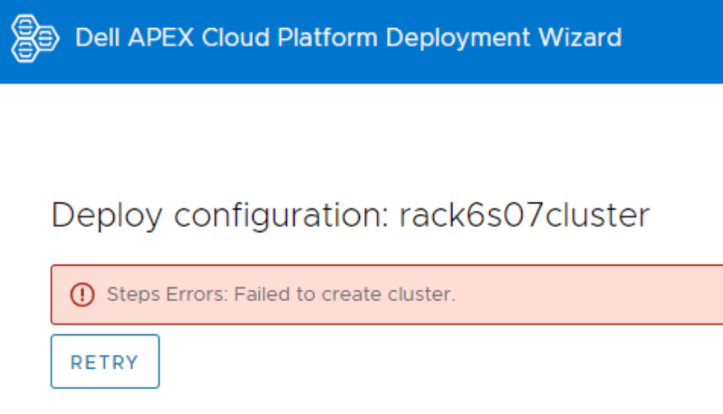
Connectez-vous au nœud et affichez le fichier journal CloudDeployment.xxx sous C :\CloudDeployment\Logs, il signale un échec ECE à : Test-AzStackHciExternalActiveDirectory.
ECE failed at: Test-AzStackHciExternalActiveDirectory,
2024-03-12 08:13:36 Verbose  [EnvironmentValidator:ValidateExternalAD] Get-InprogressUpdateNugetStore failed. Update package nuget store was not specified in runtime parameters.
2024-03-12 08:13:36 Verbose  [EnvironmentValidator:ValidateExternalAD] EnvCheckerModuleBase: C:\Program Files\WindowsPowerShell\Modules\AzStackHci.EnvironmentChecker
2024-03-12 08:13:36 Verbose  [EnvironmentValidator:ValidateExternalAD] Gathering External Active Directory validation assets.
2024-03-12 08:13:36 Verbose  [EnvironmentValidator:ValidateExternalAD] Starting External Active Directory validation. Detail output can be found in D:\CloudContent\MASLogs\AzStackHciEnvironmentChecker*
2024-03-12 08:14:10 Warning  [EnvironmentValidator:ValidateExternalAD] Critical (blocking) ExternalAD failures found in validation. 1 Rules failed:
2024-03-12 08:14:10 Verbose  [EnvironmentValidator:ValidateExternalAD] Validator failed. ExternalAD requirements not met. Review output and remediate:
Rule:

HealthCheckSource  : Deployment\ExternalActiveDirectory\16be73a5
Name               : AzStackHci_ExternalActiveDirectory_Test_OrganizationalUnit_ExecutingAsDeploymentUser
DisplayName        : Test AD Organizational Unit - ExecutingAsDeploymentUser
Tags               : {}
Title              : Test AD Organizational Unit - ExecutingAsDeploymentUser
Status             : FAILURE
Severity           : CRITICAL
Description        : Tests that the specified organizational unit exists and contains the proper OUs
Remediation        : https://learn.microsoft.com/en-us/azure-stack/hci/deploy/deployment-tool-prerequisites
TargetResourceID   : Test_AD_OU_HCIH06S3-101
TargetResourceName : Test_AD_OU_HCIH06S3-101
TargetResourceType : ActiveDirectory
Timestamp          : 3/12/2024 8:14:10 AM


 AdditionalData:

Key   : Detail
Value : The ActiveDirectory user account 'lab30114.local\MGMT' is ineligible to be used as a deployment user: the user
        is missing the GenericAll permission to the organizational unit 'OU=OUH06S3,DC=lab30114,DC=local'

Key   : Status
Value : FAILURE

Key   : TimeStamp
Value : 03/12/2024 08:14:10

Key   : Resource
Value : ExecutingAsDeploymentUser

Key   : Source
Value : HCIH06S3-101


2024-03-12 08:14:10 Verbose  [EnvironmentValidator:ValidateExternalAD] at ParseResult, C:\NugetStore\AzStackHci.EnvironmentChecker.Deploy.1.2100.2599.333\content\Classes\EnvironmentValidator\EnvironmentValidator.psm1: line 857
at Test-AzStackHciExternalActiveDirectory, C:\Program Files\WindowsPowerShell\Modules\AzStackHci.EnvironmentChecker\AzStackHciExternalActiveDirectory\AzStackHciExternalActiveDirectory.psm1: line 60
at <ScriptBlock>, <No file>: line 1
at RunSingleValidator, C:\NugetStore\AzStackHci.EnvironmentChecker.Deploy.1.2100.2599.333\content\Classes\EnvironmentValidator\EnvironmentValidator.psm1: line 429
at ValidateExternalAD, C:\NugetStore\AzStackHci.EnvironmentChecker.Deploy.1.2100.2599.333\content\Classes\EnvironmentValidator\EnvironmentValidator.psm1: line 262
at <ScriptBlock>, C:\CloudDeployment\ECEngine\InvokeInterfaceInternal.psm1: line 127
at Invoke-EceInterfaceInternal, C:\CloudDeployment\ECEngine\InvokeInterfaceInternal.psm1: line 123
2024-03-12 08:14:10 Verbose  [EnvironmentValidator:ValidateExternalAD] ECE PowerShellHost Script End
Causa
La réparation d’un nœud sur un cluster à nœud unique n’est pas prise en charge dans la version Azure 2402.
Risoluzione
Dans le cas d’un cluster à nœud unique, sauvegardez régulièrement vos données.
Lorsque vous rencontrez une erreur ECE et que la réparation du nœud unique est défaillante, veuillez appeler l’équipe de support Dell pour redéployer le cluster. Une fois le cluster redéployé, restaurez les données sur votre cluster.
Lorsque vous rencontrez une erreur ECE et que la réparation du nœud unique est défaillante, veuillez appeler l’équipe de support Dell pour redéployer le cluster. Une fois le cluster redéployé, restaurez les données sur votre cluster.
Prodotti interessati
APEX Cloud Platform for Microsoft AzureProprietà dell'articolo
Numero articolo: 000223387
Tipo di articolo: Solution
Ultima modifica: 26 mar 2026
Versione: 2
Trova risposta alle tue domande dagli altri utenti Dell
Support Services
Verifica che il dispositivo sia coperto dai Servizi di supporto.