適用於 Microsoft Azure 的 Dell APEX Cloud Platform:Azure 2402 版本上的單節點群集不支援節點修復。
Riepilogo: Azure 2402 版本不支援單節點群集節點修復操作,如果節點失敗,則需要重新部署單節點群集。
Questo articolo si applica a
Questo articolo non si applica a
Questo articolo non è legato a un prodotto specifico.
Non tutte le versioni del prodotto sono identificate in questo articolo.
Sintomi
對於單一節點叢集,當節點故障時,使用者必須遵循 Dell SolVe 程序 -> 現場更換程序 -> 更換叢集節點 -> 修復單一節點叢集上的節點步驟,以對節點進行 NIM (請勿抹除容量磁碟機),然後重新部署叢集。
但是,如果節點在 Azure 2402 版本上運行,則群集重新部署將失敗。
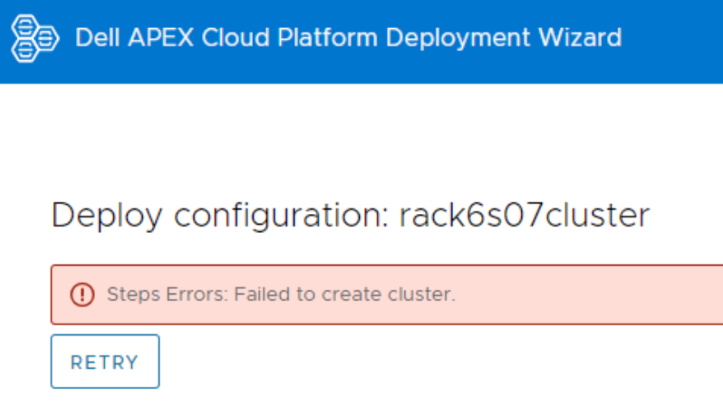
登入節點並檢視記錄檔,CloudDeployment.xxx 在 C:\CloudDeployment\Logs 下,報告 ECE 在下列位置失敗:Test-AzStackHciExternalActiveDirectory。
ECE failed at: Test-AzStackHciExternalActiveDirectory,
2024-03-12 08:13:36 Verbose  [EnvironmentValidator:ValidateExternalAD] Get-InprogressUpdateNugetStore failed. Update package nuget store was not specified in runtime parameters.
2024-03-12 08:13:36 Verbose  [EnvironmentValidator:ValidateExternalAD] EnvCheckerModuleBase: C:\Program Files\WindowsPowerShell\Modules\AzStackHci.EnvironmentChecker
2024-03-12 08:13:36 Verbose  [EnvironmentValidator:ValidateExternalAD] Gathering External Active Directory validation assets.
2024-03-12 08:13:36 Verbose  [EnvironmentValidator:ValidateExternalAD] Starting External Active Directory validation. Detail output can be found in D:\CloudContent\MASLogs\AzStackHciEnvironmentChecker*
2024-03-12 08:14:10 Warning  [EnvironmentValidator:ValidateExternalAD] Critical (blocking) ExternalAD failures found in validation. 1 Rules failed:
2024-03-12 08:14:10 Verbose  [EnvironmentValidator:ValidateExternalAD] Validator failed. ExternalAD requirements not met. Review output and remediate:
Rule:

HealthCheckSource  : Deployment\ExternalActiveDirectory\16be73a5
Name               : AzStackHci_ExternalActiveDirectory_Test_OrganizationalUnit_ExecutingAsDeploymentUser
DisplayName        : Test AD Organizational Unit - ExecutingAsDeploymentUser
Tags               : {}
Title              : Test AD Organizational Unit - ExecutingAsDeploymentUser
Status             : FAILURE
Severity           : CRITICAL
Description        : Tests that the specified organizational unit exists and contains the proper OUs
Remediation        : https://learn.microsoft.com/en-us/azure-stack/hci/deploy/deployment-tool-prerequisites
TargetResourceID   : Test_AD_OU_HCIH06S3-101
TargetResourceName : Test_AD_OU_HCIH06S3-101
TargetResourceType : ActiveDirectory
Timestamp          : 3/12/2024 8:14:10 AM


 AdditionalData:

Key   : Detail
Value : The ActiveDirectory user account 'lab30114.local\MGMT' is ineligible to be used as a deployment user: the user
        is missing the GenericAll permission to the organizational unit 'OU=OUH06S3,DC=lab30114,DC=local'

Key   : Status
Value : FAILURE

Key   : TimeStamp
Value : 03/12/2024 08:14:10

Key   : Resource
Value : ExecutingAsDeploymentUser

Key   : Source
Value : HCIH06S3-101


2024-03-12 08:14:10 Verbose  [EnvironmentValidator:ValidateExternalAD] at ParseResult, C:\NugetStore\AzStackHci.EnvironmentChecker.Deploy.1.2100.2599.333\content\Classes\EnvironmentValidator\EnvironmentValidator.psm1: line 857
at Test-AzStackHciExternalActiveDirectory, C:\Program Files\WindowsPowerShell\Modules\AzStackHci.EnvironmentChecker\AzStackHciExternalActiveDirectory\AzStackHciExternalActiveDirectory.psm1: line 60
at <ScriptBlock>, <No file>: line 1
at RunSingleValidator, C:\NugetStore\AzStackHci.EnvironmentChecker.Deploy.1.2100.2599.333\content\Classes\EnvironmentValidator\EnvironmentValidator.psm1: line 429
at ValidateExternalAD, C:\NugetStore\AzStackHci.EnvironmentChecker.Deploy.1.2100.2599.333\content\Classes\EnvironmentValidator\EnvironmentValidator.psm1: line 262
at <ScriptBlock>, C:\CloudDeployment\ECEngine\InvokeInterfaceInternal.psm1: line 127
at Invoke-EceInterfaceInternal, C:\CloudDeployment\ECEngine\InvokeInterfaceInternal.psm1: line 123
2024-03-12 08:14:10 Verbose  [EnvironmentValidator:ValidateExternalAD] ECE PowerShellHost Script End
Causa
Azure 2402 版本不支援修復單節點群集上的節點。
Risoluzione
若為單節點叢集,請定期備份您的資料。
當您遇到 ECE 錯誤且單一節點修復中斷時,請聯絡 Dell 支援團隊以重新部署叢集。重新部署集群后,將數據還原到集群。
當您遇到 ECE 錯誤且單一節點修復中斷時,請聯絡 Dell 支援團隊以重新部署叢集。重新部署集群后,將數據還原到集群。
Prodotti interessati
APEX Cloud Platform for Microsoft AzureProprietà dell'articolo
Numero articolo: 000223387
Tipo di articolo: Solution
Ultima modifica: 26 mar 2026
Versione: 2
Trova risposta alle tue domande dagli altri utenti Dell
Support Services
Verifica che il dispositivo sia coperto dai Servizi di supporto.