Anleitung zum Installieren von Dell Client Device Manager
Riepilogo: Dieser Artikel enthält Informationen zur Installation von Dell Client Device Manager (DCDM).
Questo articolo si applica a
Questo articolo non si applica a
Questo articolo non è legato a un prodotto specifico.
Non tutte le versioni del prodotto sono identificate in questo articolo.
Istruzioni
Betroffene Produkte:
- Dell Client Device Manager
- Herunterladen und Extrahieren:
- Führen Sie die Eingabeaufforderung als Administrator aus.
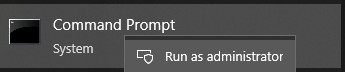
- Ändern Sie das Verzeichnis (cd) in das Verzeichnis, in das DCDM extrahiert wurde.

- Führen Sie das PowerShell-Skriptmithilfe der unten aufgeführten Parameter oder Beispiele basierend auf Ihren Anforderungen aus
powershell.exe -executionpolicy Bypass -windowstyle hidden -noninteractive -nologo -file "dcdm_deployment.ps1" -action -modules

| Parameter | Beschreibung |
|---|---|
| -help | Optional: Zeigt eine Beschreibung der Parameter an |
| -Aktion | Obligatorisch Gibt die durchzuführende Aktion an (Installation oder Deinstallation) |
| -Module | Optional: Gibt die Module an, die eingeschlossen werden sollen. Standardeinstellung (DCDMCS, DCDMU, DCDMS) |
| -logpath | Optional: Die Standardeinstellung ist C:ProgramData\Dell\ClientDeviceManager. Gibt den Pfad für Protokolldateien an |
| -verboselog | Optional: Aktiviert die Protokollanzeige in der Konsole (Wahr oder Falsch). |
| -debuglevel | Optional: Der Standardwert ist "all". Gibt die Ebene der Debugginginformationen an |
| -telemetryconsent | Optional: Der Standardwert ist "true". Zeigt Telemetriezustimmung an |
| Modul | Beschreibung | Modul hängt ab von |
|---|---|---|
| DCDMCS | Dell Client Device Manager Core Services (ehemals Dell Core Service (DCS)) | N/A Kernkomponente erforderlich |
| DCDMS | Dell Client Device Manager Security (früher bekannt als Dell Trusted Device (DTD)) | DCDMCS |
| DCDMU | Dell Client Device Manager-Update (früher bekannt als Dell Command Update (DCU)) | DCDMCS, DCDMS |
Beispiele:
Installieren oder Aktualisieren aller Module und Senden der Telemetrie für DCDMU
powershell.exe -executionpolicy Bypass -windowstyle hidden -noninteractive -nologo -file "dcdm_deployment.ps1" -action "install"
Installieren oder Aktualisieren aller Module ohne Telemetrie
powershell.exe -executionpolicy Bypass -windowstyle hidden -noninteractive -nologo -file "dcdm_deployment.ps1" -action "install" -telemetryconsent "false"
Installieren oder Aktualisieren von Dell Client Device Manager | Sicherheit (DCDMS)
powershell.exe -executionpolicy Bypass -windowstyle hidden -noninteractive -nologo -file "dcdm_deployment.ps1" -action "install" -modules "DCDMS"
Deinstallieren von Dell Client Device Manager | Sicherheit (DCDMS)
powershell.exe -executionpolicy Bypass -windowstyle hidden -noninteractive -nologo -file "dcdm_deployment.ps1" -action "uninstall" -modules "DCDMS"
Deinstallieren aller Module
powershell.exe -executionpolicy Bypass -windowstyle hidden -noninteractive -nologo -file "dcdm_deployment.ps1" -action "uninstall"
Prodotti interessati
Dell Client Device ManagerProprietà dell'articolo
Numero articolo: 000299185
Tipo di articolo: How To
Ultima modifica: 22 mag 2026
Versione: 3
Trova risposta alle tue domande dagli altri utenti Dell
Support Services
Verifica che il dispositivo sia coperto dai Servizi di supporto.