Dell Client Device Manager를 설치하는 방법
Riepilogo: 이 문서에서는 DCDM(Dell Client Device Manager) 설치에 대한 정보를 제공합니다.
Questo articolo si applica a
Questo articolo non si applica a
Questo articolo non è legato a un prodotto specifico.
Non tutte le versioni del prodotto sono identificate in questo articolo.
Istruzioni
영향을 받는 제품:
- Dell Client Device Manager
- 다운로드 및 압축 해제:
- 관리자 권한으로 명령 프롬프트를 실행합니다.
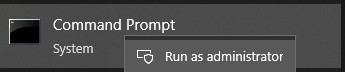
- 디렉토리 (cd)를 DCDM이 추출된 위치로 변경합니다.

- 필요에 따라 아래에 있는 매개변수 또는 예제를 사용하여 PowerShell 스크립트를실행합니다.
powershell.exe -executionpolicy Bypass -windowstyle hidden -noninteractive -nologo -file "dcdm_deployment.ps1" -action -modules

| 매개변수 | 설명 |
|---|---|
| -help | 선택 사항: 매개변수에 대한 설명을 표시합니다. |
| -행동 | Mandatory: 수행할 작업(설치 또는 제거)을 지정합니다. |
| -모듈 | 선택 사항: 포함할 모듈을 지정합니다. 기본값(DCDMCS,DCDMU,DCDMS) |
| -logpath | 선택 사항: 기본값은 C:ProgramData\Dell\ClientDeviceManager입니다. 로그 파일의 경로를 지정합니다 |
| -세부 로그 | 선택 사항: 콘솔에 로그 표시를 활성화합니다(True 또는 False). |
| -디버그 레벨 | 선택 사항: 기본값은 all입니다. 디버깅 정보의 수준을 지정합니다 |
| -텔레메트리동의 | 선택 사항: 기본값은 true입니다. 텔레메트리 동의 표시 |
| 모듈 | 설명 | 모듈은 다음에 따라 다릅니다. |
|---|---|---|
| 디디엠씨에스 | Dell Client Device Manager Core Services(이전의 DCS(Dell Core Service)) | N/A 핵심 구성 요소 필요 |
| 디씨엠에스(DCDMS) | Dell Client Device Manager Security(이전의 DTD(Dell Trusted Device)) | 디디엠씨에스 |
| DCDMU (디디무) | Dell Client Device Manager Update(이전의 DCU(Dell Command Update)) | DCDMCS, DCDMS |
예:
모든 모듈을 설치 또는 업데이트하고 DCDMU용 텔레메트리 전송
powershell.exe -executionpolicy Bypass -windowstyle hidden -noninteractive -nologo -file "dcdm_deployment.ps1" -action "install"
텔레메트리 없이 모든 모듈 설치 또는 업데이트
powershell.exe -executionpolicy Bypass -windowstyle hidden -noninteractive -nologo -file "dcdm_deployment.ps1" -action "install" -telemetryconsent "false"
Dell Client Device Manager 설치 또는 업데이트 | 보안(DCDMS)
powershell.exe -executionpolicy Bypass -windowstyle hidden -noninteractive -nologo -file "dcdm_deployment.ps1" -action "install" -modules "DCDMS"
Dell Client Device Manager 제거 | 보안(DCDMS)
powershell.exe -executionpolicy Bypass -windowstyle hidden -noninteractive -nologo -file "dcdm_deployment.ps1" -action "uninstall" -modules "DCDMS"
모든 모듈 제거
powershell.exe -executionpolicy Bypass -windowstyle hidden -noninteractive -nologo -file "dcdm_deployment.ps1" -action "uninstall"
Prodotti interessati
Dell Client Device ManagerProprietà dell'articolo
Numero articolo: 000299185
Tipo di articolo: How To
Ultima modifica: 22 mag 2026
Versione: 3
Trova risposta alle tue domande dagli altri utenti Dell
Support Services
Verifica che il dispositivo sia coperto dai Servizi di supporto.