Slik installerer du Dell Client Device Manager
Riepilogo: Denne artikkelen inneholder informasjon om hvordan du installerer Dell Client Device Manager (DCDM).
Questo articolo si applica a
Questo articolo non si applica a
Questo articolo non è legato a un prodotto specifico.
Non tutte le versioni del prodotto sono identificate in questo articolo.
Istruzioni
Berørte produkter:
- Dell Client Device Manager
- Last ned og pakk ut:
- Referanse, Slik laster du ned Dell Client Device Manager
- Referanse, hvordan du pakker ut Dell Client Device Manager.
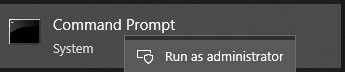
- Kjør ledeteksten som administrator.
- Endre katalogen (cd) til plasseringen der DCDM ble pakket ut.

- Kjør PowerShell-skreppet ved hjelp av parameterne eller eksemplene nedenfor, basert på dine behov
powershell.exe -executionpolicy Bypass -windowstyle hidden -noninteractive -nologo -file "dcdm_deployment.ps1" -action -modules

| Parameter | Beskrivelse |
|---|---|
| -hjelp | Valgfritt: Viser en beskrivelse av parametere |
| -handling | Obligatorisk Angir handlingen som skal utføres (installasjon eller avinstallering) |
| -Moduler | Valgfritt Angir modulene som skal inkluderes. Standard (DCDMCS, DCDMU, DCDMS) |
| -Logpath | Valgfritt: Standard er C:ProgramData\Dell\ClientDeviceManager. Angir banen for loggfiler |
| -verboselog | Valgfritt: Aktiverer loggvisning i konsollen (sann eller usann) |
| -debuglevel | Valgfri standard er alt. Angir nivået for feilsøkingsinformasjon |
| -telemetri | Valgfri standard er sann. Angir samtykke til telemetri |
| Modul | Beskrivelse | Modulen avhenger av |
|---|---|---|
| DCDMCS | Kjernetjenester for Dell enhetsbehandling for klient (tidligere kjent som Dell Core Service (DCS)) | N/A-kjernekomponent kreves |
| DCDMS | Dell Client Device Manager Security (tidligere kjent som Dell Trusted Device (DTD)) | DCDMCS |
| DCDMU | Dell Client Device Manager Update (tidligere kjent som Dell Command Update (DCU)) | DCDMCS, DCDMS |
Eksempler:
Installere eller oppdatere alle moduler og sende telemetri for DCDMU
powershell.exe -executionpolicy Bypass -windowstyle hidden -noninteractive -nologo -file "dcdm_deployment.ps1" -action "install"
Installer eller oppdater alle moduler uten telemetri
powershell.exe -executionpolicy Bypass -windowstyle hidden -noninteractive -nologo -file "dcdm_deployment.ps1" -action "install" -telemetryconsent "false"
Installere eller oppdatere Dell Client Device Manager | Sikkerhet (DCDMS)
powershell.exe -executionpolicy Bypass -windowstyle hidden -noninteractive -nologo -file "dcdm_deployment.ps1" -action "install" -modules "DCDMS"
Avinstallere Dell Client Device Manager | Sikkerhet (DCDMS)
powershell.exe -executionpolicy Bypass -windowstyle hidden -noninteractive -nologo -file "dcdm_deployment.ps1" -action "uninstall" -modules "DCDMS"
Avinstaller alle moduler
powershell.exe -executionpolicy Bypass -windowstyle hidden -noninteractive -nologo -file "dcdm_deployment.ps1" -action "uninstall"
Prodotti interessati
Dell Client Device ManagerProprietà dell'articolo
Numero articolo: 000299185
Tipo di articolo: How To
Ultima modifica: 22 mag 2026
Versione: 3
Trova risposta alle tue domande dagli altri utenti Dell
Support Services
Verifica che il dispositivo sia coperto dai Servizi di supporto.