Alienware Command Center 會自動安裝在非 Alienware 電腦上
Riepilogo: 下列文章提供將 Alienware 周邊裝置安裝至非 Alienware 裝置後,Alienware Command Center (AWCC) 安裝程序的相關資訊。
Questo articolo si applica a
Questo articolo non si applica a
Questo articolo non è legato a un prodotto specifico.
Non tutte le versioni del prodotto sono identificate in questo articolo.
Istruzioni
Alienware Command Center 應用程式自動安裝
本文說明在非 Alienware 裝置上安裝 AWCC 應用程式的原因。
注意:Windows 自動識別 (ID) 程序會推送應用程式安裝。
本文支援下列周邊設備:
- Alienware Pro 遊戲專用無線鍵盤
- Alienware Pro 遊戲專用無線滑鼠
- Alienware TKL 遊戲鍵盤 (AW420K)
- Alienware 遊戲專用無線耳機 (AW920H)
- Alienware 雙模式無線遊戲專用耳機 (AW720H)
- Alienware 遊戲專用無線滑鼠 (AW720M)
- Alienware 遊戲專用有線滑鼠 (AW320M)
- Alienware 有線或無線遊戲專用滑鼠 (AW610M)
- Alienware 低矮型 RGB 機械式遊戲專用鍵盤 (AW510K)
- Alienware RGB 機械式遊戲專用鍵盤 (AW410K)
- Alienware 遊戲專用無線滑鼠 (AW310M)
- Alienware 遊戲專用滑鼠 (AW510M)
- Alienware 機械式遊戲專用鍵盤 (AW310K)
- Alienware 三模式遊戲專用無線鍵盤 (AW920K)
- Alienware 遊戲專用耳機 (AW520H)
- Alienware Tri-Mode 無線遊戲專用耳機 (AW725H)
- Alienware Pro 遊戲專用無線耳機
- Alienware 遊戲專用無線滑鼠 (AW620M)
本文支援下列顯示器:
- Alienware 27 吋遊戲專用顯示器 (AW2725DM)
- Alienware 32 吋遊戲專用顯示器 (AW3225DM)
- Alienware 34 吋遊戲專用顯示器 (AW3425DWM)
- Alienware 27 吋遊戲專用顯示器 (AW2720HFA)
- Alienware 27 吋遊戲專用顯示器 (AW2720HF)
- Alienware 34 吋曲面遊戲專用顯示器 (AW3420DW)
- Alienware 55 吋 OLED 顯示器 (AW5520QF)
- Alienware 25 吋遊戲專用顯示器 (月陰影色) (AW2521HF)
- Alienware 25 吋遊戲專用顯示器 (月光色) (AW2521HFL)
- Alienware 25 吋遊戲專用顯示器 (月光色) (AW2521HFLA)
- Alienware 25 吋遊戲專用顯示器 (AW2521H)
- Alienware 25 吋遊戲專用顯示器 (月光色) (AW2521HFA)
- Alienware 38 吋遊戲專用曲面顯示器 (AW3821DW)
- Alienware 27 吋遊戲專用顯示器 (AW2721D)
- Alienware 34 吋 OLED 遊戲專用曲面顯示器 (AW3423DWF)
- Alienware 25 吋遊戲專用顯示器 (AW2523HF)
- Alienware 27 吋遊戲專用顯示器 (AW2723DF)
- Alienware 34 吋 OLED 遊戲專用曲面顯示器 (AW3423DW)
- Alienware 25 吋遊戲專用顯示器 (AW2524H)
- Alienware 27 吋遊戲專用顯示器 (AW2724DM)
- Alienware 27 吋遊戲專用顯示器 (AW2724HF)
- Alienware 25 吋遊戲專用顯示器 (AW2524HF)
- Alienware 32 吋遊戲專用曲面顯示器 (AW3225QF)
- Alienware 27 吋遊戲專用顯示器 (AW2725DF)
- Alienware 27 吋遊戲專用顯示器 (AW2725QF)
- Alienware 34 吋 240 Hz QD-OLED 遊戲專用顯示器 (AW3425DW)
Alienware 周邊設備和顯示器適用於 Alienware 電腦以及其他 Dell 產品和第三方裝置。為了協助您充分發揮所購買硬體的潛力,Windows 會在識別出 Alienware 周邊設備和/或顯示器後安裝 AWCC。AWCC 應用程式包含 Alienware 硬體可以使用的其他功能。(例如:RGB 色彩控制、設定檔、巨集等)
識別 Alienware 硬體後,AWCC 便會自動安裝在電腦上,以提供更順暢的使用體驗。
Dell 在畫面上新增訊息,詢問 AWCC 應用程式是否應安裝在您的作業系統上。
Dell 新增 AWCC 版本 6.6.x.x。
現在 Windows 正在推送最新版本的 AWCC 應用程式,您可以選擇是否安裝該應用程式。
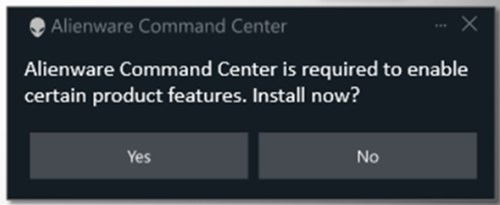
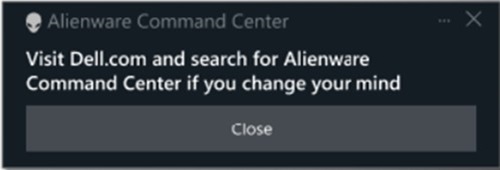
選擇「否」會顯示另一則螢幕訊息,告知您如果您改變主意,請拜訪 Dell.com。
注意:此選項不適用於舊版的 AWCC 應用程式。AWCC 版本 5.x.x.x 的應用程式已不再處於更新開發階段。
Alienware 團隊不斷致力於改善新的 AWCC 應用程式,並致力於在較舊的裝置上實作最新的 AWCC 應用程式。
如需詳細資訊,請參閱下列指南:
- Dell 文件與手冊:Alienware Command Center 使用者指南
Prodotti interessati
Alienware Mechanical Gaming Keyboard | AW310K, Alienware RGB Mechanical Gaming Keyboard AW410K, Alienware Tenkeyless Gaming Keyboard AW420K, Alienware Wireless Gaming Mouse AW310M, Alienware RGB Gaming Mouse AW510M
, Alienware Wired/Wireless Gaming Mouse AW610M, Alienware Tri-Mode Wireless Gaming Mouse AW720M, Alienware, Dell All-in-One, Dell Pro All-in-One, Dell Pro Max Micro, Dell Pro Max Slim, Dell Pro Max Tower, Dell Pro Micro, Dell Pro Slim, Dell Pro Tower, Dell Slim, Dell Tower, Inspiron, OptiPlex, Vostro, XPS, G Series, G Series, Alienware, Dell Laptops, Dell Plus, Dell Pro, Dell Pro Max, Dell Pro Plus, Dell Pro Premium, Inspiron, Latitude, Dell Pro Rugged, Vostro, XPS, Fixed Workstations, Mobile Workstations, Alienware Pro Wireless Gaming Headset, Alienware Tri-Mode Wireless Gaming Headset AW725H, Alienware Tri-Mode Wireless Gaming Headset AW920H, Alienware Wired Gaming Mouse AW320M, Alienware Pro Wireless Gaming Keyboard, Alienware Pro Wireless Gaming Mouse, Alienware Tri-Mode Wireless Gaming Keyboard AW920K, Alienware Wired Gaming Headset AW520H, Alienware Dual Mode Wireless Gaming Headset AW720H, Alienware Wireless Gaming Mouse AW620M, Alienware 27 Gaming Monitor AW2723DF, Alienware 27 Gaming Monitor AW2724DM, Alienware 27 Gaming Monitor AW2724HF, Alienware 27 360Hz QD OLED Gaming Monitor AW2725DF, Alienware 27 4K Dual-Resolution Gaming Monitor AW2725QF, Alienware 32 Gaming Monitor AW3225DM, Alienware 32 4K QD OLED Gaming Monitor AW3225QF, Alienware 34 Curved OLED Monitor AW3423DW, Alienware 34 Curved QD OLED Gaming Monitor AW3423DWF, Alienware 34 240Hz QD-OLED Gaming Monitor AW3425DW, Alienware 34 Gaming Monitor AW3425DWM, Alienware 25 Gaming Monitor AW2521H, Alienware 25 Gaming Monitor AW2521HF, Alienware 25 Gaming Monitor AW2521HFA, Alienware 25 Gaming Monitor AW2521HFL, Alienware 25 Gaming Monitor AW2521HFLA, Alienware 27 Gaming Monitor AW2720HF, Alienware 27 Gaming Monitor AW2720HFA, Alienware 27 Gaming Monitor AW2721D, Alienware AW3420DW, Alienware 38 Curved Gaming Monitor AW3821DW, Alienware 55 OLED Monitor AW5520QF, Dell Pro Max Micro XE FCM2250
...
Proprietà dell'articolo
Numero articolo: 000325948
Tipo di articolo: How To
Ultima modifica: 23 mag 2026
Versione: 2
Trova risposta alle tue domande dagli altri utenti Dell
Support Services
Verifica che il dispositivo sia coperto dai Servizi di supporto.