Dell 노트북에서 Windows Studio 효과 누락
Riepilogo: Dell 노트북에서 누락된 Windows Studio Effects를 복원하는 방법에 대해 알아보십시오.
Questo articolo si applica a
Questo articolo non si applica a
Questo articolo non è legato a un prodotto specifico.
Non tutte le versioni del prodotto sono identificate in questo articolo.
Sintomi
Windows Studio 효과 옵션이 설정의 USB 비디오 디바이스 섹션에서 누락될 수 있습니다.
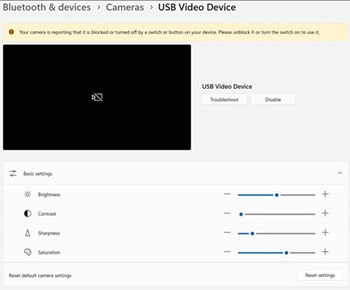
해당되는 플랫폼:
- Dell 14 DC14255
- Dell Pro 14 Essential PV14255
- Dell Pro 14 PC14255
- Dell Pro 16 PC16255
Causa
사용 가능한 원인 정보가 없습니다.
Risoluzione
- 장치 관리자를 엽니다. Camera AI Effect Opt-out을 마우스 오른쪽 버튼으로 클릭하고 Uninstall device를 선택합니다.
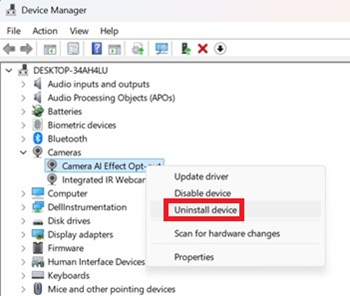
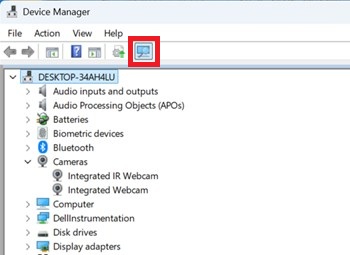
- 스캔 버튼을 눌러 내장형 IR 웹캠 이 있는지 확인합니다.
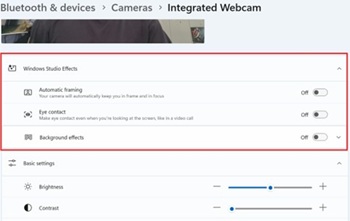
- 설정에서 Windows 스튜디오 효과 옵션을 사용할 수 있는지 확인합니다.
Prodotti interessati
Dell 14 DC14255, Dell Pro 14 PC14255, Dell Pro 16 PC16255, Dell Pro 14 Essential PV14255Proprietà dell'articolo
Numero articolo: 000407521
Tipo di articolo: Solution
Ultima modifica: 24 mag 2026
Versione: 2
Trova risposta alle tue domande dagli altri utenti Dell
Support Services
Verifica che il dispositivo sia coperto dai Servizi di supporto.