Windows Studio Effects Missing on a Dell Laptop
Riepilogo: Learn how to restore Windows Studio Effects that is missing on a Dell laptop.
Questo articolo si applica a
Questo articolo non si applica a
Questo articolo non è legato a un prodotto specifico.
Non tutte le versioni del prodotto sono identificate in questo articolo.
Sintomi
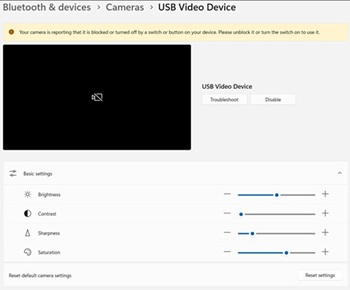
Windows Studio Effects options may be missing from the USB Video Device section in Settings.
Affected Platforms:
- Dell 14 DC14255
- Dell Pro 14 Essential PV14255
- Dell Pro 14 PC14255
- Dell Pro 16 PC16255
Causa
No cause information is available.
Risoluzione
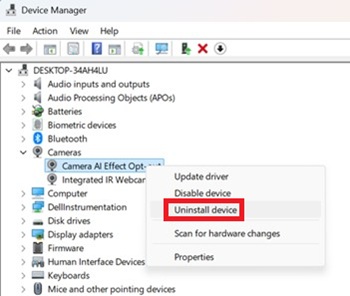
- Open Device Manager. Right click Camera AI Effect Opt-out and select Uninstall device.
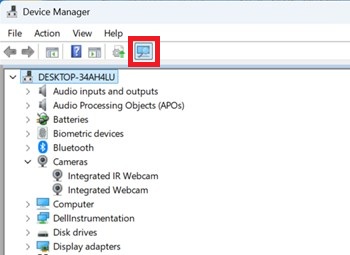
- Press the scan button to ensure Integrated IR Webcam exists.
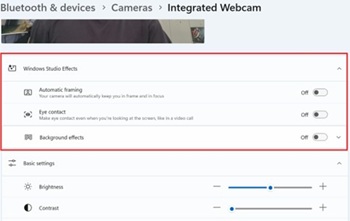
- Confirm if the Windows Studio Effects options are available in Settings.
Prodotti interessati
Dell 14 DC14255, Dell Pro 14 PC14255, Dell Pro 16 PC16255, Dell Pro 14 Essential PV14255Proprietà dell'articolo
Numero articolo: 000407521
Tipo di articolo: Solution
Ultima modifica: 24 mag 2026
Versione: 2
Trova risposta alle tue domande dagli altri utenti Dell
Support Services
Verifica che il dispositivo sia coperto dai Servizi di supporto.