Windows Studio-effecten ontbreken op een Dell laptop
Riepilogo: Informatie over het herstellen van Windows Studio-effecten die ontbreken op een Dell laptop.
Questo articolo si applica a
Questo articolo non si applica a
Questo articolo non è legato a un prodotto specifico.
Non tutte le versioni del prodotto sono identificate in questo articolo.
Sintomi
Windows Studio Effects-opties ontbreken mogelijk in het gedeelte USB-videoapparaat in Instellingen.
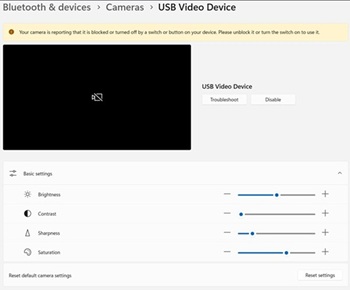
Betreffende platforms:
- Dell 14 DC14255
- Dell Pro 14 Essential PV14255
- Dell Pro 14 PC14255
- Dell Pro 16 PC16255
Causa
Er is geen informatie over de oorzaak beschikbaar.
Risoluzione
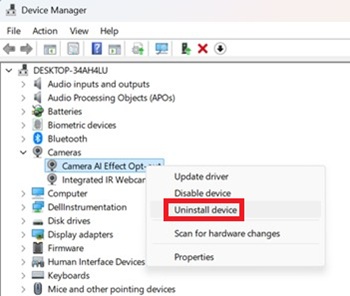
- Open Apparaatbeheer. Klik met de rechtermuisknop op Afmelden camera-AI-effect en selecteer Apparaat verwijderen.
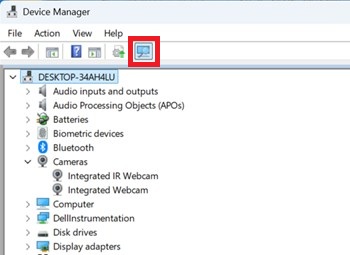
- Druk op de scanknop om ervoor te zorgen dat de geïntegreerde IR-webcam bestaat.
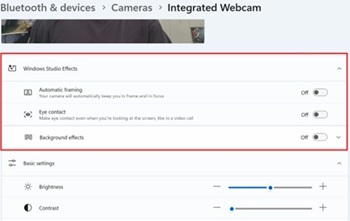
- Controleer of de opties voor Windows Studio-effecten beschikbaar zijn in Instellingen.
Prodotti interessati
Dell 14 DC14255, Dell Pro 14 PC14255, Dell Pro 16 PC16255, Dell Pro 14 Essential PV14255Proprietà dell'articolo
Numero articolo: 000407521
Tipo di articolo: Solution
Ultima modifica: 24 mag 2026
Versione: 2
Trova risposta alle tue domande dagli altri utenti Dell
Support Services
Verifica che il dispositivo sia coperto dai Servizi di supporto.