PowerProtect Data Manager : La sauvegarde de File System Agent échoue avec l’erreur « SQLite database initialization failed »
Riepilogo: La sauvegarde de File System Agent échoue avec l’erreur « SQLite database initialization failed » et indique un dossier PLCTLP manquant sur le système Data Domain.
Questo articolo si applica a
Questo articolo non si applica a
Questo articolo non è legato a un prodotto specifico.
Non tutte le versioni del prodotto sono identificate in questo articolo.
Sintomi
La sauvegarde de PowerProtect Data Manager File System Agent échoue en raison d’un problème d’agent avec erreur : échec de l’initialisation de la base de données SQLite. Le journal de l’agent d’application affiche les éléments suivants :
"failedSources": [
                    {
                        "taskId": "af5ce774-d0a0-47ce-a43a-cddc9fed363b",
                        "name": "D:\\",
                        "status": "FAILURE",
                        "subStatus": "",
                        "errorCode": "",
                        "errorMessage": "SQLite database initialization failed",
                        "remediation": "",
                        "vendorSpecificErrorMessage": "",
                        "alertArguments": []
La commande ddfssv_cent Le journal affiche les éléments suivants :
2026-04-17T13:01:06.135Z [TRACE_ID_87714f8f0c1af398_EXEC_ID_b694c97c2ccf7b27]0  12408 18308 0 ddfssv PowerProtect Data Manager notice DDP LOG: [18308:12408] ddp_stat() failed, Path //FS_Backup_TEST/PLCTLP-809cd829-eaa5-44d6-ab89-be8a61c7a293, Err: 5004-nfs lookup failed (nfs: No such file or directory)
2026-04-17T13:01:06.151Z [TRACE_ID_87714f8f0c1af398_EXEC_ID_b694c97c2ccf7b27]0  12408 18308 0 ddfssv PowerProtect Data Manager notice Unable to connect to data target: Retrieving statistics for '/FS_Backup_TEST/PLCTLP-809cd829-eaa5-44d6-ab89-be8a61c7a293' failed [5004] ([18308] [12408] Fri Apr 17 09:01:06 2026
	ddp_stat() failed, Path //FS_Backup_TEST/PLCTLP-809cd829-eaa5-44d6-ab89-be8a61c7a293, Err: 5004-nfs lookup failed (nfs: No such file or directory)
)..
La commande vmdm.log Montre:
2026-04-19T07:00:05.315Z ERROR [] [https-jsse-nio-0.0.0.0-8447-exec-47] [00000000-0000-4000-a000-000000000000][][][TRACE_ID:b46dbf1aa2e28fc5;JOB_ID:8eb6926faaed5b17][] [c.e.b.s.u.CertificateUtils.checkExpiration(1391)] - Certificate is expired, state=EXPIRED
2026-04-19T07:00:05.315Z INFO [] [https-jsse-nio-0.0.0.0-8447-exec-47] [00000000-0000-4000-a000-000000000000][][][TRACE_ID:b46dbf1aa2e28fc5;JOB_ID:8eb6926faaed5b17][] [c.e.b.v.c.util.CommonUtils.getSSLThumbprint(245)] - Host DD_host.example.com thumbprint A747D9E2E98807A8F539A65354CA01AC287542D0
La création d’une nouvelle politique de protection échoue avec :
replmgr.2026-04-18.3.log.gz: 2026-04-18T22:30:36.966Z INFO [] [pool-32-thread-1] [00000000-0000-4000-b000-000000000000][][][TRACE_ID:ad91816c2d71de66;JOB_ID:8b9b1fe73fac21e9][] c.e.b.d.c.r.connection.DdRestClient.dataDomainLogin(159) -  hostname=DD_host.example.com username=ppdm-ddboost url=https://DD_host.example.com:3009/rest/v1.0/auth
replmgr.2026-04-18.3.log.gz: 2026-04-18T22:30:37.066Z ERROR [] [pool-32-thread-1] [00000000-0000-4000-b000-000000000000][][][TRACE_ID:ad91816c2d71de66;JOB_ID:8b9b1fe73fac21e9][] c.e.b.s.utils.CertificateUtils.checkExpiration(1391) -  Certificate is expired, state=EXPIRED
replmgr.2026-04-18.3.log.gz: 2026-04-18T22:30:37.067Z ERROR [] [pool-32-thread-1] [00000000-0000-4000-b000-000000000000][][][TRACE_ID:ad91816c2d71de66;JOB_ID:8b9b1fe73fac21e9][] c.e.b.d.c.r.connection.DdRestClient.executeDataDomainAuthRequest(213) -  Exception when trying to login, PowerProtect DD System = DD_host.example.com, username = ddboo error = NotAfter: Mon Mar 23 11:06:43 EST 2026
replmgr.2026-04-18.3.log.gz: 2026-04-18T22:30:37.067Z ERROR [] [pool-32-thread-1] [00000000-0000-4000-b000-000000000000][][][TRACE_ID:ad91816c2d71de66;JOB_ID:8b9b1fe73fac21e9][] c.e.b.d.s.s.StorageUnitRestImpl.login(480) -  Exception when logging in PowerProtect DD System, error:
com.emc.brs.datadomain.common.rest.connection.DdRestClientException: NotAfter: Mon Mar 23 11:06:43 EST 2026
Causa
Les tentatives de connexion à l’interface utilisateur Data Domain échouent avec des erreurs de connexion non valides. La connexion à Data Domain via SSH pour vérifier les certificats indique que le certificat https a expiré.
sysadmin@DD_host# adminaccess certificate show
Subject           Type            Application   Valid From                 Valid Until                Fingerprint
---------------   -------------   -----------   ------------------------   ------------------------   -----------------------------------------------------------
DD_host.example.com   host            https         Sun Jul 02 00:20:44 2023   Thu Mar 23 07:20:45 2026   5E:E6:C8:B2:76:8D:C1:96:15:E3:51:7B:86:35:5D:25:1F:91:A5:3B
DD_host.example.com   ca              trusted-ca    Mon Jul 03 07:20:44 2023   Sun Jul 01 07:20:44 2029   A6:48:F6:0E:D3:29:23:89:2C:6C:D8:E5:2B:84:2B:F9:01:62:C7:E7
Risoluzione
Le renouvellement du certificat Data Domain doit être effectué, puis le certificat doit être mis à jour dans PowerProtect Data Manager. Suivez les instructions de la section Data Domain : Interface utilisateur Web inaccessible en raison d’un certificat https expirépour renouveler le certificat https Data Domain.
Une fois le certificat renouvelé sur le système Data Domain, renouvelez-le dans PowerProtect Data Manager.
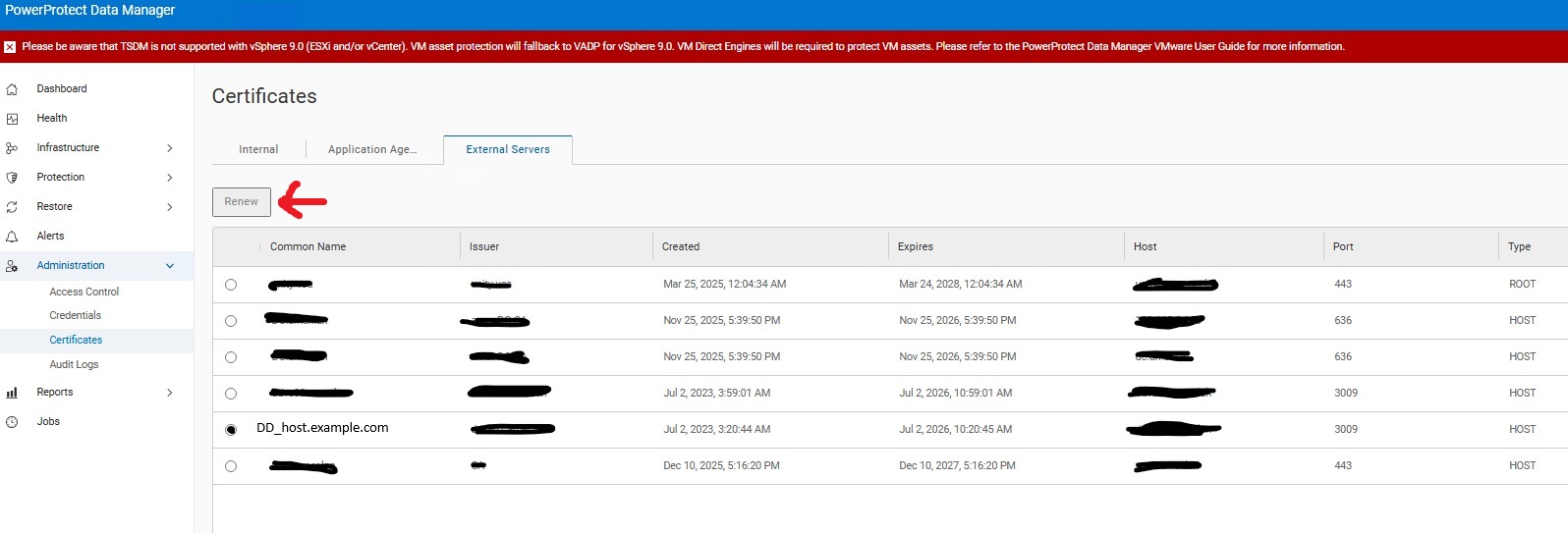
La règle concernée doit avoir redémarré la tâche de configuration en échec afin de permettre à Data Domain de créer le dossier manquant.

Proprietà dell'articolo
Numero articolo: 000458441
Tipo di articolo: Solution
Ultima modifica: 03 giu 2026
Versione: 2
Trova risposta alle tue domande dagli altri utenti Dell
Support Services
Verifica che il dispositivo sia coperto dai Servizi di supporto.