NetWorker: Not able to disable the view parallel option in the NMC View tab
Riepilogo: After enabling View Parallel option in NetWorker Management Console (NMC), the Tab has been split and unable to reset it back.
Questo articolo si applica a
Questo articolo non si applica a
Questo articolo non è legato a un prodotto specifico.
Non tutte le versioni del prodotto sono identificate in questo articolo.
Sintomi
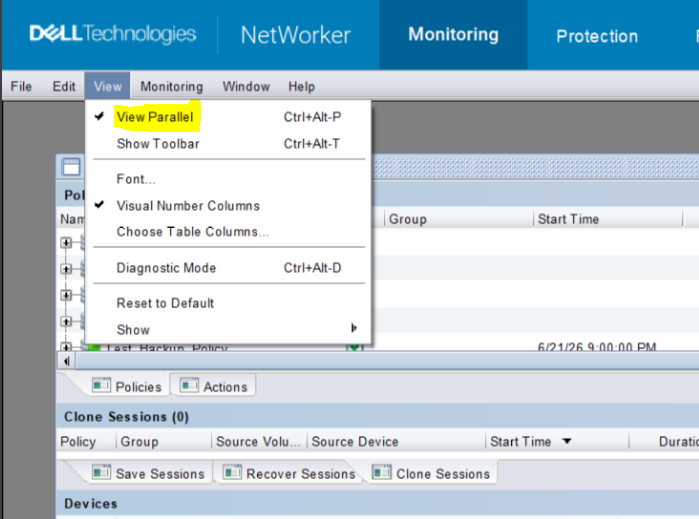
Upon enabling the "View Parallel" option in the NetWorker Management Console (NMC), the interface displays the below screen with tabs split accordingly.

The View parallel option is missing in the Monitoring tab:

It is not possible to disable "Parallel" mode from the View menu.
Causa
The issue is not a fault but expected behavior. It occurred due to enabling the "View Parallel" option, which modifies the NMC to display multiple tabs in a split (parallel) view.
Risoluzione
Perform the following actions:
- Close all open tabs using the cancel option.
- Relaunch the NetWorker Management Console (NMC).
- Close all tabs using Windows >> Close All to ensure a clean session.
- Reopen the Monitoring tab.
- Access the View menu again, after which the "View Parallel" option became visible.
- Clear the "View Parallel" option.
Prodotti interessati
NetWorker Family, NetWorker, NetWorker Management ConsoleProprietà dell'articolo
Numero articolo: 000481218
Tipo di articolo: Solution
Ultima modifica: 28 giu 2026
Versione: 1
Trova risposta alle tue domande dagli altri utenti Dell
Support Services
Verifica che il dispositivo sia coperto dai Servizi di supporto.