Avamar: VM image backups fail with "No Proxy" because vCenter proxy is powered off
요약: Avamar VM image backups fail with "No Proxy" because the proxy is powered off in vCenter.
이 문서는 다음에 적용됩니다.
이 문서는 다음에 적용되지 않습니다.
이 문서는 특정 제품과 관련이 없습니다.
모든 제품 버전이 이 문서에 나와 있는 것은 아닙니다.
증상
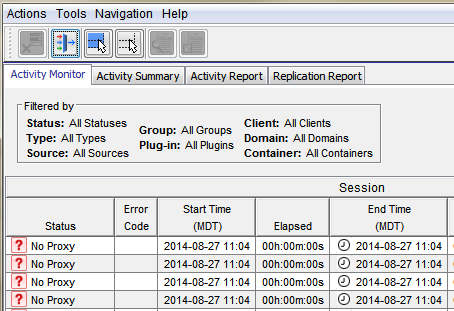
The Activity Monitor in the Avamar UI shows 'No Proxy'.
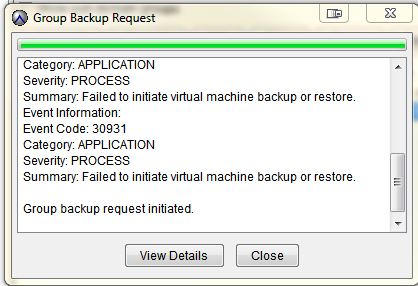
On-demand VMware Image backup fails with the following:
Category: APPLICATION
Severity: PROCESS
Summary: Failed to initiate virtual machine backup or restore.
Event Information:
Event Code: 30931
Category: APPLICATION
Severity: PROCESS
Summary: Failed to initiate virtual machine backup or restore.
If a group backup request is initiated.
원인
The proxy is powered off in vCenter.
해결
- Open vCenter and check if the proxy is powered off.
- If the proxy is powered off, power on the proxy.
추가 정보
The following articles discuss issues which have the same generic "No Proxy" error.
- Avamar VM image backups fail with "No Proxy" because no proxy servers are configured to protect the datastore holding the client’s VMDKs
- Avamar VM image backups fails with "No Proxy" error due to an interruption to the vCenter connection
- Avamar VM image backups fails with "No Proxy" error due to the VM not having any hard disks
- Avamar VM image backups fails with "No Proxy" error due to the proxy being powered off in vCenter
- Avamar VM image backups fail with "No Proxy" error due to proxies not resolving in DNS
해당 제품
Avamar제품
Avamar문서 속성
문서 번호: 000033569
문서 유형: Solution
마지막 수정 시간: 05 2월 2025
버전: 4
다른 Dell 사용자에게 질문에 대한 답변 찾기
지원 서비스
디바이스에 지원 서비스가 적용되는지 확인하십시오.