Dell Data Security Shield 모드
요약: 이 문서에서는 Dell Data Security(이전 Dell Data Protection) Shield 모드에 대해 설명합니다.
이 문서는 다음에 적용됩니다.
이 문서는 다음에 적용되지 않습니다.
이 문서는 특정 제품과 관련이 없습니다.
모든 제품 버전이 이 문서에 나와 있는 것은 아닙니다.
증상
영향을 받는 제품:
- Credant Mobile Guardian
- Dell Encryption Enterprise
- Dell Data Protection | Enterprise Edition
- Dell Encryption External Media
- Dell Data Protection | External Media Edition
- Dell Encryption Personal
- Dell Data Protection | Personal Edition
- Dell Data Protection | Security Tools
- Dell Encryption Enterprise for Server
- Dell Data Protection | Server Edition
해당되는 플랫폼:
- Windows
정책 기반 Dell Data Security(이전 Dell Data Protection) 소프트웨어는 제품 분류를 위해 보호 모드 식별자를 사용합니다.
원인
Warning:
- 쉴드 모드는 제품 설치 시 결정되며 수동으로 수정할 수 없습니다.
- Shield 모드는 제품 유형 또는 상태 문제를 해결하는 데만 사용됩니다.
해결
Dell Data Security 제품의 보호 모드는 다음과 같습니다.
| ID | 모드 | 제품 |
|---|---|---|
| 0 | 알 수 없음/초기화되지 않음 | 초기화되지 않음/프로비저닝되지 않음1 |
| 1 | Enterprise 모드 | Dell Encryption Enterprise\Dell Data Protection Enterprise Edition Shield |
| 2 | 독립형 모드 | Credant Mobile Guardian |
| 3 | 엔터프라이즈 EME 전용 모드 | Dell Encryption External Media \ Dell Data Protection | 외부 미디어 에디션 |
| 4 | 로컬 관리 모드 | Dell Encryption Personal \ Dell Data Protection | 개인용 에디션 |
| 5 | Essentials 모드 | Dell 데이터 보호 | 보안 툴2 |
| 6 | Server Encryption 모드 | 서버용 Dell Encryption Enterprise \ Dell Data Protection | Server Encryption |
| 7 | Saas 모드 | Dell Encryption Enterprise Shield |
1 개모든 Dell Data Protection 제품은 활성화될 때까지 프로비저닝되지 않은 상태로 유지됩니다.
2 개필수 모드는 Dell Data Protection | 보안 툴.
Shield 모드를 찾으려면:
Warning: Windows 레지스트리로 이동합니다.
- 레지스트리를 편집하면 다음에 재부팅할 때 컴퓨터가 응답하지 않을 수 있습니다.
- 이 단계를 수행하는 데 문제가 있는 경우 Dell Data Security 국제 지원 전화번호로 문의하십시오.
- Windows 시작 메뉴를 마우스 오른쪽 단추로 클릭한 후 실행을 선택합니다.
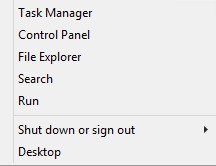
그림 1: (영어로만 제공) 실행
- 실행 UI(사용자 인터페이스)에서 regedit 를 입력하고 OK를 누릅니다.
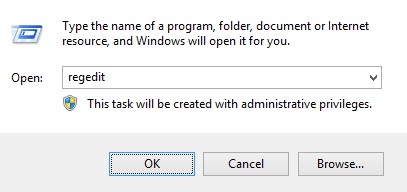
그림 2: (영어로만 제공) regedit를 입력합니다.
- HKEY_LOCAL_MACHINE\SOFTWARE\Credant\CMGShield로 이동합니다.
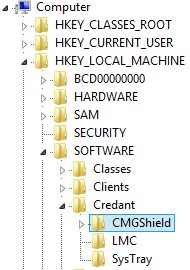
그림 3: (영어로만 제공) CMGShield
- DWORD 키 SM을 찾습니다.
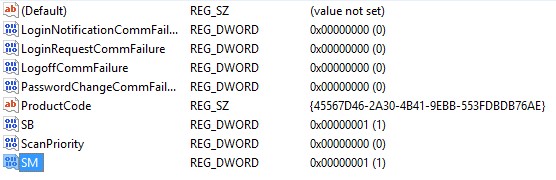
그림 4: (영어로만 제공) Sm
참고: 이 예에서는 SM 키가 1로 설정되어 있습니다. Shield 모드 Enterprise Edition을 식별합니다.
지원 부서에 문의하려면 Dell Data Security 국제 지원 전화번호를 참조하십시오.
온라인으로 기술 지원 요청을 생성하려면 TechDirect로 이동하십시오.
추가 정보 및 리소스를 보려면 Dell 보안 커뮤니티 포럼에 참여하십시오.
추가 정보
비디오
해당 제품
Dell Encryption문서 속성
문서 번호: 000132837
문서 유형: Solution
마지막 수정 시간: 19 4월 2026
버전: 11
다른 Dell 사용자에게 질문에 대한 답변 찾기
지원 서비스
디바이스에 지원 서비스가 적용되는지 확인하십시오.