PowerStore: Partial data collection cannot be downloaded
요약: Partial data collection cannot be downloaded.
이 문서는 다음에 적용됩니다.
이 문서는 다음에 적용되지 않습니다.
이 문서는 특정 제품과 관련이 없습니다.
모든 제품 버전이 이 문서에 나와 있는 것은 아닙니다.
증상
Partial data collection can occur in a multi appliance setup when data collection fails in one of the appliances.
When this occurs, the status of the data collection is 'PARTIAL' and in PowerStore Manager UI, when choosing this DC for downloading, displays the message "Support material not available for download" as seen in the following screenshot:.
Example:
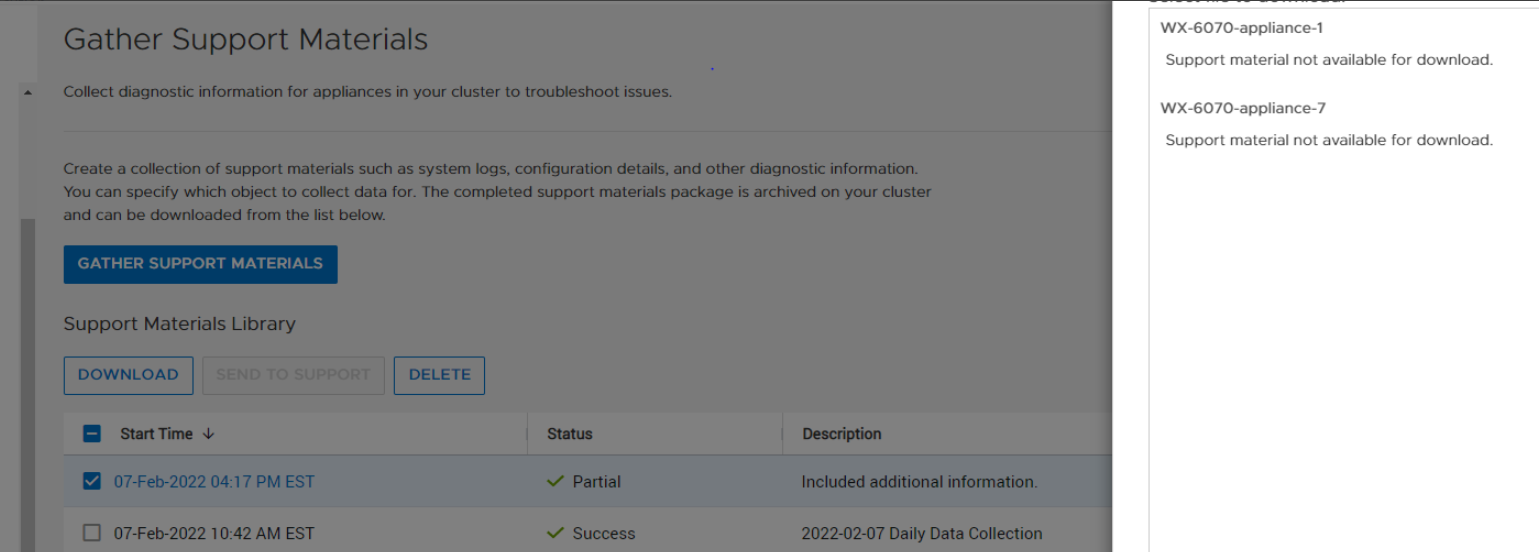
When this occurs, the status of the data collection is 'PARTIAL' and in PowerStore Manager UI, when choosing this DC for downloading, displays the message "Support material not available for download" as seen in the following screenshot:.
Example:
원인
The root cause is download for a data collection with 'dc_status' of 'PARTIAL' is not supported.
해결
To download the PARTIAL data collection bundle, use 'scp' from the command line in the service docker.
On the service docker of the appliance that has the PARTIAL data collection, do the following:
- Run 'svc_dc list' as shown below and identify the data collection to download.
[SVC:service@ABCDEF-B ~]$ svc_dc list |
- Elevate to root.
- Go to /cyc_var/cyc_service/data_collection/ and 'scp' the data collection to your target location as shown below:
root@ABCDEF-A:/home/service/user>cd /cyc_var/cyc_service/data_collection |
Resolution
This issue is fixed in PowerStore 3.0 and above where partial DCs can be downloaded for the PowerStore Manager UI.
해당 제품
PowerStore문서 속성
문서 번호: 000213481
문서 유형: Solution
마지막 수정 시간: 13 6월 2025
버전: 4
다른 Dell 사용자에게 질문에 대한 답변 찾기
지원 서비스
디바이스에 지원 서비스가 적용되는지 확인하십시오.