Backup job using PowerFlex Cloudlink to external FTP shows warning message "Failed to upload backup file to store" after every backup
요약: Backup job using PowerFlex Cloudlink to external FTP shows warning message "Failed to upload backup file to store" after every backup even though the backup file is present after every job. MD5 hash set to no ...
이 문서는 다음에 적용됩니다.
이 문서는 다음에 적용되지 않습니다.
이 문서는 특정 제품과 관련이 없습니다.
모든 제품 버전이 이 문서에 나와 있는 것은 아닙니다.
증상
Customer had configured backup of cloudlink center to external(Isilon) backup media using FTP. While running backup job as per schedule they would receive an warning message "Failed to upload backup file to store" by email as well as in Cloudlink Alarms.

원인
The alert is caused due to MD5 hash not being enabled on Isilon. Issue the command on Isilon CLI to verify the Md5
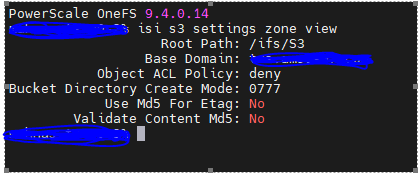
hash #isi s3 settings zone viewSee the output below
해결
Issue to below command to set MD5 for Etag and Validate Content Md5 to yes or use GUI to enable
CLI Command
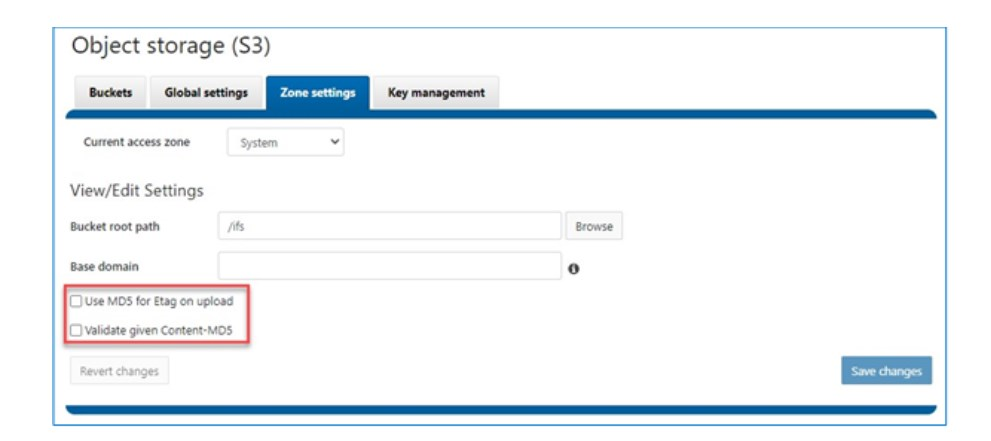
CLI Command
# isi s3 settings zone modify --use-md5-for-etag=yes --validate-content-md5=yesGUI
해당 제품
CloudLink문서 속성
문서 번호: 000220088
문서 유형: Solution
마지막 수정 시간: 22 12월 2023
버전: 1
다른 Dell 사용자에게 질문에 대한 답변 찾기
지원 서비스
디바이스에 지원 서비스가 적용되는지 확인하십시오.