High CPU Usage When Running Dell Encryption
Samenvatting: Customers running Dell Encryption may notice high CPU usage in the system process.
Dit artikel is van toepassing op
Dit artikel is niet van toepassing op
Dit artikel is niet gebonden aan een specifiek product.
Niet alle productversies worden in dit artikel vermeld.
Symptomen
Affected Products:
- Dell Encryption
Affected Versions:
- v10.10
- v11.0
- v11.1
Affected Operating Systems:
- Windows
The System process is a container for drivers to run their threads in a kernel mode context. When running Dell Encryption file or folder encryption the FFE driver threads load under the System process. Occasionally the System process consumes CPU time, resulting in high CPU usage. The steps below show how to confirm that Dell Encryption is the cause of the high CPU usage in system process.
Customers may observe high CPU usage (12-25%) in the system process on computers running Dell Encryption.
Note: To confirm we must use Process Explorer.
- Download Process Explorer from Process Explorer
- Extract the contents of the .zip file and run
procexp.exe. - Locate the System process.
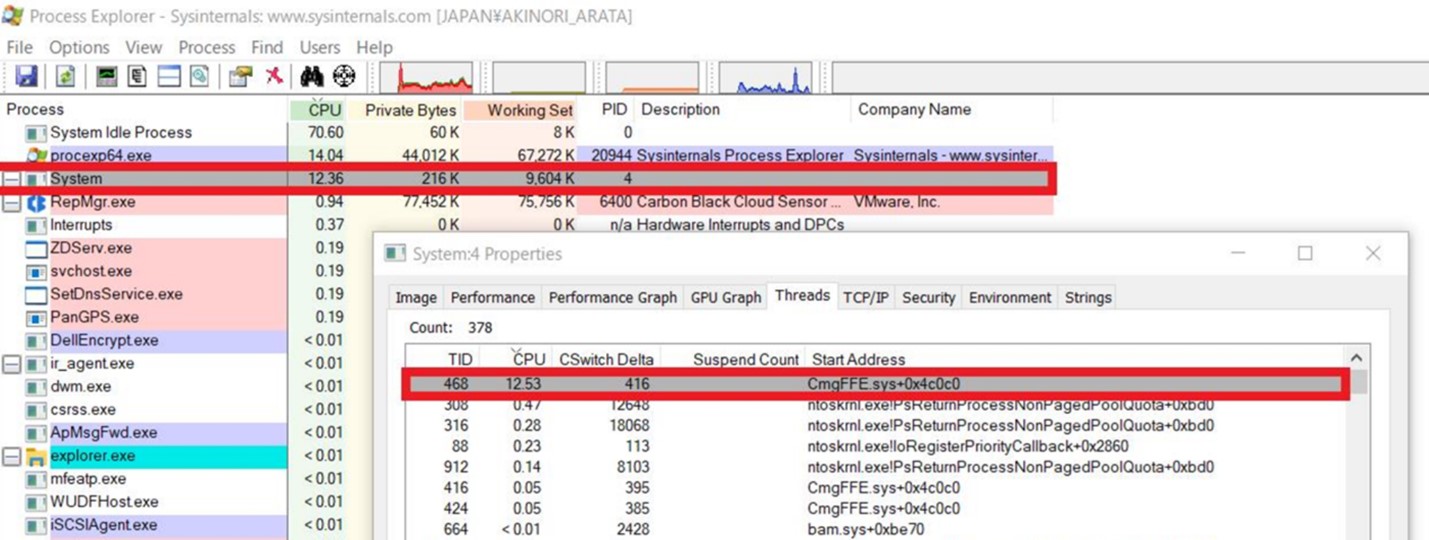

Oorzaak
If the System process is showing high CPU usage, follow the steps below:
- Double-click to open the properties window.
- Click the Threads tab.
If there is a thread showing high CPU utilization with an address beginning with, CmgFFE.sys, this matches the issue that customers reported.
Oplossing
This issue is resolved in 11.3.0 and later versions of Dell Encryption, available at: https://www.dell.com/support/home/product-support/product/dell-data-protection-encryption/drivers
To contact support, reference Dell Data Security International Support Phone Numbers.
Go to TechDirect to generate a technical support request online.
For additional insights and resources, join the Dell Security Community Forum.
Getroffen producten
Dell EncryptionArtikeleigenschappen
Artikelnummer: 000190525
Artikeltype: Solution
Laatst aangepast: 11 mei 2026
Versie: 9
Vind antwoorden op uw vragen via andere Dell gebruikers
Support Services
Controleer of uw apparaat wordt gedekt door Support Services.