Dell Command PowerShell Provider Advanced Battery Charge feature
Sammendrag: Learn how to Deploy, Manage, Secure and Virtualize BYOD, Enterprise Client, and Mobility Solutions from Experts and Peers.
Denne artikkelen gjelder for
Denne artikkelen gjelder ikke for
Denne artikkelen er ikke knyttet til noe bestemt produkt.
Det er ikke produktversjonene som identifiseres i denne artikkelen.
Symptomer
Affected Products:
- Dell Command | PowerShell Provider
Årsak
Not Applicable
Oppløsning
Advanced Battery charge maximizes battery health while still supporting heavy use during the workday. Essentially what the advanced battery charge feature does, ExpressCharge is used for accelerated battery charging from Beginning of Day and lasting for Work Period. At all other times, Standard Charge is used for maximum battery health. BIOS presents this feature.
It is clear that the user is provided fields Beginning Of Day and Work Period for each day of the week and there is a checkbox for Enabling/Disabling this feature for all the days of the week. The user can set the time and set a work duration during which ExpressCharge would be used.
Dell Command | PowerShell Provider (DCPP) has strived hard to adhere to provide this feature as close to the F2 screen as possible. DCPP provides two attributes through which the user can get and set advanced battery charge namely AdvancedBatteryChargeCfg and AdvancedBatteryChargeConfiguration. This is shown below:
AdvancedBatteryChargeCfg is a simple enumerated attribute which takes only the values Enabled and Disabled to respectively enable or disable the advanced battery charging feature. An example to set this attribute is shown below: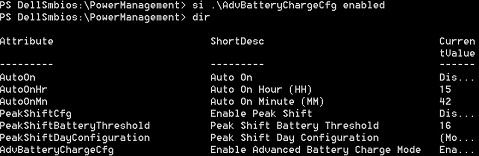
AdvancedBatteryChargeConfiguration is a more complex attribute which provides an interface to the user similar to BIOS through which the user can get and set advanced battery charge data.
Dir AdvancedBatteryChargeConfiguration|select – ExpandProperty CurrentValue
To set data for a specified day of the week:
Set-item AdvancedBatteryChargeConfiguration Sunday – BeginningOfDay "13:45" –WorkPeriod "1:30"
The user has set advanced battery charge data for Sunday with the beginning of the day as "13:45" and work duration as "1:30."
Note:
- The validation that minutes have to be in multiples of fifteen (for example, zero, fifteen, thirty, and forty-five).
- If either system or admin password is set, then it has to be provided with a
–Passwordswitch. - An example is:
Set-item AdvancedBatteryChargeConfiguration Sunday – BeginningOfDay "13:45" –WorkPeriod "1:30" –Password mySysPassword
Tilleggsinformasjon
Related Articles:
Berørte produkter
Dell Command | Powershell ProviderArtikkelegenskaper
Artikkelnummer: 000146339
Artikkeltype: Solution
Sist endret: 24 okt. 2025
Versjon: 7
Få svar på spørsmålene dine fra andre Dell-brukere
Støttetjenester
Sjekk om enheten din er dekket av støttetjenestene.