Latitude 5410: Keyboard Function Key Guide
Podsumowanie: The following guide lists the keyboard shortcuts available and the functions they perform on the Dell Latitude 5410 Laptop.
Ten artykuł dotyczy
Ten artykuł nie dotyczy
Ten artykuł nie jest powiązany z żadnym konkretnym produktem.
Nie wszystkie wersje produktu zostały zidentyfikowane w tym artykule.
Objawy
Keyboard Shortcut Key Functions
The below table is a list of combination short-cut key functions available on the Latitude 5410 laptop.
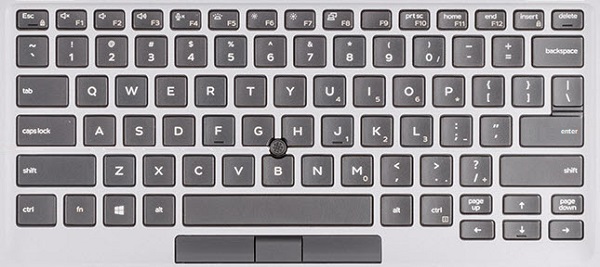
(Figure.1 Latitude 5410 US Keyboard Layout)
Przyczyna
| Keys | Primary behavior | Secondary behavior (Fn + Key) |
|---|---|---|
| Fn + Esc | Escape |
Toggle Fn-key lock |
| Fn + F1 |
Mute audio |
F1 |
| Fn + F2 |
Decrease volume |
F2 |
| Fn + F3 |
Increase volume |
F3 |
| Fn + F4 |
Mute microphone |
F4 |
| Fn + F5 |
Turn on/off keyboard backlight |
F5 |
| Fn + F6 |
Decrease brightness |
F6 |
| Fn + F7 |
Increase brightness |
F7 |
| Fn + F8 |
Switch to external display |
F8 |
| Fn + F10 |
Print screen |
F10 |
| Fn + F11 |
Home |
F11 |
| Fn + 12 |
End |
F12 |
| Fn + Ctrl |
Open application menu |
-- |
Rozwiązanie
 Visit our Keyboard knowledge base for additional resources and information.
 For additional articles and information visit our Touchpad support page.
 Additional articles and information can also be found on our Mouse support page.
Produkty, których dotyczy problem
Latitude 5410Właściwości artykułu
Numer artykułu: 000133658
Typ artykułu: Solution
Ostatnia modyfikacja: 29 kwi 2026
Wersja: 7
Znajdź odpowiedzi na swoje pytania u innych użytkowników produktów Dell
Usługi pomocy technicznej
Sprawdź, czy Twoje urządzenie jest objęte usługą pomocy technicznej.