RecoverPoint for Virtual Machine: EFI boot causes the shadow VM to go into a reboot cycle if network boot is enabled causing DRU
Podsumowanie: EFI boot causes the shadow VM to go into reboot cycle if network boot is enabled causing DRU.
Ten artykuł dotyczy
Ten artykuł nie dotyczy
Ten artykuł nie jest powiązany z żadnym konkretnym produktem.
Nie wszystkie wersje produktu zostały zidentyfikowane w tym artykule.
Objawy
Copy VM in reboot cycle
RecoverPoint for Virtual Machines Consistency Group (CG) containing the rebooting VM regulated.
EFI BIOS with PXE boot enabled on production VM
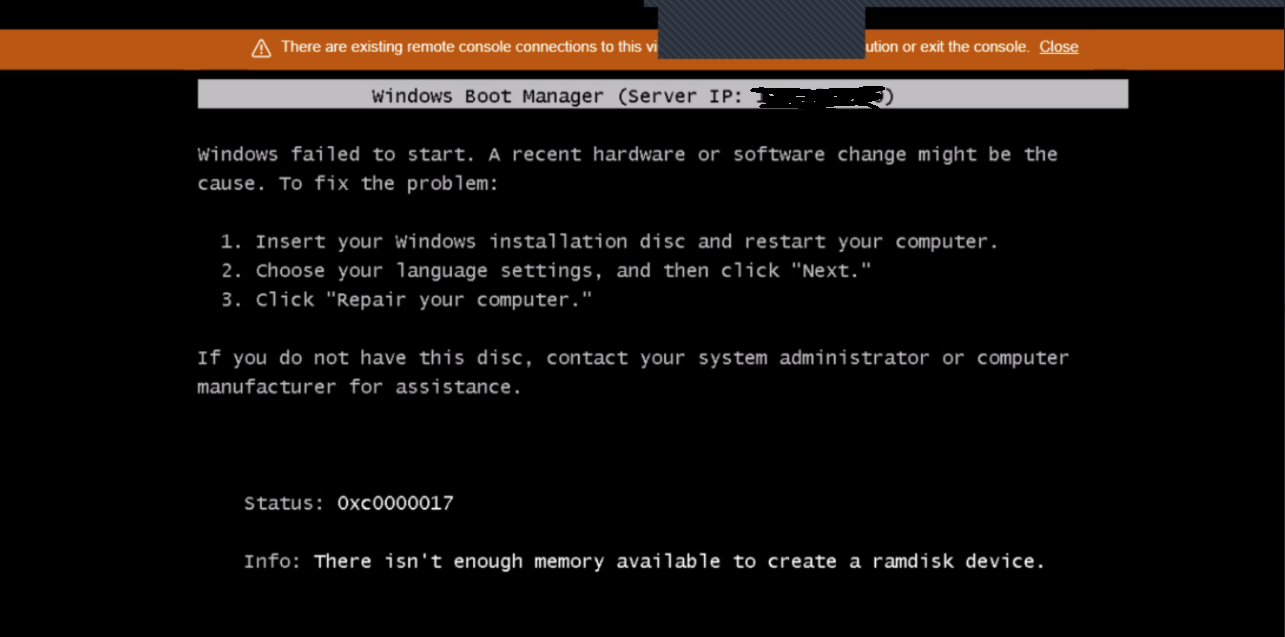
Copy VM fails to boot with error:
RecoverPoint for Virtual Machines Consistency Group (CG) containing the rebooting VM regulated.
EFI BIOS with PXE boot enabled on production VM
Copy VM fails to boot with error:
Info: There isn't enough memory available to create a ramdisk device.
Figure 1: VM Boot Error
Przyczyna
The ResourcePak SMURF Boot device (Floppy Drive) does not support EFI boot. This means when the production VM is configured with EFI instead of BIOS, and Network Boot is enabled, ResourcePak SMURF VM slips down the boot order. At PXE boot, if a PXE server is found on the network it goes for Cyclic Reboot, which causes DRU.
Rozwiązanie
Workaround:
There are three possible workarounds available:
Resolution:
Dell engineering is investigating this issue. A permanent fix is in progress and this article will be updated when more information becomes available. Contact the Dell Customer Support Center or your service representative for assistance and reference this solution ID.
There are three possible workarounds available:
- Use BIOS firmware instead of EFI for Production VMs.
- Boot the DR VM in a Network where the PXE boot server is not reachable (The PXE Boot server IP can be found in the error message.
Windows Boot Manager (Server IP: xxx.yyy.zzz.jjj)
- Disable PXE Boot from boot manager of copy VM.
NOTE: For the third workaround, if Image Access is enabled, the PXE boot is enabled again on the copy VM by default. Hence, after each Image Access, PXE Boot must be disabled in BIOS.
Resolution:
Dell engineering is investigating this issue. A permanent fix is in progress and this article will be updated when more information becomes available. Contact the Dell Customer Support Center or your service representative for assistance and reference this solution ID.
Dodatkowe informacje
This article has been translated into these languages:
Produkty, których dotyczy problem
RecoverPoint for Virtual MachinesWłaściwości artykułu
Numer artykułu: 000167708
Typ artykułu: Solution
Ostatnia modyfikacja: 26 maj 2026
Wersja: 8
Znajdź odpowiedzi na swoje pytania u innych użytkowników produktów Dell
Usługi pomocy technicznej
Sprawdź, czy Twoje urządzenie jest objęte usługą pomocy technicznej.