Dell Security Management Server Advanced Threat Tab Is Empty
Podsumowanie: The Advanced Threats tab in the Dell Security Management Server remote console is showing no data.
Ten artykuł dotyczy
Ten artykuł nie dotyczy
Ten artykuł nie jest powiązany z żadnym konkretnym produktem.
Nie wszystkie wersje produktu zostały zidentyfikowane w tym artykule.
Objawy
Affected Products:
- Dell Security Management Server
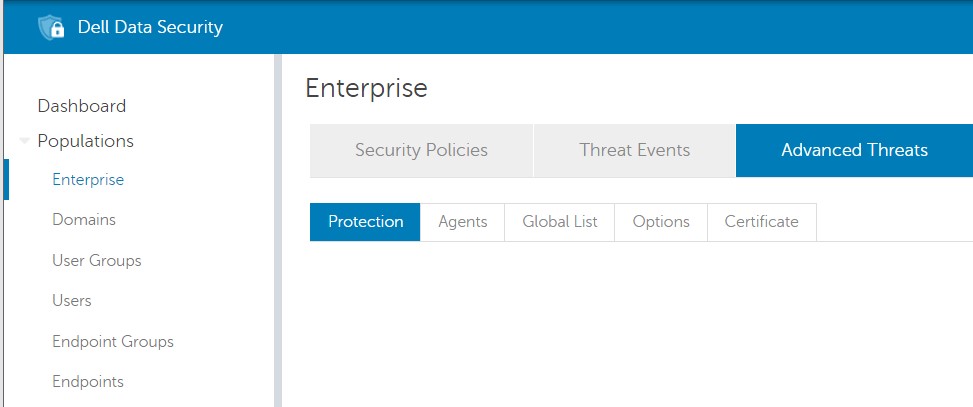
On the Dell Security Management Server, trying to access the content of the Advanced Threats tab in Population -> Enterprise, no data is showing:
Przyczyna
Chrome version 91.0.4472 that was released on May 25, 2021 and the Edge Chromium based version 91.0.864.37 that was released on May 27, 2021 is the cause of this issue.
Rozwiązanie
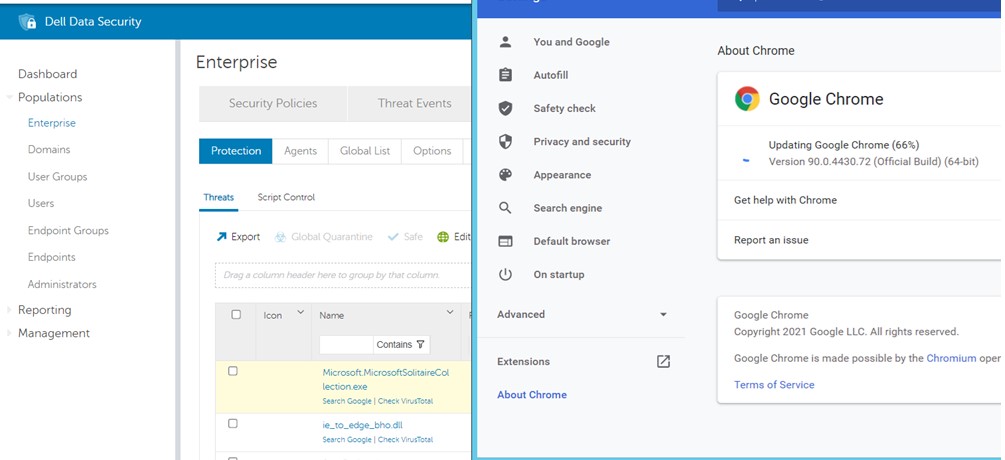
To address this problem, it is possible to install a different supported browser, such as Firefox or downgrade Chrome or Edge to a working version.
- For Chrome, it is possible to downgrade it to a previous version such as 90.0.4430.72.
- For Edge, it is possible to downgrade it to a previous version such as 90.0.818.49.
To contact support, reference Dell Data Security International Support Phone Numbers.
Go to TechDirect to generate a technical support request online.
For additional insights and resources, join the Dell Security Community Forum.
Produkty, których dotyczy problem
Dell EncryptionWłaściwości artykułu
Numer artykułu: 000188278
Typ artykułu: Solution
Ostatnia modyfikacja: 18 cze 2024
Wersja: 6
Znajdź odpowiedzi na swoje pytania u innych użytkowników produktów Dell
Usługi pomocy technicznej
Sprawdź, czy Twoje urządzenie jest objęte usługą pomocy technicznej.