Dell ESA 7.0 PAK Manager PAK file DellEMCEnterpriseStorageAnalytics-7.0.0-build-2260_signed.pak is not in zip format.
Podsumowanie: PAK Manager PAK file DellEMCEnterpriseStorageAnalytics-7.0.0-build-2260_signed.pak is not in zip format.
Ten artykuł dotyczy
Ten artykuł nie dotyczy
Ten artykuł nie jest powiązany z żadnym konkretnym produktem.
Nie wszystkie wersje produktu zostały zidentyfikowane w tym artykule.
Objawy
In VMware vRealize Operations (vROps), when trying to upload this PAK file DellEMCEnterpriseStorageAnalytics-7.0.0-build-2260_signed.pak, keep seeing a message appear:
PAK Manager: PAK file DellEMCEnterpriseStorageAnalytics-7.0.0-build-2260_signed.pak is not in zip format.OR
PAK Manager: PAK file reservedTemp_2696460655826554461.pak is not in zip format

Przyczyna
The downloaded pak file was corrupted.
Rozwiązanie
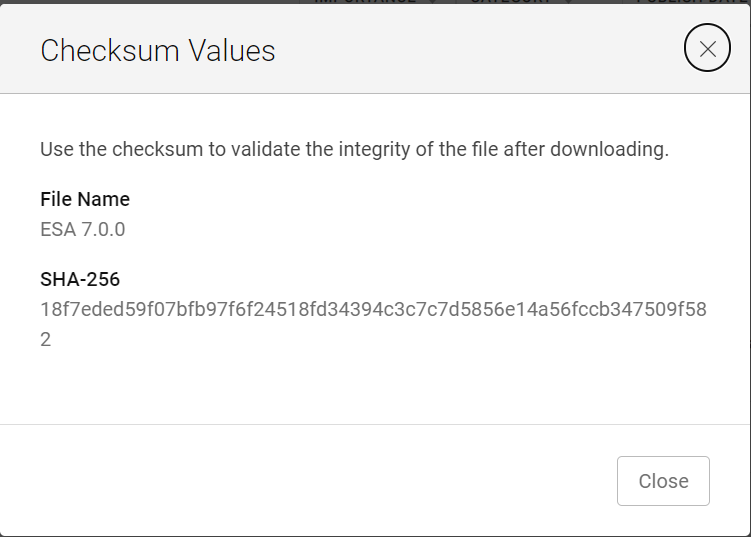
Before using the downloaded file, it is always good practice to run a checksum to confirm the integrity of the file.
1. Download the ESA 7.0 file (DellEMCEnterpriseStorageAnalytics-7.0.0-build-2260_signed.pak) and get its checksum value.
2. Invoke PowerShell
3. Run the checksum to verify that the alphanumeric checksum value of the downloaded file matches the one stated on its website.

4. Select a solution to install

5. Click "UPLOAD" and see that the validated file upload successfully.

1. Download the ESA 7.0 file (DellEMCEnterpriseStorageAnalytics-7.0.0-build-2260_signed.pak) and get its checksum value.
2. Invoke PowerShell
Input:
Press winkey+ R.
Type cmd.
The command prompt is opened.
Type PowerShell and press enter.
3. Run the checksum to verify that the alphanumeric checksum value of the downloaded file matches the one stated on its website.
4. Select a solution to install
5. Click "UPLOAD" and see that the validated file upload successfully.
Właściwości artykułu
Numer artykułu: 000204311
Typ artykułu: Solution
Ostatnia modyfikacja: 12 mar 2024
Wersja: 2
Znajdź odpowiedzi na swoje pytania u innych użytkowników produktów Dell
Usługi pomocy technicznej
Sprawdź, czy Twoje urządzenie jest objęte usługą pomocy technicznej.