VxRail: Node Add Error on "Configuring ESXi NTP Settings"
Podsumowanie: When adding a VxRail node, the step "Configuring ESXi NTP settings…" fails. Network Time Protocol (NTP).
Ten artykuł dotyczy
Ten artykuł nie dotyczy
Ten artykuł nie jest powiązany z żadnym konkretnym produktem.
Nie wszystkie wersje produktu zostały zidentyfikowane w tym artykule.
Objawy
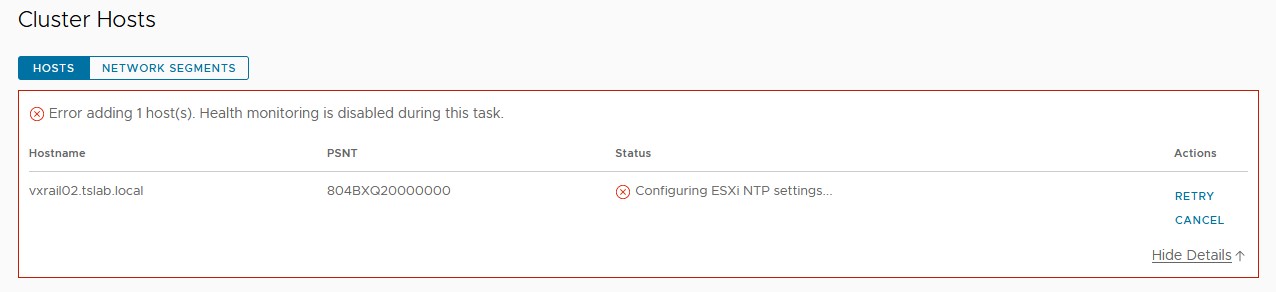
When adding a new VxRail node using the VxRM Plugin, the step "Configuring ESXi NTP settings…" fails.
Przyczyna
This can occur even when NTP is populated in ntp.conf on vCenter, VxRail Manager, and ESXi nodes. During the node addition, the setting that is used is present on the VxRail Manager Rest API. This parameter is set during the VxRail Manager deployment.
Rozwiązanie
To resolve this issue:
- Start an SSH session on VxRail Manager using mystic user.
- Change privileges using
su -and root password. - Check the current NTP setting on the Rest API using the following command:
curl --unix-socket /var/lib/vxrail/nginx/socket/nginx.sock http://127.0.0.1/rest/vxm/internal/configservice/v1/configuration/keys/system_ntp

- If the value on the last command is empty or invalid, change it using the next command, replacing
<NTP_SERVER>field with NTP IP address or FQDN:
curl -X PUT -H "Content-Type: application/json" -d '{"value":"<NTP_SERVER>"}' --unix-socket /var/lib/vxrail/nginx/socket/nginx.sock http://127.0.0.1/rest/vxm/internal/configservice/v1/configuration/keys/system_ntp

- Click "Retry" on vCenter to proceed with node addition. If the NTP server is valid, it should not fail.
Dodatkowe informacje
VxRail - API User Guide: Dell EMC VxRail TM API User Guide
Produkty, których dotyczy problem
VxRail, VxRail 460 and 470 Nodes, VxRail Appliance Series, VxRail G Series Nodes, VxRail D Series Nodes, VxRail D560, VxRail D560F, VxRail E Series Nodes, VxRail E460, VxRail E560, VxRail E560F, VxRail E560N, VxRail E660, VxRail E660F, VxRail E660N
, VxRail E665, VxRail E665F, VxRail E665N, VxRail G560, VxRail G560F, VxRail P Series Nodes, VxRail P470, VxRail P570, VxRail P570F, VxRail P580N, VxRail P670F, VxRail P670N, VxRail P675F, VxRail P675N, VxRail S Series Nodes, VxRail S470, VxRail S570, VxRail S670, VxRail Software, VxRail V Series Nodes, VxRail V470, VxRail V570, VxRail V570F, VXRAIL V670F, VxRail VD-4510C, VxRail VD-4520C, VxRail VD Series Nodes, VxRail VE-660, VxRail VE-6615, VxRail VE-670, VxRail VP-760, VxRail VP-7625, VxRail VP-770, VxRail VS-760
...
Właściwości artykułu
Numer artykułu: 000211460
Typ artykułu: Solution
Ostatnia modyfikacja: 04 cze 2026
Wersja: 3
Znajdź odpowiedzi na swoje pytania u innych użytkowników produktów Dell
Usługi pomocy technicznej
Sprawdź, czy Twoje urządzenie jest objęte usługą pomocy technicznej.