Error in Device Manager After Installing the Intel Chipset Device Software After a Windows 10 Install
Podsumowanie: Information about a Device Manager error (yellow exclamation mark) after installing the Intel Chipset Device Software.
Ten artykuł dotyczy
Ten artykuł nie dotyczy
Ten artykuł nie jest powiązany z żadnym konkretnym produktem.
Nie wszystkie wersje produktu zostały zidentyfikowane w tym artykule.
Objawy
Device Manager will have an error in the Device Manager on "PCI Data Acquisition and Signal Processing Controller" after installing the Intel Chipset Device Software on a system with a new install of Windows 10.
Affected Systems:
- Latitude 5340
- Latitude 5440
- Latitude 7340
- Latitude 7440
- Latitude 7640
- Latitude 9440 2-in-1
- Precision 3580
- Precision 3581
- Precision 5480
- Precision 5680
- Precision 7680
- Precision 7780
Przyczyna
No cause information is available.
Rozwiązanie
Intel Chipset Device Software Driver
The following two methods can be used to resolve this issue.
- Connect the system to the Internet and do a "Windows Update" to install the latest driver.
- Uninstall the Intel chipset driver and install an older version.
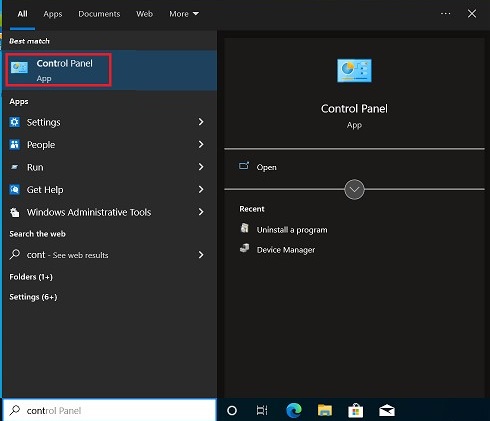
- Press the "Windows" key, search, and choose "Control Panel."
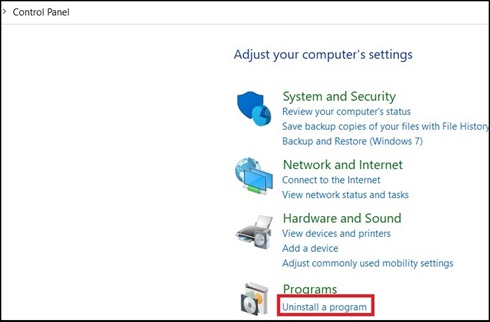
- Choose "Uninstall a program."
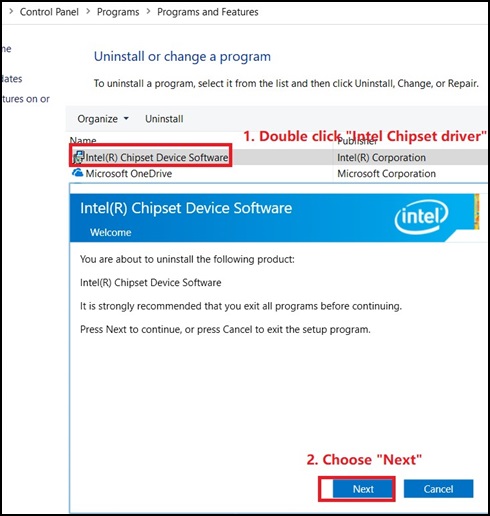
- Double-click "Intel Chipset Device Software and choose "Next" in the new window to uninstall the Chipset driver.
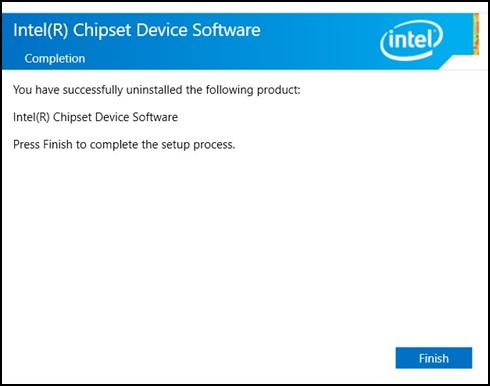
- In the Intel Chipset Device Software Window, click "Finish."
- No "Intel chipset driver" should be shown in the Control Panel.

- Download the old chipset driver from the following link: Intel Chipset
- Double-click the downloaded package and then click "Install," begin the installation.
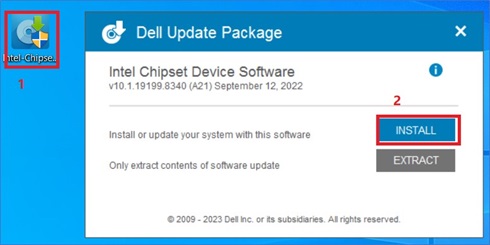
- Follow the install wizard, until the pop up complete message appears, then choose "Restart Now."
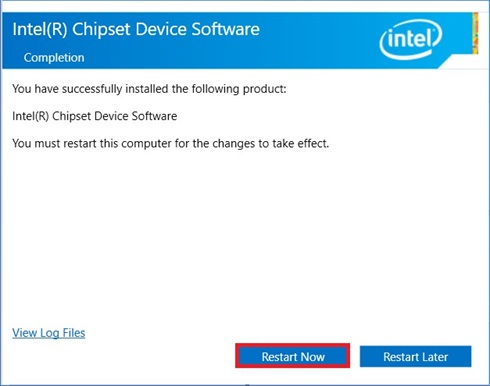
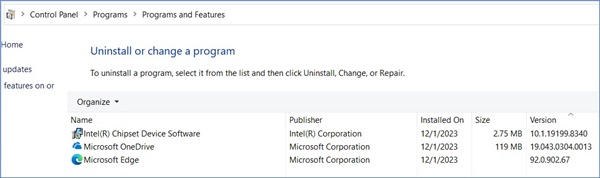
- After the system reboot, open "Control Panel" to check if the older chipset driver is installed.
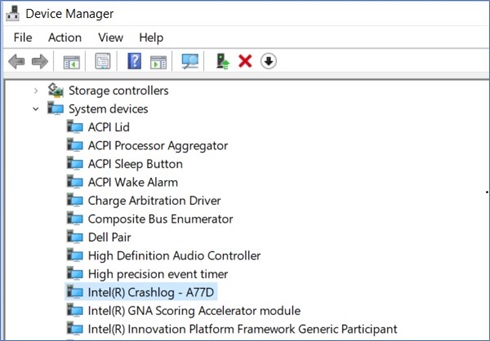
- There should be no errors in the Device Manager.
- Press the "Windows" key, search, and choose "Control Panel."
A new driver, version 10.1.19600.8418 should be available on the Dell Driver site on January 16, 2024 (Pending).
Produkty, których dotyczy problem
Latitude 5340, Latitude 7340, Latitude 7440, Latitude 9440 2-in-1, Latitude 5540, Latitude 7640, Precision 5480, Precision 3580, Precision 3581, Precision 5680, Precision 7680, Precision 7780Właściwości artykułu
Numer artykułu: 000220565
Typ artykułu: Solution
Ostatnia modyfikacja: 12 sty 2026
Wersja: 3
Znajdź odpowiedzi na swoje pytania u innych użytkowników produktów Dell
Usługi pomocy technicznej
Sprawdź, czy Twoje urządzenie jest objęte usługą pomocy technicznej.