Dell Unity: How to add SMTP server settings for Unity array
Resumo: Dell Unity: How to add SMTP server settings for Unity array.
Este artigo aplica-se a
Este artigo não se aplica a
Este artigo não está vinculado a nenhum produto específico.
Nem todas as versões do produto estão identificadas neste artigo.
Instruções
- From the "Update system setting" on the upper right corner, choose "Alerts" tab, then email and SMTP option.
- Add the required list of mails that would like to receive system alerts.
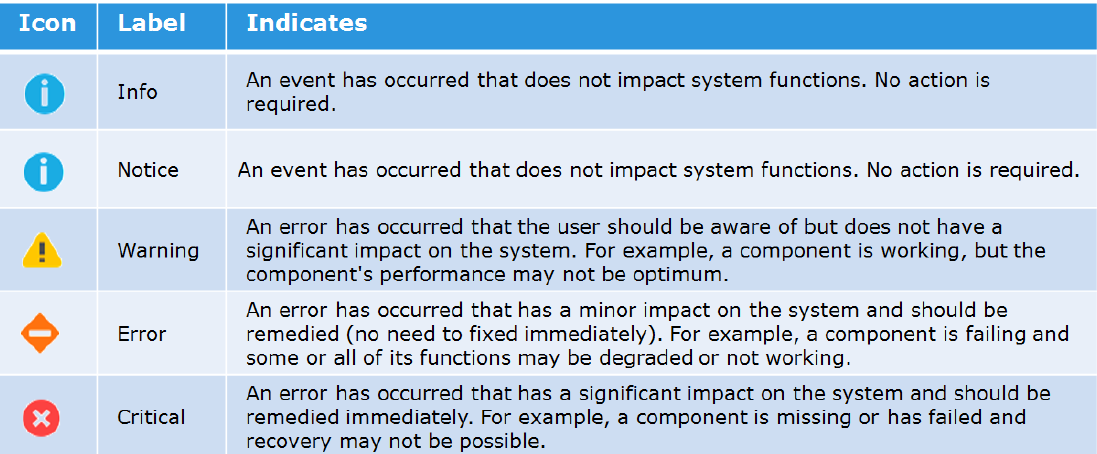
- Add the severity level of the alerts to send.
Here is the figure of the different severity levels:
- Then type the IP address or hostname of the Simple Mail Transport Protocol (SMTP) server required to send emails.
Changing the default port for SMTP (25) is not supported with Unity OE version older than Nighthawk (4.5.0).
From Nighthawk onward, unity starts to support customize of SMTP port:06:34:56 service@Peggy spa:~/user> uemcli /net/smtp -hStorage system address: 127.0.0.1Storage system port: 443HTTPS connection
Manage SMTP server settings. Use SMTP to have system alerts emailed to specified addresses.
Actions:[Show]/net/smtp [ -id <value> ] show [ -output { nvp | csv | table [ -wrap ] } ] [ { -brief | -detail | -filter <value> } ][Set]/net/smtp -id <value> set -addr <value> [ -port <value> ] [ -encryptLevel { none | startTLS | ssl } ] [ -authType { none | plain | login | cram_md5 | digest_md5 } ] [ -user <value> { -passwd <value> | -passwdSecure } ] [ -bypassProxy { yes | no } ]
Produtos afetados
Dell EMC Unity FamilyProdutos
Dell EMC Unity FamilyPropriedades do artigo
Número do artigo: 000022531
Tipo de artigo: How To
Último modificado: 22 out. 2025
Versão: 4
Encontre as respostas de outros usuários da Dell para suas perguntas.
Serviços de suporte
Verifique se o dispositivo está coberto pelos serviços de suporte.