Dell Unity: Zugriff auf die Unity-Managementoberfläche über https://FQDN oder https://ip.address nicht möglich (vom Nutzer korrigierbar)
Resumo: Zugriff auf die Unity-Managementschnittstelle über https://FQDN oder https://ip.address nicht möglich Der Zugriff auf Unity erfolgt über https://FQDN/?casHome=LOCAL und https://ip.address/?casHome=LOCAL ...
Este artigo aplica-se a
Este artigo não se aplica a
Este artigo não está vinculado a nenhum produto específico.
Nem todas as versões do produto estão identificadas neste artigo.
Sintomas
Der Zugriff auf die Unity-Managementschnittstelle kann nicht über https://FQDN oder https://ip.address
Der Zugriff auf Unity erfolgt über https://FQDN/?casHome=LOCAL und https://ip.address/?casHome=LOCAL
Der Zugriff auf Unity erfolgt über https://FQDN/?casHome=LOCAL und https://ip.address/?casHome=LOCAL
Causa
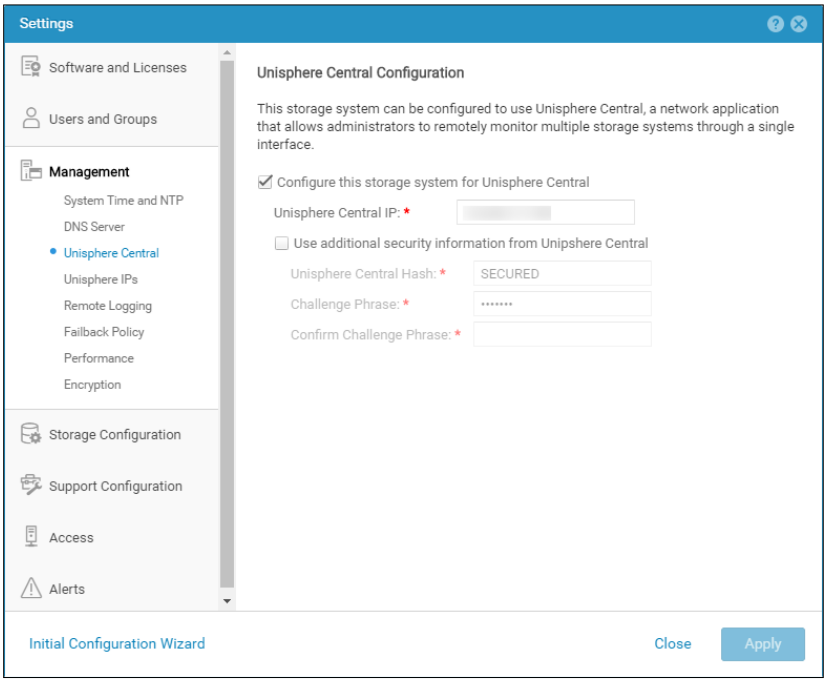
Unisphere Central ist auf Unity aktiviert, obwohl Unisphere Central nicht verwendet wird.
Resolução
Aktivieren Sie "Configure this storage system for Unisphere Central" (Dieses Speichersystem nur für Unisphere Central konfigurieren), wenn Unisphere Central verwendet wird. Wenn dies nicht der Lage ist, entfernen Sie die Überprüfung, mit der Unisphere Central aktiviert wird.
Produtos afetados
Dell EMC UnityPropriedades do artigo
Número do artigo: 000205133
Tipo de artigo: Solution
Último modificado: 12 dez. 2025
Versão: 5
Encontre as respostas de outros usuários da Dell para suas perguntas.
Serviços de suporte
Verifique se o dispositivo está coberto pelos serviços de suporte.