Connectrix B-Series: The Web Browsers Report "Cipher Mismatch, No Matching Ciphers" When Accessing WebTools UI Using HTTPS
Resumo: AES256-SHA256 (0x3d) and AES128-SHA256 (0x3c) is blocked for TLS.
Este artigo aplica-se a
Este artigo não se aplica a
Este artigo não está vinculado a nenhum produto específico.
Nem todas as versões do produto estão identificadas neste artigo.
Sintomas
The web browsers (Chrome, New Edge, or Firefox) refused to open the WebTools using HTTPS.
The error message contains "Cipher Mismatch" or "No Matching Ciphers."
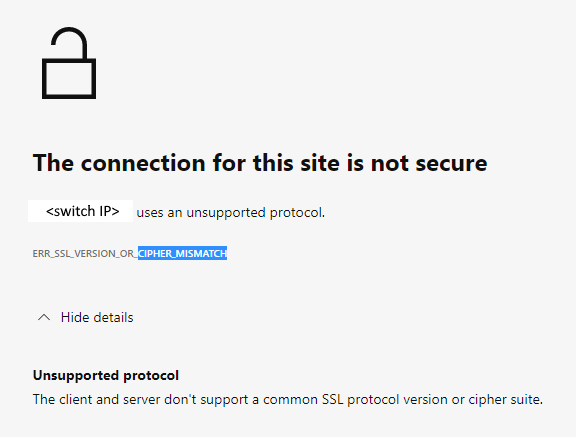
Figure 1: Screenshot of Error Message Showing Connection Not Secure, Unsupported Protocol
The switch is running in FOS 8.1 or 8.2 firmware.
The error message contains "Cipher Mismatch" or "No Matching Ciphers."
Figure 1: Screenshot of Error Message Showing Connection Not Secure, Unsupported Protocol
The switch is running in FOS 8.1 or 8.2 firmware.
Causa
The switch HTTPS cipher setting only allows AES256-SHA256 and AES128-SHA256 for TLS 1.2 (the "default_generic" or "default_strong templates" of FOS 8.1 or 8.2).
The Wireshark dump shows that the client does not accept AES256-SHA256 (0x3d) or AES128-SHA256 (0x3c), hence the TLS handshake fails.
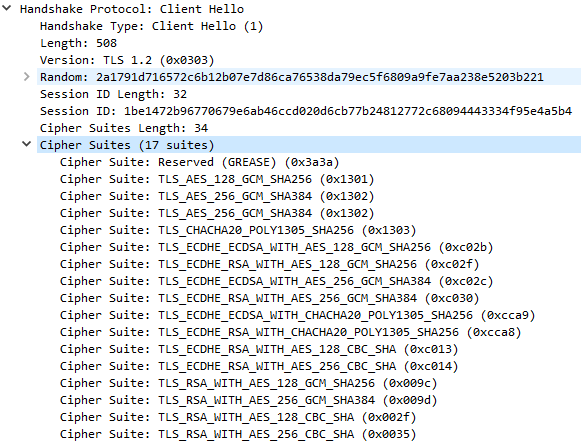
Figure 2: Screenshot of Wireshark Dump Showing Handshake Failure
<switchname>:root> seccryptocfg --show | grep HTTPS
HTTPS                    : !ECDH:!DH:HIGH:-MD5:!CAMELLIA:!SRP:!PSK:!AESGCM:!SSLv3
HTTPS                    : TLSv1.2

<switchname:root> openssl ciphers -v '!ECDH:!DH:HIGH:-MD5:!CAMELLIA:!SRP:!PSK:!AESGCM:!SSLv3'
AES256-SHA256           TLSv1.2 Kx=RSA      Au=RSA  Enc=AES(256)  Mac=SHA256
AES128-SHA256           TLSv1.2 Kx=RSA      Au=RSA  Enc=AES(128)  Mac=SHA256
The Wireshark dump shows that the client does not accept AES256-SHA256 (0x3d) or AES128-SHA256 (0x3c), hence the TLS handshake fails.
Figure 2: Screenshot of Wireshark Dump Showing Handshake Failure
Resolução
Modify the switch HTTPS cipher setting to cover the client.
Example:
In this example, the current HTTPS cipher setting is "!ECDH:!DH:HIGH:-MD5:!CAMELLIA:!SRP:!PSK:!AESGCM:!SSLv3"
To enable AES256-GCM-SHA384 (0x9d) and AES128-GCM-SHA256 (0x9c), remove "!AESGCM" from the setting with the command:
Example:
In this example, the current HTTPS cipher setting is "!ECDH:!DH:HIGH:-MD5:!CAMELLIA:!SRP:!PSK:!AESGCM:!SSLv3"
To enable AES256-GCM-SHA384 (0x9d) and AES128-GCM-SHA256 (0x9c), remove "!AESGCM" from the setting with the command:
seccryptocfg --replace -type https -cipher '!ECDH:!DH:HIGH:-MD5:!CAMELLIA:!SRP:!PSK:!SSLv3'
Mais informações
Map OpenSSL cipher names (displayed in the OpenSSL command) with IANA cipher names (displayed in Wireshark dump) using the Mozilla document, Security/Cipher Suites - MozillaWiki

Produtos afetados
Connectrix B-SeriesPropriedades do artigo
Número do artigo: 000213633
Tipo de artigo: Solution
Último modificado: 18 mai. 2026
Versão: 6
Encontre as respostas de outros usuários da Dell para suas perguntas.
Serviços de suporte
Verifique se o dispositivo está coberto pelos serviços de suporte.