PowerVault: TL2000 and TL4000 Tape Library - Reference Article
Summary: The article gives an over view of the TL2000 and TL4000e and provides guides and how to troubleshoot.
Instructions
Support Library - PowerVault TL2000 Tape Library

Product Overview:
The PowerVault™ TL2000 tape library offers expandable and affordable tape automation for organizations whose data-protection needs have outgrown autoloader technology or capacity. The PowerVault™ TL2000 tape library is ideal for businesses needing an affordable, versatile, and to use midrange, tape backup solution. It holds two half-height drives and 24 tape slots, with one as an I/O slot.
Support Library - PowerVault TL4000 Tape Library
Product Overview:
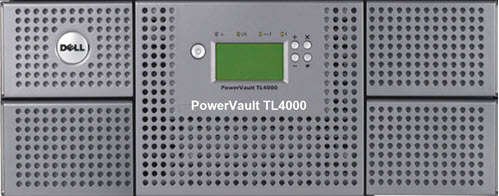
The PowerVault™ TL4000 tape library offers expandable and affordable tape automation for organizations whose data-protection needs have outgrown autoloader technology or capacity. It is the product of choice for small, medium, and large businesses that require an affordable, versatile, easy-to-use, automated midrange, tape backup solution.
The PowerVault TL4000 library has four tape cartridge magazines, two on each side for 48 tape slots. The lower-left magazine has nine storage slots and houses the three-slot I/O Station.
The two solutions can be rack mounted or converted into a desktop solution with Web-based remote management: perform diagnostics, check status, monitor operations and logs, and upgrade firmware to enable Library-managed encryption (optional with LTO4, LTO5, LTO6, and LTO7).
Getting Started:
- Dell PowerVault TL2000 Tape Library and TL4000 Tape Library: User's Guide
- Additional Manuals and Documents (Linear tape-open (LTO) Media Handbook and Tape Compatibility Matrix)
- 1 Gb iSCSI to SAS User's Guide
- Dell PowerVault TL400/TL2000 Failover Guide
- Dell EMC Tape Systems LTO Media Handbook
- PowerVault TL2000/TL4000 - How to Configure the iSCSI Bridge
Troubleshooting:
- TL4000 Drivers & Downloads
- TL2000 Drivers & Downloads
- ITDT-SE CLI for Windows: How to use the IBM Total Storage Diagnostic Tool CLI (Driver Firmware update and Diagnostics Tool)
- PowerVault ML3 SKLM (Encryption software) (Security Key Life Manager (SKLM) Applies to TL2000/TL4000)
Licensing Encryption Key Manager (EKM) and Path Failover:
- The TL2000 and TL4000 can have additional licensing options to provide EKM or Path Failover. This is an external site to Dell.com.
- To generate your keys, go Here.
Library-managed Encryption
-
- Use the web user interface to apply the license key to your library:
- Log in to the web user interface.
- Select Configure Library on the left navigation tree.
- Select Encryption.
- Enter your library-managed encryption license key.
- Select the Activation button.
- Use the web user interface to apply the license key to your library.
- Use the web user interface to apply the license key to your library:
Path Failover
-
- Use the library user interface to apply the license key to your library:
- Log in to the web user interface.
- Select Configure Library on the left navigation tree.
- Select Path Failover.
- Enter your library-managed encryption license key.
- Select the Activation button.
- Use the web user interface to apply the license key to your library.
- Use the library user interface to apply the license key to your library: