Loading Default in BIOS Does Not Change the Secure Boot Mode from Audit Mode to Deployed Mode
Summary: Learn why the Secure Boot Mode does not change from Audit Mode to Deployed Mode after loading default in BIOS.
Acest articol se aplică pentru
Acest articol nu se aplică pentru
Acest articol nu este legat de un produs specific.
Acest articol nu acoperă toate versiunile de produs existente.
Symptoms
Secure Boot Mode may not change from Audit Mode to Deployed Mode after loading default in BIOS.
Affected Platforms:
- Alienware m16 R1 AMD
- Alienware m18 R1 AMD
- Inspiron 14 5425
- Inspiron 14 5435
- Inspiron 14 7425 2-in-1
- Inspiron 14 7435 2-in-1
- Inspiron 16 5625
- Inspiron 16 5635
- Inspiron 16 7635 2-in-1
- Inspiron 7415 2-in-1
- Vostro 16 5635
- Vostro 5625
Cause
This option is not defined in the load default setting in the original design.
Resolution
Follow the steps to change the Secure Boot Mode change from Audit Mode to Deployed Mode manually.
- Press F2 key repeatedly after turning on the computer to boot to the BIOS setup menu.
- Select Security.
- Select Secure Boot.
- Select Deployed Mode.
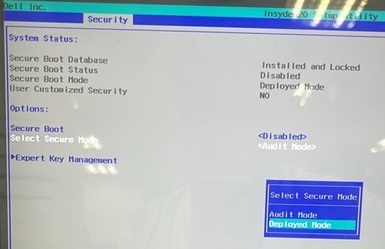
- Confirm the message and select Yes.

- See if it is changed to Deployment Mode.
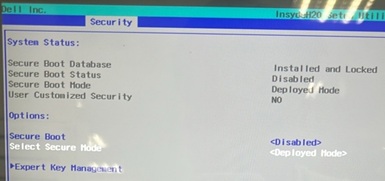
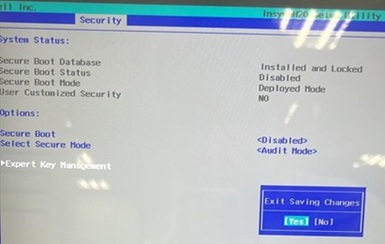
- Press F10. Select Yes when Exit Saving Changes appears.
Produse afectate
Alienware m16 R1 AMD, Alienware m18 R1 AMD, Inspiron 14 5425, Inspiron 14 5435, Inspiron 7415 2-in-1, Inspiron 14 7425 2-in-1, Inspiron 14 7435 2-in-1, Inspiron 16 5625, Inspiron 16 5635, Inspiron 16 7635 2-in-1, Vostro 5625, Vostro 16 5635Proprietăți articol
Article Number: 000388366
Article Type: Solution
Ultima modificare: 24 May 2026
Version: 2
Găsiți răspunsuri la întrebările dvs. de la alți utilizatori Dell
Servicii de asistență
Verificați dacă dispozitivul dvs. este acoperit de serviciile de asistență.