Unable to Enable BitLocker After a Hard Drive Replacement
Summary: BitLocker may not enable after a Hard Drive replacement.
Acest articol se aplică pentru
Acest articol nu se aplică pentru
Acest articol nu este legat de un produs specific.
Acest articol nu acoperă toate versiunile de produs existente.
Symptoms
If you encounter a hard drive failure on a BitLocker enabled drive, after the drive is replaced, then you could enable BitLocker during a new operating system without issue.
Cause
If for any reason you encounter an error that the computer cannot communicate with the Trusted Platform Module (TPM), you must clear the TPM chip and then configure BitLocker.
Resolution
- To clear the TPM, boot into the BIOS and locate the area with the TPM control. (Located in the same location for TPM but may have various options under TPM)
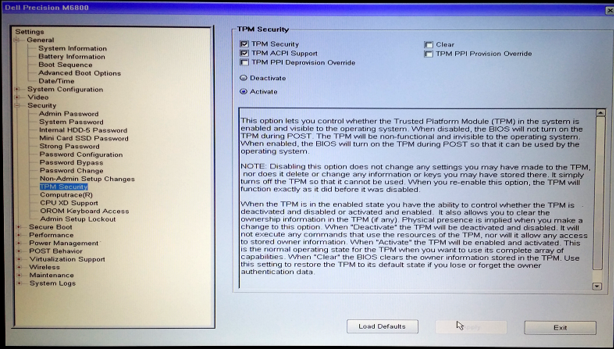
- Choose to clear the TPM and then click yes to remove all keys from the TPM. (TPM must remain active)
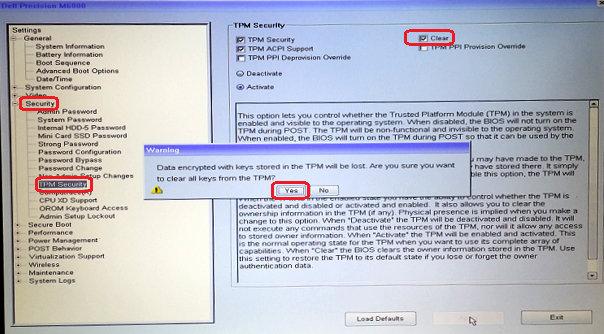
- Then exit and reboot into BIOS again and verify that the TPM is still seen as active.
- Exit and reboot into the operating system and then configure BitLocker using the normal process.
Produse afectate
Desktops & All-in-Ones, Alienware, Dell All-in-One, Dell Pro All-in-One, Dell Pro Max Micro, Dell Pro Max Slim, Dell Pro Max Tower, Dell Pro Micro, Dell Pro Slim, Dell Pro Tower, Dell Slim, Dell Tower, Inspiron, Legacy Desktop Models, OptiPlex
, Vostro, XPS, G Series, G Series, Alienware, Dell Plus, Dell Pro, Dell Pro Max, Dell Pro Plus, Dell Pro Premium, Inspiron, Latitude, Dell Pro Rugged, Vostro, XPS, Legacy Laptop Models, Fixed Workstations, Mobile Workstations, Dell Pro Max Micro XE FCM2250, Dell Pro Max Slim XE FCS1250, Dell Pro Max Tower T2 XE FCT2250, Dell Pro Max 16 XE MC16250, Dell Pro Micro Plus XE QBM1250, Dell Pro Slim Plus XE5 QBS1250, Dell Pro Tower Plus XE5 QBT1250
...
Proprietăți articol
Article Number: 000137422
Article Type: Solution
Ultima modificare: 13 mai 2025
Version: 5
Găsiți răspunsuri la întrebările dvs. de la alți utilizatori Dell
Servicii de asistență
Verificați dacă dispozitivul dvs. este acoperit de serviciile de asistență.