OptiPlex 3000 Thin Client Shows a Flash Screen on Boot
Summary: OptiPlex 3000 Thin Client users may notice a screen flicker around half a second when booting the unit.
Acest articol se aplică pentru
Acest articol nu se aplică pentru
Acest articol nu este legat de un produs specific.
Acest articol nu acoperă toate versiunile de produs existente.
Symptoms
Affected Products:
- OptiPlex 3000 Thin Client
The screen on an OptiPlex 3000 Thin Client (TC) flickers for half a second during the handover from the BIOS to the Ubuntu operating system.
Cause
Loading the Intel graphics driver causes this issue. A mode setting transition causes the flash for less than a second, due to the inherited frame buffer not handled properly by Intel graphics.
Resolution
To correct the flicker issue, run an online kernel update with the following steps:
- With the computer booted to Ubuntu and connected to the Internet, launch the Terminal with CTRL + ALT + t.
- Run
sudo apt-get updateand wait for the update to complete. - Run
sudo apt-get install linux-oem-20.04c, and pressEnterkey to continue.
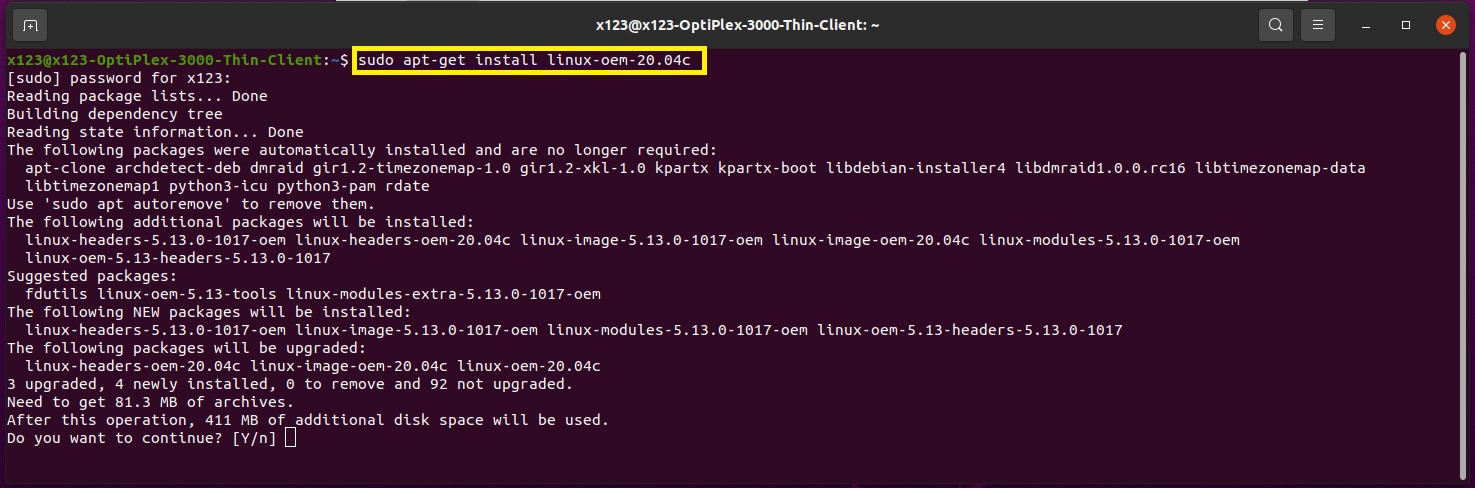
- Wait for the kernel update to complete and then reboot the computer.
- Open the Terminal again, and run
$uname -a(to check that the updated kernel version becomes 5.13.0-1017-oem.

Produse afectate
OptiPlex 3000 Thin ClientProprietăți articol
Article Number: 000193357
Article Type: Solution
Ultima modificare: 12 mai 2026
Version: 6
Găsiți răspunsuri la întrebările dvs. de la alți utilizatori Dell
Servicii de asistență
Verificați dacă dispozitivul dvs. este acoperit de serviciile de asistență.