APEX Cloud Platform: How to Update CSI Configuration When PowerFlex Config Changes
Summary: When PowerFlex credential or certificate changes, CSI configuration must also sync with PowerFlex to make it work.
Acest articol se aplică pentru
Acest articol nu se aplică pentru
Acest articol nu este legat de un produs specific.
Acest articol nu acoperă toate versiunile de produs existente.
Instructions
This article describes how to update CSI configuration when a PowerFlex credential or certificate changes.
Note: The required actions are different in different APEX Cloud Platform (ACP) software versions.
Actions Needed After PowerFlex Credential Changes
For OCP cluster, when the ACP software version < 3.0.5
- Run the command below to find the secret, copy the value of "config" and "MDM" from the command output.
oc get secret csi-vxflexos-config -n dell-acp -o yaml
For example:

- Run the command below to decode the base64 encoded value of "config" and "MDM", and save them to a file. The encoded values of "config" and "MDM" are marked with yellow line in the figure above.
echo -n "<base64 encoded config value>" | base64 --decode > config

echo -n "<base64 encoded MDM value>" | base64 --decode > MDM
For example:

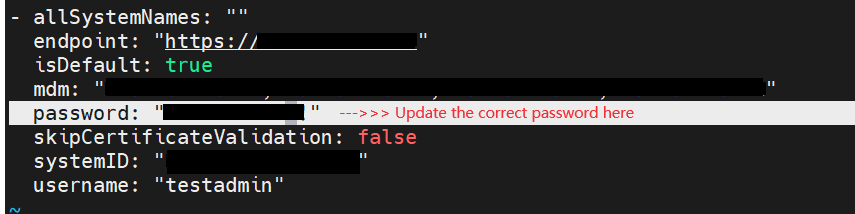
- Edit the saved "config" file, update password according to PowerFlex.
For example:
- Run the command below to update secrets.
oc create secret generic csi-vxflexos-config -n dell-acp --save-config --from-file=./MDM --from-file=./config -o yaml --dry-run | oc apply -f -
- Run the commands below to restart related resources.
oc rollout restart deployment csi-vxflexos-controller -n dell-acp

oc rollout restart daemonset csi-vxflexos-node -n dell-acp

oc rollout restart deployment mcp-powerflex-operation -n dell-acp
For OCP cluster, when the ACP software version >= 3.0.5
- Run the command below to find the secret, copy the value of "config" and "MDM" from the command output.
oc get secret csi-vxflexos-config -n dell-acp -o yaml
For example:

- Run the command below to decode the base64 encoded value of "config" and "MDM". Save them to a file. The encoded values of "config" and "MDM" are marked with yellow line in the figure above.
echo -n "<base64 encoded config value>" | base64 --decode > config

echo -n "<base64 encoded MDM value>" | base64 --decode > MDM
For example:

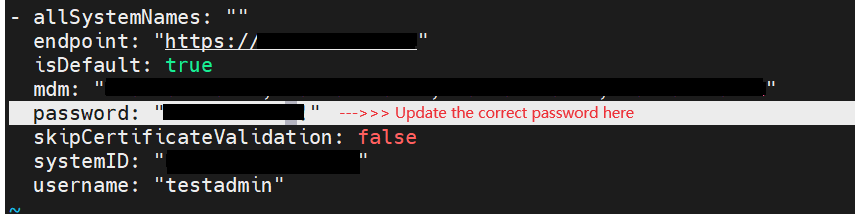
- Edit the saved "config" file, update password according to PowerFlex.
For example:
- Run the command below to update secrets.
oc create secret generic csi-vxflexos-config -n dell-acp --save-config --from-file=./MDM --from-file=./config -o yaml --dry-run | oc apply -f -

oc create secret generic vxflexos-config -n vxflexos --save-config --from-file=./config -o yaml --dry-run | oc apply -f -
- Run the commands below to restart related resources.
oc rollout restart deployment vxflexos-controller -n vxflexos

oc rollout restart daemonset vxflexos-node -n vxflexos

oc rollout restart deployment mcp-powerflex-operation -n dell-acp
For Hosted Control Plane (HCP) cluster
- Log in to Hub Cluster, follow above case "ACP software version >= 3.0.5" to update the Hub cluster secrets.
- Log in to HCP Cluster: Run the command below to find the secret, copy the value of "config" from the command output.
oc get secret csi-vxflexos-config -n dell-acp -o yaml
- Run the command below to decode the base64 encoded value of "config", and save them to a file.
echo -n "<base64 encoded config value>" | base64 --decode > config
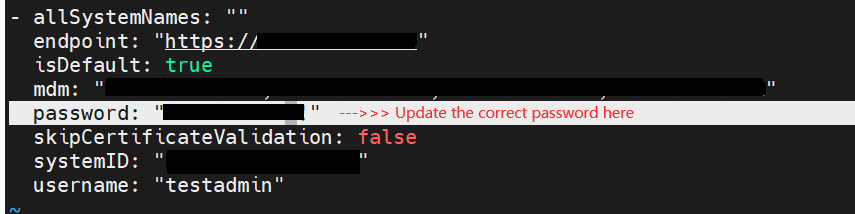
- Edit the saved "config" file, update password according to PowerFlex.
For example:
- Run the command below to update secrets.
oc create secret generic vxflexos-config -n vxflexos --save-config --from-file=./config -o yaml --dry-run | oc apply -f -
- Restart related resources.
oc rollout restart deployment vxflexos-controller -n vxflexos

oc rollout restart daemonset vxflexos-node -n vxflexos
Actions Needed After PowerFlex Certificate Changes
For OCP cluster, when the ACP software version < 3.0.5
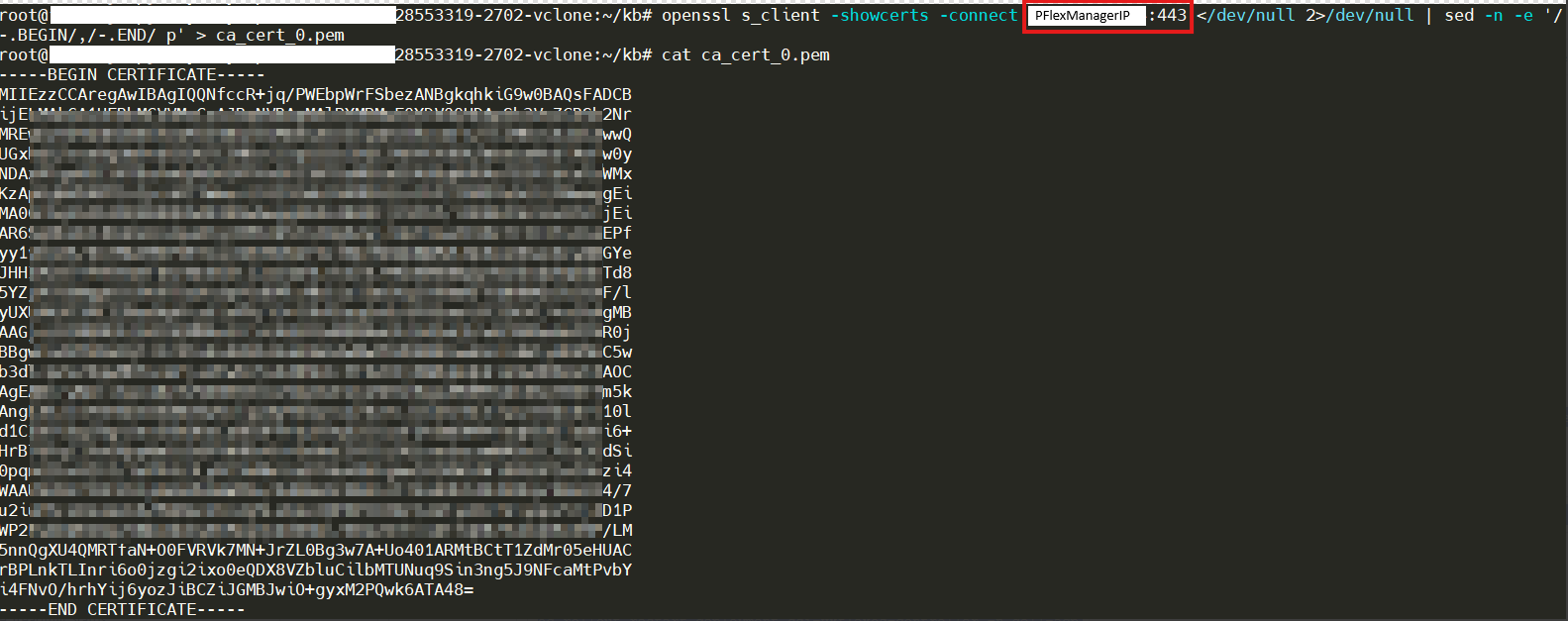
- Run the following command on VDI to fetch the updated certificate. The <Gateway IP> is PowerFlex manager ip/fqdn, <Port> is 443.
openssl s_client -showcerts -connect <Gateway IP:Port> </dev/null 2>/dev/null | sed -n -e '/-.BEGIN/,/-.END/ p' > ca_cert_0.pem

cat ca_cert_0.pem
For example:
- If the certificate file ca_cert_0.pem contains the whole certificate chain of the PowerFlex cluster, trim the file ca_cert_0.pem and only keep the last certificate. (The last certificate is at the bottom of the file, it starts with "-----BEGIN CERTIFICATE-----" and ends with "-----END CERTIFICATE-----")
- Run the following commands on the host which can connect to OCP to update csi certificate configuration.
oc patch secret csi-vxflexos-certs-0 -n dell-acp --patch="{\"data\": { \"cert-0\": \"$(cat ca_cert_0.pem |base64 -w0)\" }}" - Restart related resources.
oc rollout restart deployment csi-vxflexos-controller -n dell-acp

oc rollout restart daemonset csi-vxflexos-node -n dell-acp

oc rollout restart deployment mcp-powerflex-operation -n dell-acp
For OCP cluster, when the ACP software version >= 3.0.5
- Run the following command on VDI to fetch the updated certificate. The <Gateway IP> is PowerFlex manager ip/fqdn, <Port> is 443.
openssl s_client -showcerts -connect <Gateway IP:Port> </dev/null 2>/dev/null | sed -n -e '/-.BEGIN/,/-.END/ p' > ca_cert_0.pem

cat ca_cert_0.pem
For example:
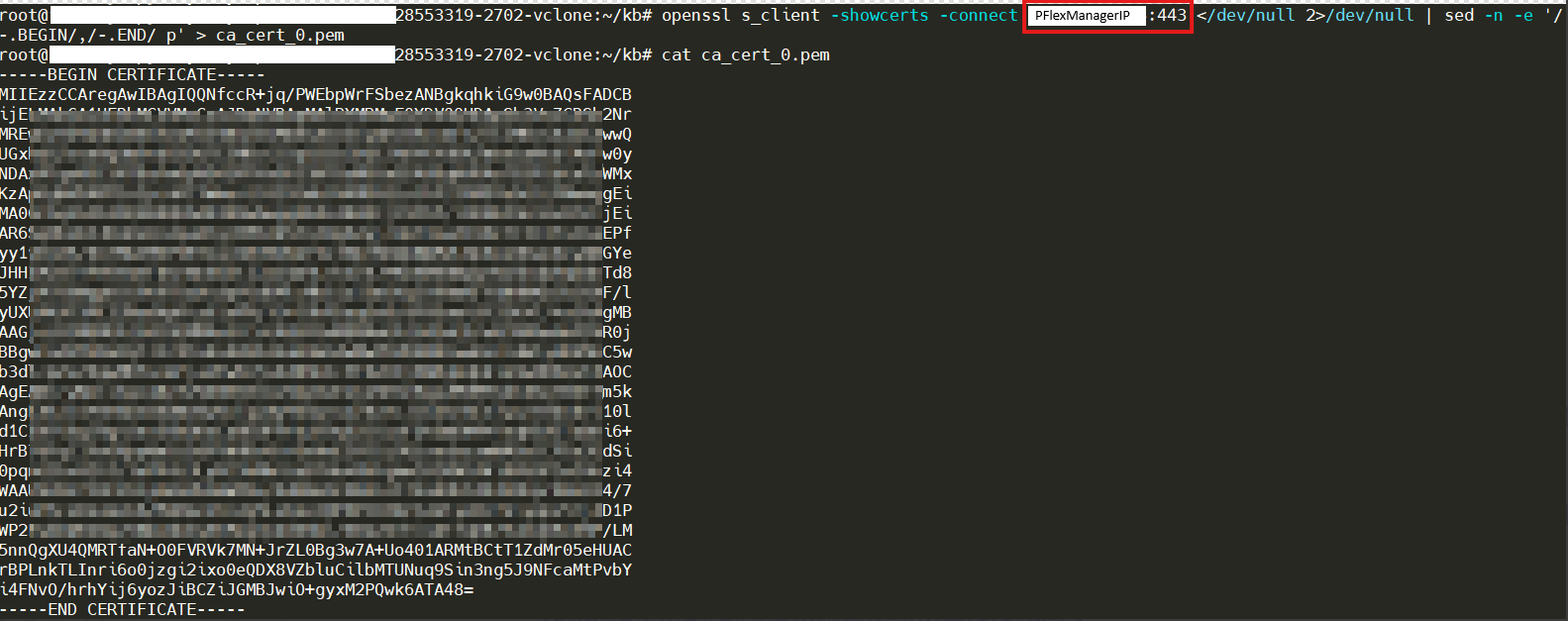
- If the certificate file ca_cert_0.pem contains the whole certificate chain of the PowerFlex cluster, trim the file ca_cert_0.pem and only keep the last certificate. (The last certificate is at the bottom of the file, it starts with "-----BEGIN CERTIFICATE-----" and ends with "-----END CERTIFICATE-----")
- Run the following commands on the host which can connect to OCP to update csi certificate configuration.
oc patch secret csi-vxflexos-certs-0 -n dell-acp --patch="{\"data\": { \"cert-0\": \"$(cat ca_cert_0.pem |base64 -w0)\" }}" oc patch secret vxflexos-certs-0 -n vxflexos --patch="{\"data\": { \"cert-0\": \"$(cat ca_cert_0.pem |base64 -w0)\" }}" - Restart related resources.
oc rollout restart deployment vxflexos-controller -n vxflexosoc rollout restart daemonset vxflexos-node -n vxflexosoc rollout restart deployment mcp-powerflex-operation -n dell-acp
For Hosted Control Plane (HCP) cluster
- Log in to Hub Cluster, follow the above case "ACP software version >= 3.0.5" to update the Hub cluster certificate.
- Log in to HCP Cluster: Run the following command on VDI to fetch the updated certificate. The <Gateway IP> is PowerFlex manager ip/fqdn, <Port> is 443.
openssl s_client -showcerts -connect <Gateway IP:Port> </dev/null 2>/dev/null | sed -n -e '/-.BEGIN/,/-.END/ p' > ca_cert_0.pem

cat ca_cert_0.pem
For example:
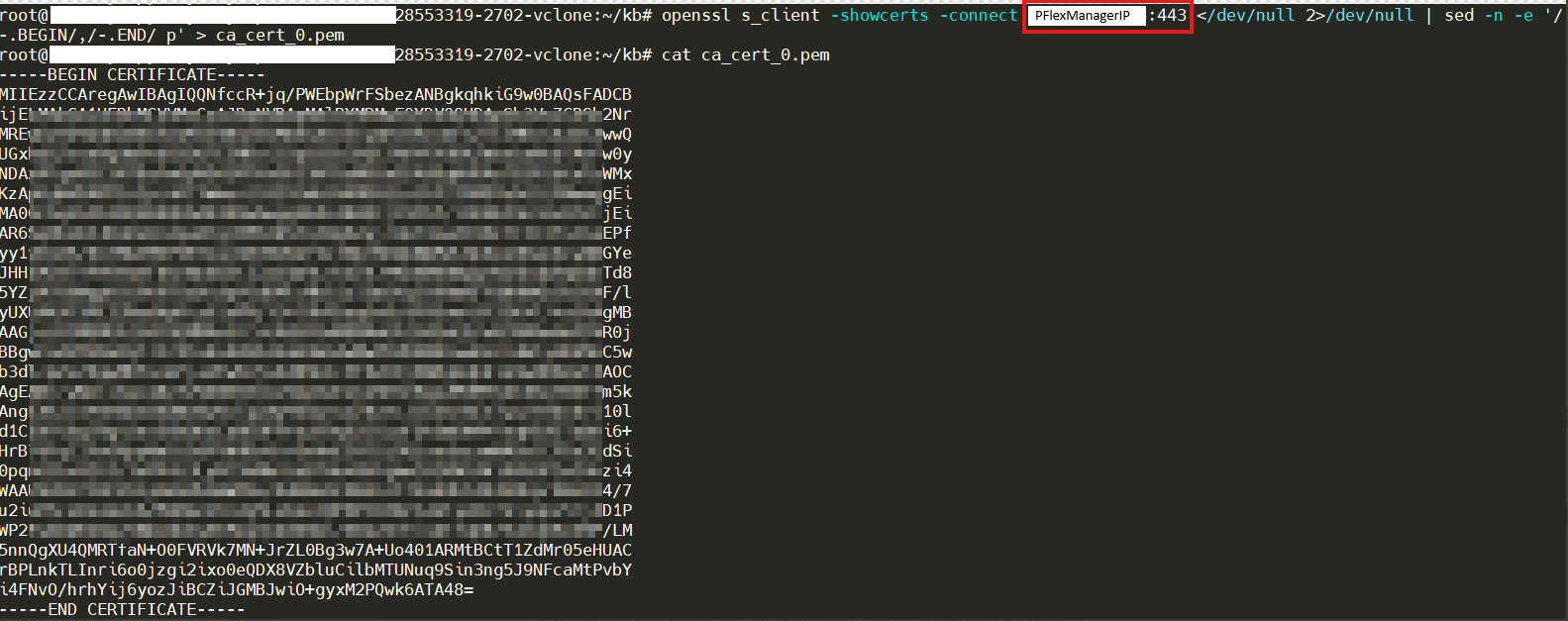
- If the certificate file ca_cert_0.pem contains the whole certificate chain of the PowerFlex cluster, trim the file ca_cert_0.pem and only keep the last certificate. (The last certificate is at the bottom of the file, it starts with "-----BEGIN CERTIFICATE-----" and ends with "-----END CERTIFICATE-----")
- Run the following commands on the host which can connect to HCP cluster to update csi certificate configuration.
oc patch secret csi-vxflexos-certs-0 -n dell-acp --patch="{\"data\": { \"cert-0\": \"$(cat ca_cert_0.pem |base64 -w0)\" }}"oc patch secret vxflexos-certs-0 -n vxflexos --patch="{\"data\": { \"cert-0\": \"$(cat ca_cert_0.pem |base64 -w0)\" }}" - Restart related resources.
oc rollout restart deployment vxflexos-controller -n vxflexosoc rollout restart daemonset vxflexos-node -n vxflexos
Produse afectate
APEX Cloud Platform for Red Hat OpenShiftProprietăți articol
Article Number: 000217834
Article Type: How To
Ultima modificare: 30 iul. 2026
Version: 6
Găsiți răspunsuri la întrebările dvs. de la alți utilizatori Dell
Servicii de asistență
Verificați dacă dispozitivul dvs. este acoperit de serviciile de asistență.