Dell Encryption Agent Reporting a Different Hostname in Dell Data Security Server Console
摘要: This article provides steps to correct an issue with inventory reporting as the wrong hostname with Windows clients.
本文适用于
本文不适用于
本文并非针对某种特定的产品。
本文并非包含所有产品版本。
症状
Affected Products:
- Dell Encryption
- Dell Endpoint Security Suite Enterprise
Affected Operating Systems:
- Windows
原因
Dell Data Security products can report the wrong hostname during inventory uploads to the server if there is a different hostname in the hosts file before the current hostname.
解决方案
- Edit the hosts file located at C:\Windows\System32\drivers\etc.
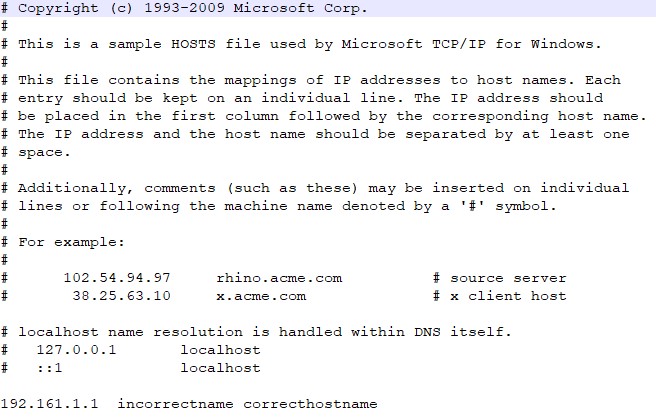
- Change the order to reflect the current hostname to be the first entry in the hosts file.

Note: You can still have other aliases in the hosts file that have to be after the current hostname.
- When finished, click File > Save.
- The hostname will change within the server upon the next inventory upload.
To contact support, reference Dell Data Security International Support Phone Numbers.
Go to TechDirect to generate a technical support request online.
For additional insights and resources, join the Dell Security Community Forum.
受影响的产品
Dell Encryption, Dell Endpoint Security Suite Enterprise文章属性
文章编号: 000187320
文章类型: Solution
上次修改时间: 20 5月 2024
版本: 4
从其他戴尔用户那里查找问题的答案
支持服务
检查您的设备是否在支持服务涵盖的范围内。